

In iOS 15, has brought several major improvements to the Maps app, with better driving directions, improved transit directions, and more immersive AR-based walking directions.

In addition, Apple has added a dedicated Guides Home that houses editorially curated guides with tips on what to do in a city where you live or where you're visiting.
To explore Apple's guides at any time in the Maps app, drag up the main menu card with your finger. In the section titled "Editor's Picks," you can scroll sideways to check out the guides Apple is currently highlighting. Alternately, tap Explore Guides to go to the main Guides Home.
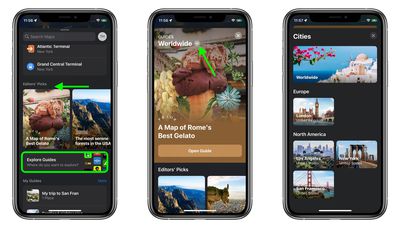
The Guides Home is organized vertically, with Editor's Picks at the top, followed by seasonal guides, the latest guides, and then cities. If you keep scrolling, you'll find a section allowing you to browse by publisher. Tapping the chevron at the very top of Guides Home lets you switch between city guides worldwide, or city guides broken down into continents.
Once you open a guide, you'll see a map highlighting all the places covered in the editorial below. Tapping on a place gives you more details about opening times, reviews, directions, and so on, or you can scroll down the guide and read the summary descriptions of each place.
At the top of the editorial section, you'll see options to go to the publisher's website, share the guide or save it. If you opt to save it, it'll appear in the "My Guides" section of the main Maps menu card.
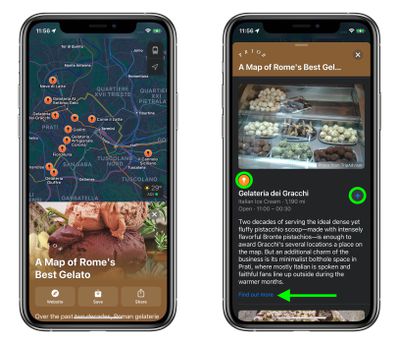
Tap the icon above a write-up, and it'll be highlighted in the map, along with more details on it. If you tap the + button next to a place in the guide, you can add it to your own custom guide, for quick reference when you're out and about. If you tap Find out more, Safari will open and you'll be taken to the publisher's website to see the full article.
For more on all the changes to Maps in iOS 15, be sure to check out our dedicated Maps guide.
















