
In the Notes app in macOS, it's possible to float individual notes over other windows so that they stay visible regardless of which application is active.

float notes macos
This makes for a convenient way to reference an existing note while writing an essay or report, for example. It also comes in useful if you want to take notes when researching something online. Keep reading to learn how it's done.

How to Float a Note in macOS

  1. Launch the Notes app, located in your Mac's Applications folder.

  2. Click the Create a Note button, or click an existing note in the list on the left-hand panel.

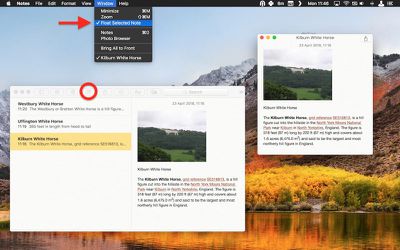
  3. In the Notes menu bar, select Window -> Float Selected Note.
float a note macos notes
The note will be automatically given its own window, which will remain above other open application windows. To turn off the floating behavior but retain the note's separate window, simply click inside the note's window and again select Window -> Float Selected Note to untick the option in the menu bar.

You can have as many note windows open as you want – just double-click each note in your Notes list and they'll pop up separately on the screen. If you've selected several in the list by holding down the Command key, simply double-click one to open them all at once. You can then position them on the screen and control which ones float using the same menu bar option outlined above.

If you close Apple Notes, the number and position of your open note windows will be remembered the next time you launch the app, as well as which ones you've opted to float on top of other open windows. Just remember that your floating notes can't share the same screen as another app that's in fullscreen mode.


Tag: Notes

Top Rated Comments

penguintheft Avatar
102 months ago
This article is missing a step. After selecting "Float Selected Note," the note will not automatically stay on top of all other active windows, unless you click on "Window" again, and then select "Float on Top."
Score: 4 Votes (Like | Disagree)
plexdk Avatar
102 months ago
Floating notes was a feature available even in Windows 98!
Hehe yeah, and Stickies (floating notes) was part of Classic macOS, back in the mid 90s :p actually I didn’t know we have the feature in Notes..
Score: 4 Votes (Like | Disagree)
tch999 Avatar
102 months ago
A double click on the note in the menu also makes it pop out of the main window.
Score: 4 Votes (Like | Disagree)
timmyh Avatar
102 months ago
I used to use a fantastic little app called Afloat for system-wide floating windows, but it stopped working around the time of El Capitan.


For anyone with the patience, I found this neat guide to getting Afloat working again in macOS (although I can't vouch for it): http://www.perfectlyrandom.org/2016/10/23/always-on-top-in-macos-sierra/

Attachment Image
Score: 3 Votes (Like | Disagree)
Osamede Avatar
102 months ago
Very useful tip in this article - thanks!
Score: 3 Votes (Like | Disagree)
ignatius345 Avatar
102 months ago
Honestly, the HUD function of Dashboard is really perfect for little stuff like this -- provided you uncheck that "Dashboard as Space" nonsense so dashboard just flashes up on top of whatever you were doing and disappears just as easily. Basically zero disruption to your workflow, perfect for something you just need to refer to or check on really quickly and don't want eating up space on your screen at all times. You do need to reclaim the F4 button from Launchpad though, unless you have an older Mac keyboard with the Dashboard icon on it (FunctionFlip works for this). Sadly Dashboard is on life support these days and every widget is super dated, but most of them still work and you can still make web clippings in Safari which is a great way to snag part of a web page for a piece of information.

All that said, floating notes is a great little feature -- I rely on Notes more and more these days and find it a very worthy replacement for Evernote (for my purposes anyway).
Score: 2 Votes (Like | Disagree)

Popular Stories

Apple Logo Zoomed

Tim Cook Teases Plans for Apple's Upcoming 50th Anniversary

Thursday February 5, 2026 12:54 pm PST by
Apple turns 50 this year, and its CEO Tim Cook has promised to celebrate the milestone. The big day falls on April 1, 2026. "I've been unusually reflective lately about Apple because we have been working on what do we do to mark this moment," Cook told employees today, according to Bloomberg's Mark Gurman. "When you really stop and pause and think about the last 50 years, it makes your heart ...
wwdc sans text feature

Apple Rumored to Announce New Product on February 19

Thursday February 5, 2026 12:22 pm PST by
Apple plans to announce the iPhone 17e on Thursday, February 19, according to Macwelt, the German equivalent of Macworld. The report, citing industry sources, is available in English on Macworld. Apple announced the iPhone 16e on Wednesday, February 19 last year, so the iPhone 17e would be unveiled exactly one year later if this rumor is accurate. It is quite uncommon for Apple to unveil...
Finder Siri Feature

Why Apple's iOS 26.4 Siri Upgrade Will Be Bigger Than Originally Promised

Friday February 6, 2026 3:06 pm PST by
In the iOS 26.4 update that's coming this spring, Apple will introduce a new version of Siri that's going to overhaul how we interact with the personal assistant and what it's able to do. The iOS 26.4 version of Siri won't work like ChatGPT or Claude, but it will rely on large language models (LLMs) and has been updated from the ground up. Upgraded Architecture The next-generation...
iOS 26

iOS 26.3 and iOS 26.4 Will Add These New Features to Your iPhone

Tuesday February 3, 2026 7:47 am PST by
While the iOS 26.3 Release Candidate is now available ahead of a public release, the first iOS 26.4 beta is likely still at least a week away. Following beta testing, iOS 26.4 will likely be released to the general public in March or April. Below, we have recapped known or rumored iOS 26.3 and iOS 26.4 features so far. iOS 26.3 iPhone to Android Transfer Tool iOS 26.3 makes it easier...
iphone 17 pro dark blue 1

iPhone 18 Pro Max Rumored to Deliver Next-Level Battery Life

Friday February 6, 2026 5:14 am PST by
The iPhone 18 Pro Max will feature a bigger battery for continued best-in-class battery life, according to a known Weibo leaker. Citing supply chain information, the Weibo user known as "Digital Chat Station" said that the iPhone 18 Pro Max will have a battery capacity of 5,100 to 5,200 mAh. Combined with the efficiency improvements of the A20 Pro chip, made with TSMC's 2nm process, the...















