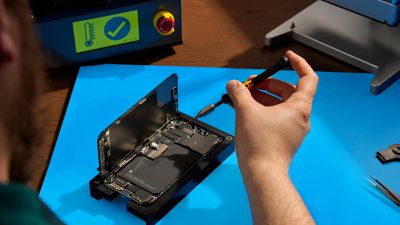
In iOS 17.5, Apple added a "Repair State" feature that's designed to allow an iPhone to be sent in for service without having to deactivate Find My and Activation Lock. Keep reading to learn how it works and why it's worth using the next time you send an ‌iPhone‌ in for repair.

apple self service repair iphone
Before iOS 17.5 was released, sending an ‌iPhone‌ to Apple for repair required disabling ‌Find My‌, since Apple states that it "might not" repair devices with ‌Find My‌ activated. However, disabling ‌Find My‌ also turns off Activation Lock, a crucial security feature that prevents unauthorized use of an ‌iPhone‌ with a different Apple ID.

Apple relies on ‌Find My‌ and Activation Lock to verify device ownership and prevent theft. When ‌Find My‌ is turned off, the ‌iPhone‌ cannot be tracked and is vulnerable to theft during the repair process. Also, if the device is lost or stolen in transit, it cannot be recovered. Worse, turning off ‌Find My‌ involves a one-hour delay, which prolongs the repair process.

To avoid ‌Find My‌ deactivation, Apple in iOS 17.5 introduced a new "Repair State" feature that allows ‌Find My‌ to remain active, keeping Activation Lock enabled and the ‌iPhone‌ trackable through the ‌Find My‌ app during repairs. When the feature is enabled, the device will display a "Ready for Repair" label, indicating that it remains fully functional in this state.

Get Ready for iPhone Repair

Before enabling the Repair State feature on your ‌iPhone‌, there are also a couple of other recommended steps to perform prior to sending your device to Apple. First and foremost, you should back up your ‌iPhone‌. You can back up your device either to your computer or via iCloud.

In addition, for security reasons you should remove any cards and passes from Apple Wallet: Open the Wallet app, select a card or pass, tap the More button, then tap Card (or Pass) Details. Lastly, tap Remove Card (or Pass).

When you've performed the above steps, you're ready to enable Repair State:

  1. Open the Find My app on your ‌iPhone‌.
  2. Select your ‌iPhone‌ in the Devices list.
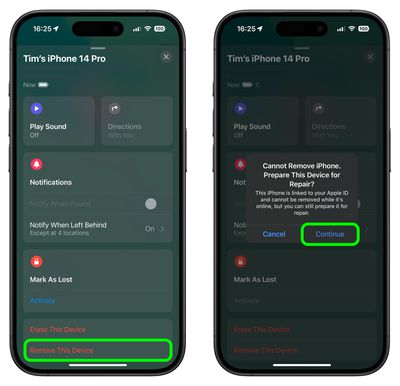
  3. Tap Remove This Device at the bottom of the card.
  4. Tap Continue at the prompt to enable Repair State.
find my

When the feature is enabled in ‌Find My‌, the ‌iPhone‌ shows a stethoscope icon and can still be marked as lost. Note that the ‌iPhone‌ must be online and trackable via ‌Find My‌ for the repair state option to be available. If the ‌iPhone‌ is offline, it will show the standard removal text.

Popular Stories

Apple Logo Zoomed

Tim Cook Teases Plans for Apple's Upcoming 50th Anniversary

Thursday February 5, 2026 12:54 pm PST by
Apple turns 50 this year, and its CEO Tim Cook has promised to celebrate the milestone. The big day falls on April 1, 2026. "I've been unusually reflective lately about Apple because we have been working on what do we do to mark this moment," Cook told employees today, according to Bloomberg's Mark Gurman. "When you really stop and pause and think about the last 50 years, it makes your heart ...
iOS 26

iOS 26.3 and iOS 26.4 Will Add These New Features to Your iPhone

Tuesday February 3, 2026 7:47 am PST by
While the iOS 26.3 Release Candidate is now available ahead of a public release, the first iOS 26.4 beta is likely still at least a week away. Following beta testing, iOS 26.4 will likely be released to the general public in March or April. Below, we have recapped known or rumored iOS 26.3 and iOS 26.4 features so far. iOS 26.3 iPhone to Android Transfer Tool iOS 26.3 makes it easier...
imac video apple feature

Apple Makes Its Second-Biggest Acquisition Ever

Tuesday February 3, 2026 12:45 pm PST by
Apple recently acquired Israeli startup Q.ai for close to $2 billion, according to Financial Times sources. That would make this Apple's second-biggest acquisition ever, after it paid $3 billion for the popular headphone maker Beats in 2014. This is also the largest known Apple acquisition since the company purchased Intel's smartphone modem business and patents for $1 billion in 2019....
wwdc sans text feature

Apple Rumored to Announce New Product on February 19

Thursday February 5, 2026 12:22 pm PST by
Apple plans to announce the iPhone 17e on Thursday, February 19, according to Macwelt, the German equivalent of Macworld. The report, citing industry sources, is available in English on Macworld. Apple announced the iPhone 16e on Wednesday, February 19 last year, so the iPhone 17e would be unveiled exactly one year later if this rumor is accurate. It is quite uncommon for Apple to unveil...
Finder Siri Feature

Why Apple's iOS 26.4 Siri Upgrade Will Be Bigger Than Originally Promised

Friday February 6, 2026 3:06 pm PST by
In the iOS 26.4 update that's coming this spring, Apple will introduce a new version of Siri that's going to overhaul how we interact with the personal assistant and what it's able to do. The iOS 26.4 version of Siri won't work like ChatGPT or Claude, but it will rely on large language models (LLMs) and has been updated from the ground up. Upgraded Architecture The next-generation...