In iOS 15, Apple added separation alerts to the Find My app, which let you know when you leave an AirTag or other Apple device behind. Thanks to an October 2021 firmware update, AirPods Pro now also support separation alerts. This article explains more about how they work and how you can set them up.

airpods pro black background
Called "Notify When Left Behind," the ‌‌Find My‌‌ separation alerts in iOS 15 let you know every time you are separated from your item at an unknown location, which can be helpful for items you take with you while traveling or visiting public locations. Like AirPods Pro, for example.

The feature automatically sets your home as a Trusted Location (somewhere where you leave your AirPods Pro frequently and don't want to be notified every time), so you need to add your home address to your contact card in the Contacts app before enabling it.

To use separation alerts with AirPods Pro, first you'll need to make sure your ‌AirPods Pro‌ have been updated with the latest firmware. Here's how.

How to Update Your AirPods Pro Firmware

You can do this by inserting them in the AirPods Pro charging case and connecting the case to a power source using the included Lightning to USB cable. Then move the iPhone or iPad that the AirPods have been paired with, near to the charging case, and make sure the iOS device has an internet connection.

After a short while, any available software updates should be automatically downloaded and installed. If you're having trouble updating your ‌AirPods‌, make sure the charging case is fully charged. You can also try resetting the ‌AirPods‌. You need AirPods firmware 4A400 or later, and can check your firmware version by following these steps:

  • Connect your ‌‌AirPods‌‌ or ‌‌AirPods Pro‌‌ to your iOS device.
  • Open the Settings app.
  • Tap General.
  • Tap About.
  • Tap ‌‌‌‌‌AirPods‌‌‌‌‌.
  • Look at the number next to "Firmware Version."

How to Enable Separation Alerts for AirPods Pro

The following steps run through the process of setting up separation alerts in ‌iOS 15 for AirPods Pro with updated firmware.

  1. Launch the Find My app on your ‌iPhone‌ or ‌iPad‌.
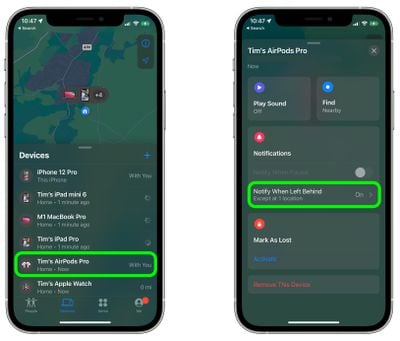
  2. Select the Devices, and tap the AirPods Pro in the list that you want to set up the alerts for.
  3. Tap Notify When Left Behind.
    find my

  4. Toggle on the switch for Notify When Left Behind.
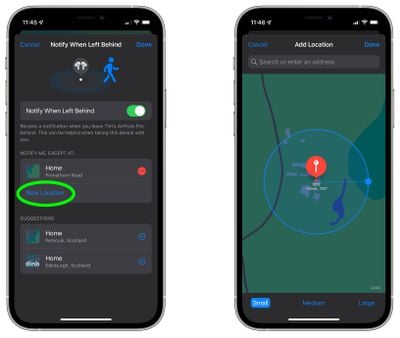
  5. Under "Notify Me, Except At," tap New Location to set a Trusted Location where you don't want to receive alerts.
  6. In the "Add Location" map screen, search or enter an address in the input field. You can define the radius of the ringed geofence for your trusted location by dragging the blue dot or using the Small, Medium, or Large options at the bottom. Tap Done when you're finished.
  7. If there are no more location exceptions you want to add, tap Done.
    find my

Now the next time you leave your AirPods Pro behind in a public place, you'll receive an alert informing you shortly after, giving you a chance to retrieve them before you travel any further.

Of course, these alerts depend on you not leaving your ‌iPhone‌ behind (there's currently no equivalent separation alert available on Apple Watch for this scenario), so that's the device you won't want to forget, wherever it is you go.


Related Roundup: AirPods Pro 3
Buyer's Guide: AirPods Pro (Buy Now)
Related Forums: AirPods, iOS 15

Top Rated Comments

bzhash Avatar
57 months ago
I have the proper firmware but it says this feature is not supported...Any clue?


Attachment Image

Attachment Image
Score: 32 Votes (Like | Disagree)
FasterQuieter Avatar
57 months ago
Yesterday, after arriving home from the movie theater, my watch informed me my AirPods Pro were missing. I had a minor heart attack before reaching into my pocket and finding them safe and sound. Looking forward to many more mini-frights like this in the future.
Score: 8 Votes (Like | Disagree)
Gator5000e Avatar
57 months ago
This feature does not work correctly or I don't understand how it works. Three times, and as recently as this morning, I got a notificaton that I left the APPs behind at home or in my office. However, the entire time they were in my pocket in the car. I'm not sure what is wrong but it's clearly not working correctly.
Score: 7 Votes (Like | Disagree)
Siannath Avatar
57 months ago

I have the proper firmware but it says this feature is not supported...Any clue?


I am in the same situation.
My device is an iPhone SE (2016) with iOS 15.0.1.
Score: 4 Votes (Like | Disagree)
GubbyMan Avatar
57 months ago

I am in the same situation.
My device is an iPhone SE (2016) with iOS 15.0.1.
Same, I’m on an iPhone X. It says it’s not supported.
Score: 4 Votes (Like | Disagree)
TheYayAreaLiving ?️ Avatar
57 months ago
This is a wishy washy feature. It should be on by default no matter what. Come on!
Score: 3 Votes (Like | Disagree)

Popular Stories

Apple Logo Zoomed

Tim Cook Teases Plans for Apple's Upcoming 50th Anniversary

Thursday February 5, 2026 12:54 pm PST by
Apple turns 50 this year, and its CEO Tim Cook has promised to celebrate the milestone. The big day falls on April 1, 2026. "I've been unusually reflective lately about Apple because we have been working on what do we do to mark this moment," Cook told employees today, according to Bloomberg's Mark Gurman. "When you really stop and pause and think about the last 50 years, it makes your heart ...
iOS 26

iOS 26.3 and iOS 26.4 Will Add These New Features to Your iPhone

Tuesday February 3, 2026 7:47 am PST by
While the iOS 26.3 Release Candidate is now available ahead of a public release, the first iOS 26.4 beta is likely still at least a week away. Following beta testing, iOS 26.4 will likely be released to the general public in March or April. Below, we have recapped known or rumored iOS 26.3 and iOS 26.4 features so far. iOS 26.3 iPhone to Android Transfer Tool iOS 26.3 makes it easier...
imac video apple feature

Apple Makes Its Second-Biggest Acquisition Ever

Tuesday February 3, 2026 12:45 pm PST by
Apple recently acquired Israeli startup Q.ai for close to $2 billion, according to Financial Times sources. That would make this Apple's second-biggest acquisition ever, after it paid $3 billion for the popular headphone maker Beats in 2014. This is also the largest known Apple acquisition since the company purchased Intel's smartphone modem business and patents for $1 billion in 2019....
wwdc sans text feature

Apple Rumored to Announce New Product on February 19

Thursday February 5, 2026 12:22 pm PST by
Apple plans to announce the iPhone 17e on Thursday, February 19, according to Macwelt, the German equivalent of Macworld. The report, citing industry sources, is available in English on Macworld. Apple announced the iPhone 16e on Wednesday, February 19 last year, so the iPhone 17e would be unveiled exactly one year later if this rumor is accurate. It is quite uncommon for Apple to unveil...
Finder Siri Feature

Why Apple's iOS 26.4 Siri Upgrade Will Be Bigger Than Originally Promised

Friday February 6, 2026 3:06 pm PST by
In the iOS 26.4 update that's coming this spring, Apple will introduce a new version of Siri that's going to overhaul how we interact with the personal assistant and what it's able to do. The iOS 26.4 version of Siri won't work like ChatGPT or Claude, but it will rely on large language models (LLMs) and has been updated from the ground up. Upgraded Architecture The next-generation...