In iOS 17 and iPadOS 17, Apple has added a new Siri ability that means you can get the virtual assistant to read web articles aloud to you just like an audiobook, even if your device is locked. Keep reading to learn how it's done on iPhone and iPad.
iOS 17 Siri Feature
If you tend to be put off by the thought of reading long-form articles on the web on a small screen, we have good news for you. In iOS 17, Siri can read them out loud for you, meaning all you have to do is listen.

How It Works

There are a few things to keep in mind when you want Siri to read web content out loud for you. First, you need to be using Apple's Safari when browsing webpages, otherwise it won't work. As it stands, Siri won't respond to read requests in third-party browsers.

Second, the webpage you want read to you needs to be compatible with Reader View. Almost all news articles on modern websites are compatible with Safari's Reader View, which strips away images, ads, and any other extraneous webpage content, leaving you looking at a clean page of legible text.
reader available
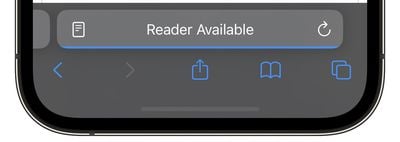
You can tell which pages support Reader View by looking for the words "Reader Available" and the document icon that briefly appears in the address bar when a webpage is loading. If you tap the aA icon that eventually replaces it, the Show Reader option will also be available (i.e. not grayed out) to indicate compatibility.

The last thing to be aware of is that if the article you want read to you is just one of many articles in a feed, such as on the MacRumors.com front page, you need to tap through to the individual article in question. Then you can do one of two things.

Method 1:

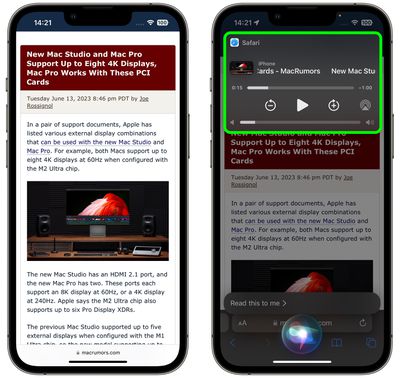
One way to get Siri to read the selected article to you is to hold your iPhone's side button (or top button on iPad) which will activate Siri. Then say "Read this to me." Alternatively, simply say "Siri, read this to me," hands-free. (In iOS 17, you don't even have to prefix a command with "Hey" to invoke Siri any more.)
siri
Siri will then begin reading the article to you out loud, and a media player panel will appear in the upper section of the screen, allowing you to rewind, fast-forward, adjust the volume, and even AirPlay the spoken audio to another device.

Method 2:

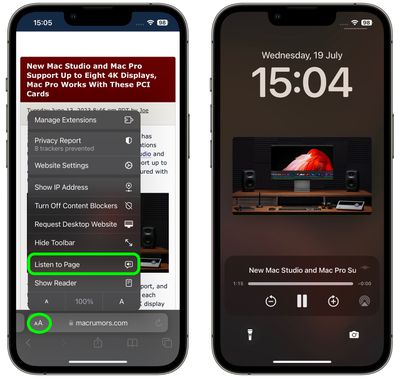
Another way to get Siri talking is to tap the Aa icon in the address bar, then choose the Listen to Page option in the pop-up menu. Siri will immediately begin reading the page to you.
safari
The only difference with this method is that, unless you lock your device while Siri is reading, you won't see a media control panel on the screen. If the article is still open in Safari, you can stop Siri reading it by tapping the Pause Listening option that replaces the "Listen to Page" option in the Aa pop-up menu.
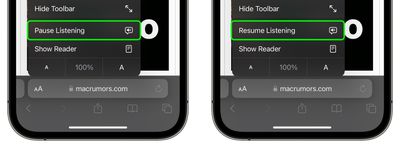
listen to page safari
If you pause Siri, it will be replaced by a Resume Listening option, and the option will remain even if you navigate away from the page and return to it later.

So there you have it. With iOS 17, now almost any article on the web can be read to you via Siri while you're doing something else, even if your iPhone is locked and tucked away in your purse or pocket.


Related Forums: iOS 17, iPadOS 17

Top Rated Comments

macsplusmacs Avatar
34 months ago
Going to use this a LOT!
Score: 4 Votes (Like | Disagree)
macsplusmacs Avatar
34 months ago

Just curious -- what use case do people find for this? I would vastly prefer to read an article in 5-10 minutes instead of spending 30 minutes listening to it being read (especially by an AI voice). I guess this is useful for driving?
For me, background listing while I work of articles that I would like to read, but are not super essential or detailed so to save time I might as well listen to them.

For more important pages or stories I will definitely read them though.
Score: 4 Votes (Like | Disagree)
Apple Fan 2008 Avatar
34 months ago
Cool feature!
Score: 3 Votes (Like | Disagree)
klasma Avatar
34 months ago

Very cool! I’ve been waiting a long time for this feature. Previously, I’ve had to laboriously select text from a page to have it read. This will be very nice.
You could already (since iOS 12 I believe) use the Speak Screen two-finger swipe down to have a complete web page be read in Safari (https://support.apple.com/en-us/guide/iphone/iph96b214f0/).

Speak Screen works regardless of Reader mode support, and you even get controls to skip paragraphs forth and back, and (limited) control over reading speed. It also continues speaking when the iPhone is turned off.

So I’m not sure why Apple is now introducing a separate feature with different trade-offs, instead of integrating/expanding the existing one.
Score: 3 Votes (Like | Disagree)
mrr Avatar
34 months ago
Very cool! I’ve been waiting a long time for this feature. Previously, I’ve had to laboriously select text from a page to have it read. This will be very nice.
Score: 3 Votes (Like | Disagree)
Lcgiv Avatar
34 months ago
Probably not something I will use unless something happens to my vision, but definitely a useful feature for many
Score: 3 Votes (Like | Disagree)

Popular Stories

Apple Logo Zoomed

Tim Cook Teases Plans for Apple's Upcoming 50th Anniversary

Thursday February 5, 2026 12:54 pm PST by
Apple turns 50 this year, and its CEO Tim Cook has promised to celebrate the milestone. The big day falls on April 1, 2026. "I've been unusually reflective lately about Apple because we have been working on what do we do to mark this moment," Cook told employees today, according to Bloomberg's Mark Gurman. "When you really stop and pause and think about the last 50 years, it makes your heart ...
wwdc sans text feature

Apple Rumored to Announce New Product on February 19

Thursday February 5, 2026 12:22 pm PST by
Apple plans to announce the iPhone 17e on Thursday, February 19, according to Macwelt, the German equivalent of Macworld. The report, citing industry sources, is available in English on Macworld. Apple announced the iPhone 16e on Wednesday, February 19 last year, so the iPhone 17e would be unveiled exactly one year later if this rumor is accurate. It is quite uncommon for Apple to unveil...
Finder Siri Feature

Why Apple's iOS 26.4 Siri Upgrade Will Be Bigger Than Originally Promised

Friday February 6, 2026 3:06 pm PST by
In the iOS 26.4 update that's coming this spring, Apple will introduce a new version of Siri that's going to overhaul how we interact with the personal assistant and what it's able to do. The iOS 26.4 version of Siri won't work like ChatGPT or Claude, but it will rely on large language models (LLMs) and has been updated from the ground up. Upgraded Architecture The next-generation...
iOS 26

iOS 26.3 and iOS 26.4 Will Add These New Features to Your iPhone

Tuesday February 3, 2026 7:47 am PST by
While the iOS 26.3 Release Candidate is now available ahead of a public release, the first iOS 26.4 beta is likely still at least a week away. Following beta testing, iOS 26.4 will likely be released to the general public in March or April. Below, we have recapped known or rumored iOS 26.3 and iOS 26.4 features so far. iOS 26.3 iPhone to Android Transfer Tool iOS 26.3 makes it easier...
iphone 17 pro dark blue 1

iPhone 18 Pro Max Rumored to Deliver Next-Level Battery Life

Friday February 6, 2026 5:14 am PST by
The iPhone 18 Pro Max will feature a bigger battery for continued best-in-class battery life, according to a known Weibo leaker. Citing supply chain information, the Weibo user known as "Digital Chat Station" said that the iPhone 18 Pro Max will have a battery capacity of 5,100 to 5,200 mAh. Combined with the efficiency improvements of the A20 Pro chip, made with TSMC's 2nm process, the...