On iPhone and iPad, Apple's screen recording feature records a video of what you're doing on your screen, which is great if you want to capture gameplay, walk someone through a tutorial in an app, demonstrate a bug, or anything else. You can also include a voiceover in screen recordings. Keep reading to learn how.
iPhone Home Screen Gradient
If you're making a screen recording to demonstrate something in iOS, chances are it would benefit from some voiceover commentary. Fortunately, Apple enables you to do this by activating your device's microphone for the duration of the recording.

To record your voice along with screen activity, simply follow these steps.

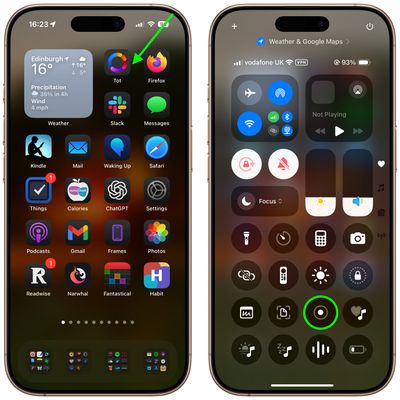
  1. Invoke the Control Center by swiping down diagonally from the top-right corner of the screen.
  2. Long press the Screen Recording button in Control Center (if it isn't there, you can add the function via Settings -> Control Center).
    home screen

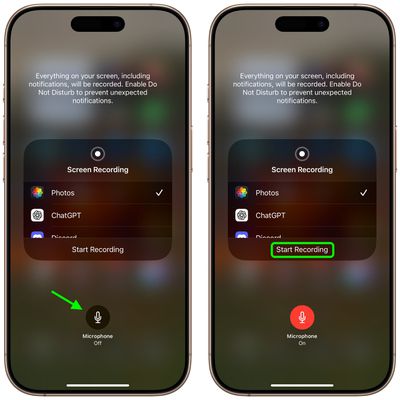
  3. Tap the Microphone button so that it turns red and reads "Microphone On."
  4. Select an app from the list that you want to save the recording to.
  5. When you're ready, tap Start Recording.
    control center

You can end the recording by tapping the Stop button in the top-left corner of the screen (if your iPhone has a Dynamic Island, tap it to reveal the Stop button), and the recording will be automatically saved to the app that you checked in the app list.


Top Rated Comments

mrgraff Avatar
9 months ago

I think it is just showing how to invoke Control Center. The app it is pointing to is irrelevant.
Correct. But it also took me a second to realize that the step had nothing to do with Tot. Also, I've never had to swipe diagonally to invoke Command Center; straight down has always worked. A stubby shorter arrow that stops just below the battery indicator might've been better.
Score: 4 Votes (Like | Disagree)
Starfia Avatar
9 months ago
That is a great tip about a very hidden feature!

And, wow – this is the first time I've ever heard of the gesture to invoke Control Center interpreted as a diagonal swipe from the upper-right corner as opposed to a vertical swipe down from the upper-right status cluster. I wonder what the code is actually detecting.
Score: 4 Votes (Like | Disagree)
UpsetTheAppleCart Avatar
9 months ago
Does anyone know how to reduce the file size of a screen recording on iPhone/iPad? I don’t always need a recording to be super clear, so a slight reduction in quality to keep the file small would be nice.
Score: 3 Votes (Like | Disagree)
e-coli Avatar
9 months ago
Love this type of content
Score: 3 Votes (Like | Disagree)
MasterControlProgram Avatar
9 months ago

Correct. But it also took me a second to realize that the step had nothing to do with Tot. Also, I've never had to swipe diagonally to invoke Command Center; straight down has always worked. A stubby shorter arrow that stops just below the battery indicator might've been better.
Agreed, doing it diagonally is probably not the best instruction. Doing it that way on my iPad brings in the app I last used with slide over. It has to be a straight down swipe on there or it doesn’t work.
Score: 3 Votes (Like | Disagree)
UpsetTheAppleCart Avatar
9 months ago

I have a “Reduce Video Size” shortcut that I don’t know where it came from on the share sheet. If you don’t have it already, try to search online, it uses an iOS built in “Encode Media” function, just like there’s one on macOS.
Oh! I never thought of using a shortcut. Thanks for the info! I found one that works great for me. Here’s the link for anyone who may be interested: https://www.icloud.com/shortcuts/cf7efcf1b47148278044bc240b7d8c99
Score: 2 Votes (Like | Disagree)

Popular Stories

Apple Logo Zoomed

Tim Cook Teases Plans for Apple's Upcoming 50th Anniversary

Thursday February 5, 2026 12:54 pm PST by
Apple turns 50 this year, and its CEO Tim Cook has promised to celebrate the milestone. The big day falls on April 1, 2026. "I've been unusually reflective lately about Apple because we have been working on what do we do to mark this moment," Cook told employees today, according to Bloomberg's Mark Gurman. "When you really stop and pause and think about the last 50 years, it makes your heart ...
wwdc sans text feature

Apple Rumored to Announce New Product on February 19

Thursday February 5, 2026 12:22 pm PST by
Apple plans to announce the iPhone 17e on Thursday, February 19, according to Macwelt, the German equivalent of Macworld. The report, citing industry sources, is available in English on Macworld. Apple announced the iPhone 16e on Wednesday, February 19 last year, so the iPhone 17e would be unveiled exactly one year later if this rumor is accurate. It is quite uncommon for Apple to unveil...
Finder Siri Feature

Why Apple's iOS 26.4 Siri Upgrade Will Be Bigger Than Originally Promised

Friday February 6, 2026 3:06 pm PST by
In the iOS 26.4 update that's coming this spring, Apple will introduce a new version of Siri that's going to overhaul how we interact with the personal assistant and what it's able to do. The iOS 26.4 version of Siri won't work like ChatGPT or Claude, but it will rely on large language models (LLMs) and has been updated from the ground up. Upgraded Architecture The next-generation...
iOS 26

iOS 26.3 and iOS 26.4 Will Add These New Features to Your iPhone

Tuesday February 3, 2026 7:47 am PST by
While the iOS 26.3 Release Candidate is now available ahead of a public release, the first iOS 26.4 beta is likely still at least a week away. Following beta testing, iOS 26.4 will likely be released to the general public in March or April. Below, we have recapped known or rumored iOS 26.3 and iOS 26.4 features so far. iOS 26.3 iPhone to Android Transfer Tool iOS 26.3 makes it easier...
iphone 17 pro dark blue 1

iPhone 18 Pro Max Rumored to Deliver Next-Level Battery Life

Friday February 6, 2026 5:14 am PST by
The iPhone 18 Pro Max will feature a bigger battery for continued best-in-class battery life, according to a known Weibo leaker. Citing supply chain information, the Weibo user known as "Digital Chat Station" said that the iPhone 18 Pro Max will have a battery capacity of 5,100 to 5,200 mAh. Combined with the efficiency improvements of the A20 Pro chip, made with TSMC's 2nm process, the...