
How to Hide Default Apps on iOS 9 Using Limited Trick - MacRumors
Skip to Content

How to Hide Default Apps on iOS 9 Using Limited Trick

by

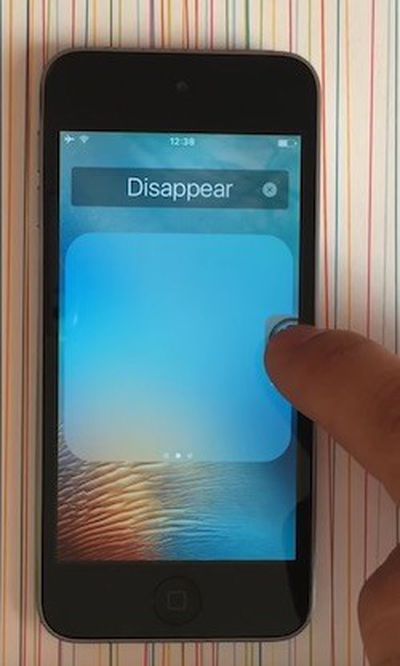
How-to-Hide-App-Icons-iOS-9While Tim Cook has promised Apple will "figure out a way" for iPhone and iPad users to remove certain default apps, a new limited trick allows for stock icons to be temporarily hidden on devices running iOS 9.0 to iOS 9.2 without jailbreaking.

YouTube channel videosdebarraquito shared a video of his trick over the weekend, and we have confirmed the method works as shown. Follow these step-by-step instructions and watch the video below for a demonstration.

How to Hide App Icons on iOS 9

  1. Hold down on the app icon you want to hide until it starts to wiggle.

  2. Drag the app icon over any other app to create a folder.

  3. Take your finger off the icon once in the folder. Do not press the Home button.

  4. Drag the app icon to the second page of the folder. Take your finger off the icon.

  5. Drag the app icon to the third page of the folder and keep your finger on it.

  6. Drag the app icon to the edge of the folder and press the Home button simultaneously.

As long as the device remains powered on, including when the display is locked, the app icons removed with this trick will remain hidden.


Keep in mind that the hidden app icons will reappear when the iPhone and iPad is restarted, so this trick only serves as a temporarily solution.

As a boilerplate disclaimer, this is an unofficial trick and we cannot guarantee it will not cause any unforeseen problems on your iPhone or iPad.

(Thanks, Jose!)

Top Rated Comments

133 months ago
Why can't Apple just make a way to hide apps of the user's choice?

And why do I need an Apple Watch app when I don't have one? Can't the Apple Watch owners just go to the App Store and download the app? :/
Score: 14 Votes (Like | Disagree)
mdridwan47 Avatar
133 months ago
I don't want to just hide it. I want to remove it. And if necessary redownload it from the app store.
Score: 13 Votes (Like | Disagree)
BrodieApple Avatar
133 months ago
I can see why people want apps to be hidden, but I don't see whats so annoying about having it just on the last page of a folder. Or a seperate page on your home screen.
Score: 10 Votes (Like | Disagree)
133 months ago
Is Apple still selling phones with 16GB? Then yes, people will still be b*tching about 100MB.
It's clear from your other post that you don't have an iPhone, but let me put 16GB devices into perspective for you. 100MB is less than 1% of available storage on a 16GB iPhone. Besides, those people bought a 16GB device.


WTH??? Are you blind?

If something is there that you don’t like/need it’s not too much of a stretch that it be described as clutter.
Personally, I’ve never gone down the space used line. But waste is waste and at the premium Apple charge for space I’d rather it was used for something I actually want or that it be free space.
The default apps that I don’t want are crap, (to me), in fact they’re not even that good. At least with the 3rd party ones I can remove them.
Like I said, a simple 'hide' option would solve two of them but as it's not an option yet, just stick them in a folder and done. This really is a non-issue.

And in terms of "premium" Apple storage, 100MB is 20 cents.
Score: 6 Votes (Like | Disagree)
133 months ago
Lol, you iPhone users still can't do that :)

So a simple 'hide' option would solve two of them, so the third is storage space.

Are you really quibbling over 100MB?
Is Apple still selling phones with 16GB? Then yes, people will still be b*tching about 100MB.
Score: 6 Votes (Like | Disagree)
133 months ago
Hold on a sec, this is becoming one very slippery slope... One minute it's about clutter, the next it's about space used and now it's about advertising?

What exactly is your problem with default iOS apps? Make your mind up!
All of the above! :)
Score: 4 Votes (Like | Disagree)

Popular Stories

iOS 26

iOS 26.4 Adds Two New Features to CarPlay

Tuesday March 24, 2026 1:55 pm PDT by
iOS 26.4 was released today, and it includes a couple of new features for CarPlay: an Ambient Music widget and support for voice-based chatbot apps. To update your iPhone 11 or newer to iOS 26.4, open the Settings app and tap on General → Software Update. CarPlay will automatically offer the new features so long as the iPhone connected to your vehicle is running iOS 26.4 or later....
Apple Business hero

Apple Unveils 'Apple Business' All-in-One Platform

Tuesday March 24, 2026 8:53 am PDT by
Apple today announced Apple Business, a new all-in-one platform that unifies device management, productivity tools, and customer outreach features. The service is designed to be a consolidated replacement for several of Apple's existing business-focused offerings, including Apple Business Essentials, Apple Business Manager, and Apple Business Connect. It provides organizations with a single...
AirPods Pro Firmware Feature

Apple Releases New Firmware for AirPods Pro 3, AirPods Pro 2 and AirPods 4

Tuesday March 24, 2026 12:31 pm PDT by
Apple today released new firmware for the AirPods Pro 2, AirPods Pro 3, and the AirPods 4. The firmware has a version number of 8B39, up from 8B34 on the AirPods Pro 3, 8B28 on the AirPods Pro 2, and 8B21 on the AirPods 4. There is no word on what's included in the firmware, but Apple has a support document with limited notes. Most updates are limited to bug fixes and performance...
















