
How to Hide Like and View Counts on Instagram Posts - MacRumors
Skip to Content

How to Hide Like and View Counts on Instagram Posts

by

Instagram includes several options on the platform that allow users to hide the number of like and view counts on posts. This article explains where to find them and adjust them to your preferences.
Instagram Feature 2
The new options were originally introduced a few years ago to "depressurize people's experience" on the platform, the Meta-owned social media company said at the time.

Instagram said its testing had found that removing likes had little impact on users' behavior and wellbeing, despite use of the platform being linked to anxiety and poor mental health. The following steps outline where you can find the new options in the Instagram mobile app.

How to Hide Like and View Counts on New Posts

By enabling this feature, you will see the username of a follower who has liked your post, followed by "and others," instead of a number indicating the number of likes.

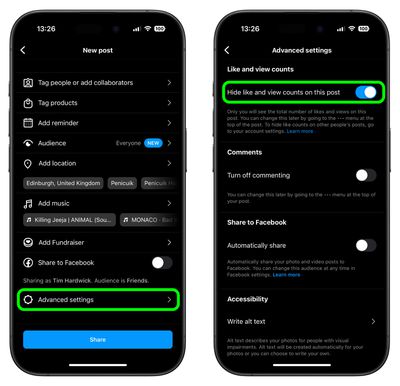
  1. Start a new Instagram post as usual until you get to the last menu before posting.
  2. Tap Advanced Settings at the bottom of the menu.
  3. Tap the switch next to Hide like and view counts on this post to toggle the option on and off.
instagram

Note that even if a user has Like Counts enabled, they will not be able to see the number of likes on accounts or posts that have hidden them.

How to Hide Like Counts on Your Existing Posts

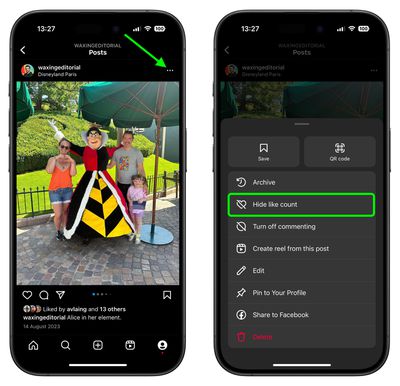
  1. Find one of your own shared posts.
  2. Tap the ellipsis icon (three dots) in the top-right corner of the post.
  3. Select Hide Like Count from the pop-up menu.
instagram

How to Hide Like and Share Counts on Other Users' Posts

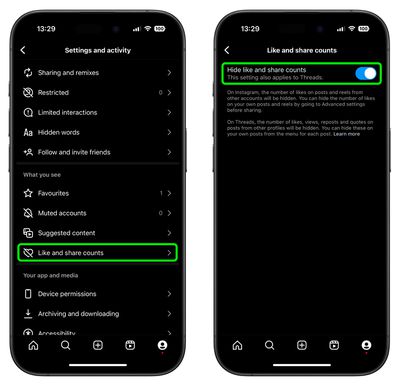
  1. Tap the Profile icon in the bottom-right corner of the Instagram interface, then tap the More (three-line) icon in the top-right corner.
  2. Scroll down to the "What you see" section, then tap Like and share counts.
  3. Tap the switch next to Hide like and share counts to toggle the option on or off.
instagram

Sometimes, for whatever reason, you might not want someone – or indeed anyone – to know when you were last active on Instagram. Fortunately, there is a way to hide your activity status in the app. Check our dedicated how-to article to learn how it's done.


Top Rated Comments

dannyyankou Avatar
63 months ago

The new options have been introduced to "depressurize people's experience" on the platform, the Facebook-owned social media company said.
A great way to do that is to deactivate your Instagram and Facebook account :)
Score: 30 Votes (Like | Disagree)
LiE_ Avatar
63 months ago
Step 1: long press app on Home Screen to enter jiggle mode.

Step 2: delete app

Now you have depressurised yourself from Instagram.
Score: 27 Votes (Like | Disagree)
Blackstick Avatar
63 months ago
I thought the entire point of Insta was the tiny dopamine hit from lots of people loving your dog or sunset photo with the perfect hashtags 🙄.
Score: 13 Votes (Like | Disagree)
63 months ago

A great way to do that is to deactivate your Instagram and Facebook account :)
A great decision for your mental health too I've found. At least for me it was.
Score: 8 Votes (Like | Disagree)
63 months ago
These are nice additions and options available. I’m sure most people will say to delete these apps, but the simple fact is that just isn’t going to happen for most and isn’t even solving anything really.

I don’t understand people’s unwillingness to learn and adapt to new things and the only “cure” is to delete and pretend it doesn’t exist at all. This applies to much more than just apps.
Score: 8 Votes (Like | Disagree)
GeoStructural Avatar
63 months ago

These are nice additions and options available. I’m sure most people will say to delete these apps, but the simple fact is that just isn’t going to happen for most and isn’t even solving anything really.

I don’t understand people’s unwillingness to learn and adapt to new things and the only “cure” is to delete and pretend it doesn’t exist at all. This applies to much more than just apps.
Man really good points. Many people will continue using social media, period. Some for business, quick news briefing and others for fun. And those are all valid choices.

And regarding the option I am glad it exists, it won’t have a personal impact on me but I have young people in my family that seem to be concerned about how much their content is liked or not, so I welcome it.
Score: 5 Votes (Like | Disagree)

Popular Stories

iOS 26

iOS 26.4 Adds Two New Features to CarPlay

Tuesday March 24, 2026 1:55 pm PDT by
iOS 26.4 was released today, and it includes a couple of new features for CarPlay: an Ambient Music widget and support for voice-based chatbot apps. To update your iPhone 11 or newer to iOS 26.4, open the Settings app and tap on General → Software Update. CarPlay will automatically offer the new features so long as the iPhone connected to your vehicle is running iOS 26.4 or later....
Apple Business hero

Apple Unveils 'Apple Business' All-in-One Platform

Tuesday March 24, 2026 8:53 am PDT by
Apple today announced Apple Business, a new all-in-one platform that unifies device management, productivity tools, and customer outreach features. The service is designed to be a consolidated replacement for several of Apple's existing business-focused offerings, including Apple Business Essentials, Apple Business Manager, and Apple Business Connect. It provides organizations with a single...
AirPods Pro Firmware Feature

Apple Releases New Firmware for AirPods Pro 3, AirPods Pro 2 and AirPods 4

Tuesday March 24, 2026 12:31 pm PDT by
Apple today released new firmware for the AirPods Pro 2, AirPods Pro 3, and the AirPods 4. The firmware has a version number of 8B39, up from 8B34 on the AirPods Pro 3, 8B28 on the AirPods Pro 2, and 8B21 on the AirPods 4. There is no word on what's included in the firmware, but Apple has a support document with limited notes. Most updates are limited to bug fixes and performance...















