
iPhone 14 Pro: How to Hide Notifications When Always On Display Is Enabled - MacRumors
Skip to Content

iPhone 14 Pro: How to Hide Notifications When Always On Display Is Enabled

by

In iOS 16.2, Apple allows iPhone 14 Pro owners to hide incoming notifications when in the always on display mode. Keep reading to learn how it's done.
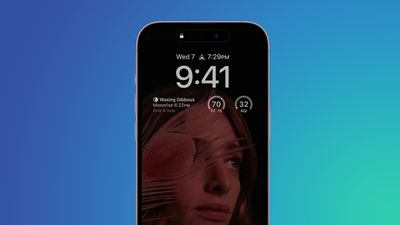
iphone 14 display
The iPhone 14 Pro and ‌iPhone 14 Pro‌ Max come with some advanced features not included in the rest of the iPhone 14 series. One of these features is the always on display, which is made possible by a more power-efficient OLED panel that can drop its refresh rate to as low as 1Hz, thereby preserving battery life.

When the iPhone 14 Pro originally launched with iOS 16 installed, the always on display did not have any customization options and would therefore show a dimmed version of the iPhone's Lock Screen wallpaper behind any widgets and notifications.

This gave an idle iPhone 14 Pro a standardized yet unique look compared to other devices with always on displays, but some users wished that they could hide their notifications when the always-on display is active for security purposes.

Thankfully, Apple listened to user feedback, and in iOS 16.2 it added new customization options that allow users to hide notifications from the always on display mode. The following steps show you how it's done.

  1. Launch the Settings app on your iPhone.
  2. Tap Display & Brightness.
  3. Tap Always On Display.
  4. Toggle off the switch next to Show Notifications.
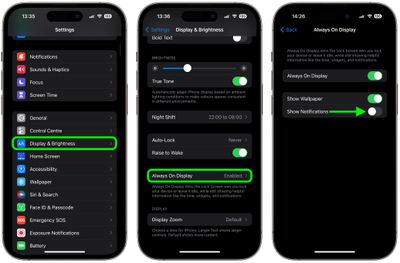
settings

That's all there is to it. The next time you put down your locked iPhone, the always on display will show the time and any widgets you have against a dimmed version of your Lock Screen wallpaper, but crucially, no notifications will be visible.


Popular Stories

iOS 26

iOS 26.4 Adds Two New Features to CarPlay

Tuesday March 24, 2026 1:55 pm PDT by
iOS 26.4 was released today, and it includes a couple of new features for CarPlay: an Ambient Music widget and support for voice-based chatbot apps. To update your iPhone 11 or newer to iOS 26.4, open the Settings app and tap on General → Software Update. CarPlay will automatically offer the new features so long as the iPhone connected to your vehicle is running iOS 26.4 or later....
Apple Business hero

Apple Unveils 'Apple Business' All-in-One Platform

Tuesday March 24, 2026 8:53 am PDT by
Apple today announced Apple Business, a new all-in-one platform that unifies device management, productivity tools, and customer outreach features. The service is designed to be a consolidated replacement for several of Apple's existing business-focused offerings, including Apple Business Essentials, Apple Business Manager, and Apple Business Connect. It provides organizations with a single...
AirPods Pro Firmware Feature

Apple Releases New Firmware for AirPods Pro 3, AirPods Pro 2 and AirPods 4

Tuesday March 24, 2026 12:31 pm PDT by
Apple today released new firmware for the AirPods Pro 2, AirPods Pro 3, and the AirPods 4. The firmware has a version number of 8B39, up from 8B34 on the AirPods Pro 3, 8B28 on the AirPods Pro 2, and 8B21 on the AirPods 4. There is no word on what's included in the firmware, but Apple has a support document with limited notes. Most updates are limited to bug fixes and performance...














