
How to Hide Pictures in the Photos App on iPhone and iPad - MacRumors
Skip to Content

How to Hide Pictures in the Photos App on iPhone and iPad

by

Sometimes you might not want certain pictures shot on your iPhone or iPad to take pride of place in your Photo Library, but for whatever reason, you don't want to just outright delete them. Fortunately, Apple's Photos app includes an option to hide certain photos from the main library. This article shows you how.
hide photos feature

Bear in mind that hiding pictures via the following method ensures they won't appear in the Photos or For You sections of the Photos app, but they will still be accessible in the Albums section. If you're looking for a more secure way to squirrel away pictures, consider using a third-party app like Safe Lock instead.

How to Hide Pictures in the Photos App

  1. Launch the Photos app on your iPhone or iPad.
  2. Tap Select in the top-right corner of the screen.
  3. Tap the pictures you want to hide.
    hide photos ios 12

  4. Tap the Share button in the bottom-left corner of the screen. (It looks like a square with an arrow pointing out.)
  5. In the Share Sheet's bottom row of available actions, tap Hide.
  6. Tap the prompt that appears at the bottom of the screen to confirm.
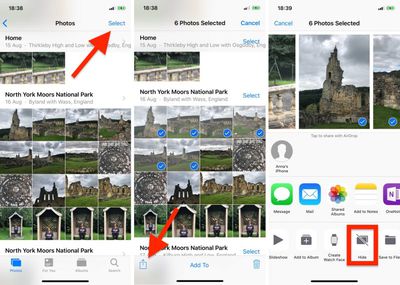
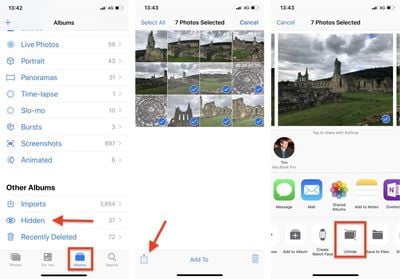
Note that pictures you choose to hide from your photo library are stored in an album called Hidden, which lives in the Albums tab.

How to Unhide Pictures in the Photos App

  1. Launch the Photos app on your iPhone or iPad.
  2. Tap the Albums tab at the bottom of the screen.
  3. Scroll to the bottom and under Other Albums, tap Hidden.
    unhide photos ios 12

  4. Tap Select in the top-right corner of the screen.
  5. Tap the pictures you want to unhide.
  6. Tap the Share button at the bottom-left corner of the screen.
  7. In the Share Sheet's bottom row of available actions, tap Unhide.
Related Forum: iOS 12

Top Rated Comments

97 months ago
Yes cause putting photos in a visible file called “hidden” is so smart.
Score: 12 Votes (Like | Disagree)
97 months ago
Yes cause putting photos in a visible file called “hidden” is so smart.
I’m assuming the intent is to get it out of your main camera roll...not to hide evidence from the cops.
Score: 9 Votes (Like | Disagree)
reybart Avatar
97 months ago
But I can’t put password.
Score: 8 Votes (Like | Disagree)
HelloMikee Avatar
97 months ago
Love this because now when I’m scrolling through my photos I don’t have to be embarrassed by someone seeing my Shawn Mendes photos I’ve saved lol.

But in all seriousness, it’s a nice thing to have. Next step would be allowing to lock the hidden album with Face ID
Score: 7 Votes (Like | Disagree)
itsmilo Avatar
97 months ago
So dumb without Face ID lock. Might as well call it LOOK AT ME
Score: 5 Votes (Like | Disagree)
97 months ago
iOS's most useless feature.

Let me put a lock on certain Albums Apple!
Score: 4 Votes (Like | Disagree)

Popular Stories

iOS 26

iOS 26.4 Adds Two New Features to CarPlay

Tuesday March 24, 2026 1:55 pm PDT by
iOS 26.4 was released today, and it includes a couple of new features for CarPlay: an Ambient Music widget and support for voice-based chatbot apps. To update your iPhone 11 or newer to iOS 26.4, open the Settings app and tap on General → Software Update. CarPlay will automatically offer the new features so long as the iPhone connected to your vehicle is running iOS 26.4 or later....
Apple Business hero

Apple Unveils 'Apple Business' All-in-One Platform

Tuesday March 24, 2026 8:53 am PDT by
Apple today announced Apple Business, a new all-in-one platform that unifies device management, productivity tools, and customer outreach features. The service is designed to be a consolidated replacement for several of Apple's existing business-focused offerings, including Apple Business Essentials, Apple Business Manager, and Apple Business Connect. It provides organizations with a single...
AirPods Pro Firmware Feature

Apple Releases New Firmware for AirPods Pro 3, AirPods Pro 2 and AirPods 4

Tuesday March 24, 2026 12:31 pm PDT by
Apple today released new firmware for the AirPods Pro 2, AirPods Pro 3, and the AirPods 4. The firmware has a version number of 8B39, up from 8B34 on the AirPods Pro 3, 8B28 on the AirPods Pro 2, and 8B21 on the AirPods 4. There is no word on what's included in the firmware, but Apple has a support document with limited notes. Most updates are limited to bug fixes and performance...

















