Hide iPhone Find My Location Without Raising Suspicion - MacRumors
Skip to Content

Hide iPhone Find My Location Without Raising Suspicion

by

Ever need a moment of privacy without raising suspicion? If you're secretly shopping for a holiday gift or planning a surprise party, you might want to temporarily obscure your actual location in Apple's Find My app on your iPhone without completely turning off location sharing.
FindMy Feature
Here's a clever trick that lets you keep sharing enabled while displaying a different location – all by using another Apple device you own.

To hide your actual location, you'll need to own an iPhone and an iPad, or two iPhones or two iPads (i.e. not a Mac) signed in to your Apple Account with Find My enabled. This method works by telling Find My to use a stationary device's location instead of your iPhone's.

Start by leaving the device you want to use as your displayed location (like an iPad) in a convincing spot – perhaps your home or office. Then, take your iPhone and follow these steps:

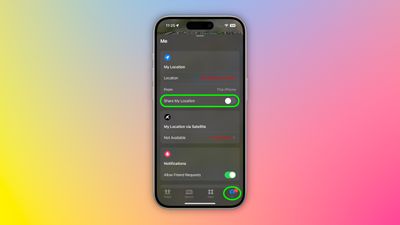
  1. Open the Find My app and tap the Me tab at the bottom of the screen.
  2. Scroll down to find "Use This iPhone as My Location" and make sure it's toggled off.
    find my

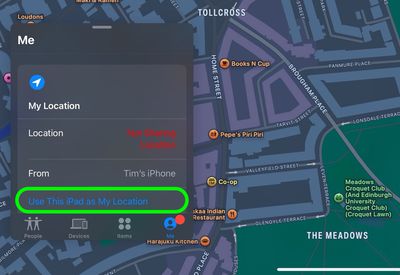
  3. Grab your other Apple device and open Find My.
  4. Tap the Me tab, then select "Use this [device] as My Location."
    find my

  5. Toggle on the switch next to Share My Location. Your shared location will now show where this device is stationed, not where you actually are with your iPhone.
  6. When you're ready to resume normal location sharing, simply return to your iPhone's Find My app and toggle "Use This iPhone as My Location" back on.
Remember that this trick only works as long as your decoy device stays put and powered on. Lastly, we trust that you'll use this tip responsibly – like keeping that upcoming surprise party under wraps!


Top Rated Comments

18 months ago
« If you're secretly shopping for a holiday gift or planning a surprise party » well sure…😏🤥
Score: 59 Votes (Like | Disagree)
18 months ago
Strip club, here I come!!!!! :D

j/k
Score: 43 Votes (Like | Disagree)
Dwalls90 Avatar
18 months ago
I have seen some use this functionality, and it wasn't for buying holiday gifts...
Score: 42 Votes (Like | Disagree)
18 months ago
I can't believe people let other people constantly track their location on their phone. I've never used this feature and never will, nor will I ever expect anyone else to have me constantly tracking them.
Score: 26 Votes (Like | Disagree)
18 months ago
I’m sure that’s exactly what people will use this for, much in the same way Craig Federighi hides Hair Track Pro on his phone. 😉
Score: 22 Votes (Like | Disagree)
brett_x Avatar
18 months ago
Cheaters gonna cheat
Score: 19 Votes (Like | Disagree)

Popular Stories

iOS 26

iOS 26.4 Adds Two New Features to CarPlay

Tuesday March 24, 2026 1:55 pm PDT by
iOS 26.4 was released today, and it includes a couple of new features for CarPlay: an Ambient Music widget and support for voice-based chatbot apps. To update your iPhone 11 or newer to iOS 26.4, open the Settings app and tap on General → Software Update. CarPlay will automatically offer the new features so long as the iPhone connected to your vehicle is running iOS 26.4 or later....
Apple Business hero

Apple Unveils 'Apple Business' All-in-One Platform

Tuesday March 24, 2026 8:53 am PDT by
Apple today announced Apple Business, a new all-in-one platform that unifies device management, productivity tools, and customer outreach features. The service is designed to be a consolidated replacement for several of Apple's existing business-focused offerings, including Apple Business Essentials, Apple Business Manager, and Apple Business Connect. It provides organizations with a single...
AirPods Pro Firmware Feature

Apple Releases New Firmware for AirPods Pro 3, AirPods Pro 2 and AirPods 4

Tuesday March 24, 2026 12:31 pm PDT by
Apple today released new firmware for the AirPods Pro 2, AirPods Pro 3, and the AirPods 4. The firmware has a version number of 8B39, up from 8B34 on the AirPods Pro 3, 8B28 on the AirPods Pro 2, and 8B21 on the AirPods 4. There is no word on what's included in the firmware, but Apple has a support document with limited notes. Most updates are limited to bug fixes and performance...