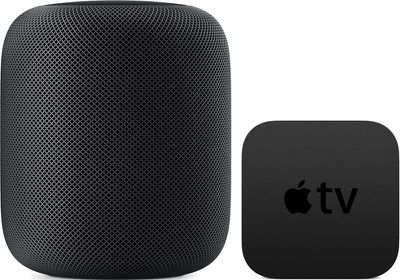
The HomePod offers great sound, and with AirPlay connectivity, you can set the ‌HomePod‌ up to function as a speaker for your Apple TV, routing ‌Apple TV‌ sound through the ‌HomePod‌.

You can use ‌Apple TV‌ and ‌HomePod‌ together as long as you have a third, fourth, or fifth-generation ‌Apple TV‌

homepodappletv

Pairing Apple TV and HomePod

  1. Open the Settings app on the ‌Apple TV‌.
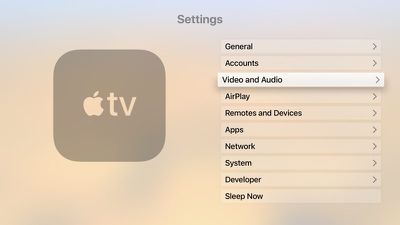
  2. Scroll down to the Video and Audio section and select it. appletvaudiovideo
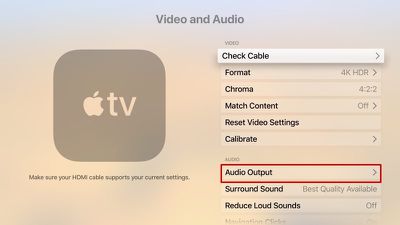
  3. Choose "Audio Output." audiooutputappletv
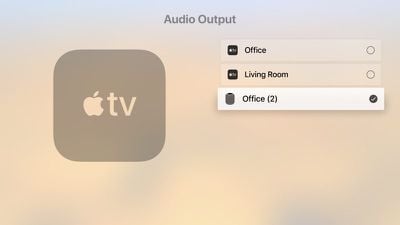
  4. Select the ‌HomePod‌ icon from the list of available devices.homepodappletvaudiooutput

Once the ‌Apple TV‌ is paired with the ‌HomePod‌, TV sound will be routed through your ‌HomePod‌ instead of through your TV. Using the ‌HomePod‌'s physical controls, you can change the volume of the ‌Apple TV‌, or you can ask Siri to do so. You can also play/pause content through the top of the ‌HomePod‌ or through ‌Siri‌.

Unpairing Apple TV and HomePod

You'll presumably want to use your ‌HomePod‌ for purposes beyond playing audio from the ‌Apple TV‌, and unpairing is done through the same settings you used to pair the ‌HomePod‌ and ‌Apple TV‌ in the first place.

  1. Open the Settings app on the ‌Apple TV‌.
  2. Scroll down to the Video and Audio section and select it.
  3. Choose "Audio Output."
  4. Click on the ‌HomePod‌ icon from the list of available devices to deselect it.

Choosing Audio Output Device with the Apple TV Remote

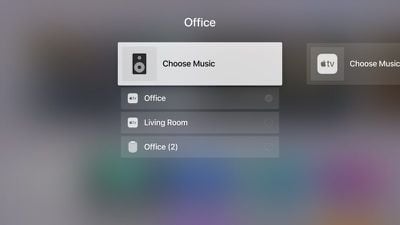
You can also choose your ‌HomePod‌ as your audio output device using your ‌Apple TV‌ Remote, which is a quicker way to swap between devices.

  1. Go to the Home screen of the ‌Apple TV‌.
  2. Hold down the Play/Pause button on the ‌Apple TV‌ Remote.
  3. In the menu that comes up, select the ‌HomePod‌ option. homebuttonaudioinput

To go back to using the ‌Apple TV‌ audio, you can repeat the same steps above, but this time select your ‌Apple TV‌ instead of the ‌HomePod‌.

Related Roundups: Apple TV, HomePod, HomePod mini

Top Rated Comments

Cankoda Avatar
104 months ago
Why is it you have to keep the HomePod plugged in for it to work I just don’t get it couldn’t it have been rechargeable or something I don’t like leaving things plugged in when I’m off to work
So when you leave the house you unplug your tv, stove, microwave, lights, furnace, etc, etc. It’s a good quality speaker with bass and a lot of output, speakers like that almost never have battery’s because they need more power than a battery can give, and leaving it plugged in or anything doesn’t really matter, power draw from anything is very minimal if its off, it’s actually more likley for a battery to combusted than an electrical fire
Score: 28 Votes (Like | Disagree)
robgreene Avatar
104 months ago
Can someone please confirm something. I want to know if you can control the volume output on the HomePod with the Siri remote the same way you can control the volume when using AirPods on the Apple TV?
Yes. Pull one of your HomePods out of your ear and it will pause the Apple TV.
Score: 15 Votes (Like | Disagree)
rshev Avatar
104 months ago
There is a much faster way - just hold play/pause button on the home screen, and then select audio output.
Score: 8 Votes (Like | Disagree)
profets Avatar
104 months ago
The audio volume is so low using when using apps in Apple TV. I crank the volume up to max, and it's not really very loud. This is my one disappointment with homepod. Not sure why this is the case. Grrr. :(
They need to put out an update for the Apple TV so the output isn’t so low when using the HomePod. I’ve noticed having it cranked all the way up is still significantly lower volume than when I’m using the speaker on it’s own.
FWIW, now that I think about it, when I use my AirPods with the Apple TV I do the same thing - have the sound nearly at 100%
Score: 7 Votes (Like | Disagree)
ike1707 Avatar
104 months ago
My only ultimate disappointment with this product thus far is 2 home pods are explicitly not designed to work as stereo TV speakers together. If I could replace a set of traditional tower speakers with these puppies, it would be an instant sale.
Score: 6 Votes (Like | Disagree)
thisisnotmyname Avatar
104 months ago
Why is it you have to keep the HomePod plugged in for it to work I just don’t get it couldn’t it have been rechargeable or something I don’t like leaving things plugged in when I’m off to work
do you unplug your refrigerator?
Score: 5 Votes (Like | Disagree)

Popular Stories

Apple Logo Zoomed

Tim Cook Teases Plans for Apple's Upcoming 50th Anniversary

Thursday February 5, 2026 12:54 pm PST by
Apple turns 50 this year, and its CEO Tim Cook has promised to celebrate the milestone. The big day falls on April 1, 2026. "I've been unusually reflective lately about Apple because we have been working on what do we do to mark this moment," Cook told employees today, according to Bloomberg's Mark Gurman. "When you really stop and pause and think about the last 50 years, it makes your heart ...
iOS 26

iOS 26.3 and iOS 26.4 Will Add These New Features to Your iPhone

Tuesday February 3, 2026 7:47 am PST by
While the iOS 26.3 Release Candidate is now available ahead of a public release, the first iOS 26.4 beta is likely still at least a week away. Following beta testing, iOS 26.4 will likely be released to the general public in March or April. Below, we have recapped known or rumored iOS 26.3 and iOS 26.4 features so far. iOS 26.3 iPhone to Android Transfer Tool iOS 26.3 makes it easier...
imac video apple feature

Apple Makes Its Second-Biggest Acquisition Ever

Tuesday February 3, 2026 12:45 pm PST by
Apple recently acquired Israeli startup Q.ai for close to $2 billion, according to Financial Times sources. That would make this Apple's second-biggest acquisition ever, after it paid $3 billion for the popular headphone maker Beats in 2014. This is also the largest known Apple acquisition since the company purchased Intel's smartphone modem business and patents for $1 billion in 2019....
wwdc sans text feature

Apple Rumored to Announce New Product on February 19

Thursday February 5, 2026 12:22 pm PST by
Apple plans to announce the iPhone 17e on Thursday, February 19, according to Macwelt, the German equivalent of Macworld. The report, citing industry sources, is available in English on Macworld. Apple announced the iPhone 16e on Wednesday, February 19 last year, so the iPhone 17e would be unveiled exactly one year later if this rumor is accurate. It is quite uncommon for Apple to unveil...
Finder Siri Feature

Why Apple's iOS 26.4 Siri Upgrade Will Be Bigger Than Originally Promised

Friday February 6, 2026 3:06 pm PST by
In the iOS 26.4 update that's coming this spring, Apple will introduce a new version of Siri that's going to overhaul how we interact with the personal assistant and what it's able to do. The iOS 26.4 version of Siri won't work like ChatGPT or Claude, but it will rely on large language models (LLMs) and has been updated from the ground up. Upgraded Architecture The next-generation...