How to Use Your HomePod as a Speaker for Your Apple TV - MacRumors
Skip to Content

How to Use Your HomePod as a Speaker for Your Apple TV

by

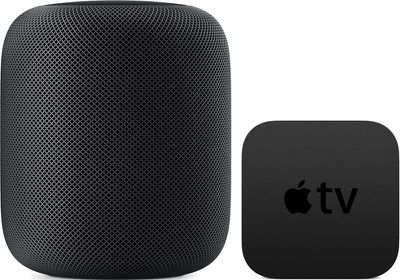
The HomePod offers great sound, and with AirPlay connectivity, you can set the ‌HomePod‌ up to function as a speaker for your Apple TV, routing ‌Apple TV‌ sound through the ‌HomePod‌.

You can use ‌Apple TV‌ and ‌HomePod‌ together as long as you have a third, fourth, or fifth-generation ‌Apple TV‌

homepodappletv

Pairing Apple TV and HomePod

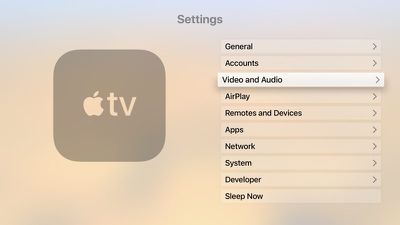
  1. Open the Settings app on the ‌Apple TV‌.
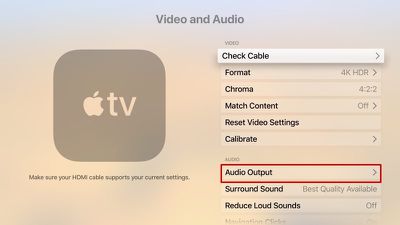
  2. Scroll down to the Video and Audio section and select it. appletvaudiovideo
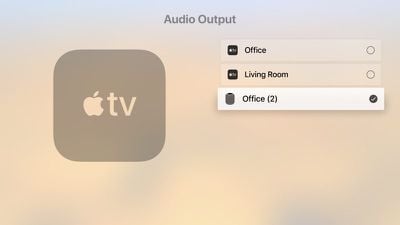
  3. Choose "Audio Output." audiooutputappletv
  4. Select the ‌HomePod‌ icon from the list of available devices.homepodappletvaudiooutput

Once the ‌Apple TV‌ is paired with the ‌HomePod‌, TV sound will be routed through your ‌HomePod‌ instead of through your TV. Using the ‌HomePod‌'s physical controls, you can change the volume of the ‌Apple TV‌, or you can ask Siri to do so. You can also play/pause content through the top of the ‌HomePod‌ or through ‌Siri‌.

Unpairing Apple TV and HomePod

You'll presumably want to use your ‌HomePod‌ for purposes beyond playing audio from the ‌Apple TV‌, and unpairing is done through the same settings you used to pair the ‌HomePod‌ and ‌Apple TV‌ in the first place.

  1. Open the Settings app on the ‌Apple TV‌.
  2. Scroll down to the Video and Audio section and select it.
  3. Choose "Audio Output."
  4. Click on the ‌HomePod‌ icon from the list of available devices to deselect it.

Choosing Audio Output Device with the Apple TV Remote

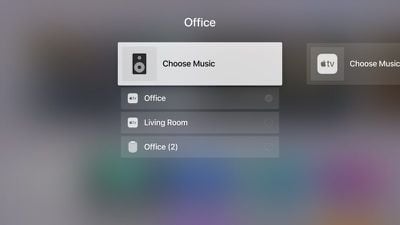
You can also choose your ‌HomePod‌ as your audio output device using your ‌Apple TV‌ Remote, which is a quicker way to swap between devices.

  1. Go to the Home screen of the ‌Apple TV‌.
  2. Hold down the Play/Pause button on the ‌Apple TV‌ Remote.
  3. In the menu that comes up, select the ‌HomePod‌ option. homebuttonaudioinput

To go back to using the ‌Apple TV‌ audio, you can repeat the same steps above, but this time select your ‌Apple TV‌ instead of the ‌HomePod‌.

Related Roundups: Apple TV, HomePod, HomePod mini 2

Top Rated Comments

Cankoda Avatar
114 months ago
Why is it you have to keep the HomePod plugged in for it to work I just don’t get it couldn’t it have been rechargeable or something I don’t like leaving things plugged in when I’m off to work
So when you leave the house you unplug your tv, stove, microwave, lights, furnace, etc, etc. It’s a good quality speaker with bass and a lot of output, speakers like that almost never have battery’s because they need more power than a battery can give, and leaving it plugged in or anything doesn’t really matter, power draw from anything is very minimal if its off, it’s actually more likley for a battery to combusted than an electrical fire
Score: 28 Votes (Like | Disagree)
robgreene Avatar
114 months ago
Can someone please confirm something. I want to know if you can control the volume output on the HomePod with the Siri remote the same way you can control the volume when using AirPods on the Apple TV?
Yes. Pull one of your HomePods out of your ear and it will pause the Apple TV.
Score: 15 Votes (Like | Disagree)
rshev Avatar
114 months ago
There is a much faster way - just hold play/pause button on the home screen, and then select audio output.
Score: 8 Votes (Like | Disagree)
114 months ago
The audio volume is so low using when using apps in Apple TV. I crank the volume up to max, and it's not really very loud. This is my one disappointment with homepod. Not sure why this is the case. Grrr. :(
They need to put out an update for the Apple TV so the output isn’t so low when using the HomePod. I’ve noticed having it cranked all the way up is still significantly lower volume than when I’m using the speaker on it’s own.

FWIW, now that I think about it, when I use my AirPods with the Apple TV I do the same thing - have the sound nearly at 100%
Score: 7 Votes (Like | Disagree)
ike1707 Avatar
114 months ago
My only ultimate disappointment with this product thus far is 2 home pods are explicitly not designed to work as stereo TV speakers together. If I could replace a set of traditional tower speakers with these puppies, it would be an instant sale.
Score: 6 Votes (Like | Disagree)
thisisnotmyname Avatar
114 months ago
Why is it you have to keep the HomePod plugged in for it to work I just don’t get it couldn’t it have been rechargeable or something I don’t like leaving things plugged in when I’m off to work
do you unplug your refrigerator?
Score: 5 Votes (Like | Disagree)

Popular Stories

Apple TV Sans Remote Feature

New Apple TV 4K Leaked

Friday September 25, 2026 8:16 am PDT by
MacRumors contributor Aaron Perris has uncovered an image file from Apple for an unreleased Apple TV 4K, suggesting that a new model will finally be released soon. The image is specifically for an "Apple TV 4K (4th generation)" model. Apple TV 4K (4th generation) image (on a gradient) The image reveals that the Apple TV will have the same external design as the current model, with all of its...
Apple TV 4K HomeView HomePod Mini tweaked

New Apple TV 4K, HomeView, and HomePod Mini: 16 Details Just Leaked

Sunday October 11, 2026 12:56 pm PDT by
Just two days before Apple's "Welcome home" experience in New York, Bloomberg's Mark Gurman has leaked several details about the new products set to be unveiled, including an all-new smart home hub, a HomePod mini 2, and a new Apple TV 4K. Here is an all-in-one summary of the details shared by Gurman:Apple's home hub with a touch-enabled display will be named HomeView, seemingly confirming a ...
HomePod minis Apple TV and iPad mini Leak Feature

iPad Mini With A20 Pro, New HomePod Mini Colors, and New Apple TV 4K All Just Leaked

Friday September 25, 2026 8:18 am PDT by
The next iPad mini, HomePod mini, and Apple TV 4K models have all leaked, just a few weeks before the devices are expected to be announced. Specifically, MacRumors contributor Aaron Perris discovered a few of Apple's official images of the devices, confirming their existence and some new features that are planned. The most notable iPad mini details revealed in today's leak include an A20 Pro ...


Latest Stories
Apple Pulls Keynote, Pages and Numbers From App Store
13 minutes ago
Apple Updates More Apps With iPhone Duo Support
43 minutes ago
Apple Will Label Apps 'Made for iPhone Duo' in App Store
4 hours ago
Amazon Takes $49 Off iPad With Prices Starting at $399.99
4 hours ago
F1 on Apple TV Now Available in Dolby Atmos
5 hours ago
Apple Reveals More Than 50 Apps That Will Be Updated for iPhone Duo
5 hours ago
Apple Blocks Certificates That Could Help Attackers Fake Websites
7 hours ago
Giant iPhone Duo Installations Spotted at Apple Fifth Avenue
7 hours ago
iPhone Duo 2 Prototypes Include Under-Display Face ID
7 hours ago
Tesla App Gains iPad and iPhone Duo Support
11 hours ago
Apple Reportedly Boosts iPhone Duo Orders by 44%
12 hours ago
Fortnite Returning to Australian App Store After Court Ruling
12 hours ago
Apple Ordered to Open iPhone to Rival App Stores in Australia
13 hours ago
Apple Suppliers Face Hurdles Cutting Circuit Board Emissions
13 hours ago
Things Updated for iPhone Duo With Adaptive Layout
13 hours ago
Simplicity and Siri AI Are HomeView's Killer Features, Apple Says
14 hours ago
iPhone Duo Reviewers Really Miss Face ID
19 hours ago
Does the iPhone Duo Run Hot? Here's What Reviews Found
20 hours ago
Apple Music's New Look is Now Live on Apple's Website
21 hours ago
Anthropic Launches Claude Duet, a Proactive AI Agent
21 hours ago
What 32,000 Folds Did to the iPhone Duo's Hinge
22 hours ago
iPhone Duo's Hidden FaceTime Camera Takes 'Trash' Photos
1 day ago
iPhone Duo Has 'Edge Light' Feature That Debuted on Macs Last Year
1 day ago
Apple Support App Updated for iPhone Duo's Larger Display
1 day ago
Amazon Sweetens the Deal on Entry-Level 16-Inch MacBook Pro With $570 Off
1 day ago
iPhone Duo Tips Over on MagSafe Stands When Unfolded
1 day ago
Apple Music's New Look Officially Announced
1 day ago
iPhone Duo Supports Apple Pencil Starting With iOS 27.2
1 day ago
iPhone Duo Accessories Roundup: Cases and Screen Protectors From OtterBox, ZAGG, and More
1 day ago
Apple Stores Will Have 'Limited' Availability of iPhone Duo for Walk-In Customers
1 day ago