
As a smart speaker, HomePod comes with built-in Siri support, so you can use it without ever touching it, but Apple did include a touch panel at the top of the device that supports several gestures.
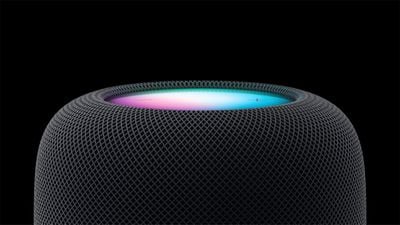
HomePod 2023
‌HomePod‌ gestures can activate ‌Siri‌, control the volume of what's playing, skip to the next song, pause/play and more. All of the touch gestures you can use with the ‌HomePod‌ are below.

Volume

Volume up - Tap on the "+" button to raise volume by one level, or touch and hold to increase the volume by several levels.

Volume down - Tap on the "-" button to lower the volume by one level, or touch and hold to decrease the volume by several levels.

Playback

Pause or resume playback - Tap in the middle of the ‌HomePod‌ to pause your music and tap it again to unpause.

Go to the next track - When a song is playing, double tap in the middle of the ‌HomePod‌ to skip a song.

Replay the previous track - When a song is playing from a playlist or an album, triple tap in the middle of the ‌HomePod‌ to go back to the previous song that was playing.

Siri

To activate ‌Siri‌, place a place a finger on the top of the ‌HomePod‌ and hold it there until the visual ‌Siri‌ waveform appears. From there, you can speak your ‌Siri‌ command.

Other Available Gestures

Dismiss an alarm - If an alarm is going off on the ‌HomePod‌, tap in the middle of it to stop it.

Activate VoiceOver - If you have VoiceOver enabled in the Accessibility settings, double tap to activate it. With VoiceOver enabled, all other gestures will require one extra tap, so pausing, for example will require two taps.

End a call - When using your HomePod as a speakerphone, you can end a call by tapping on the green light on top of the ‌HomePod‌.

Switch calls - If you're using ‌HomePod‌ as a speakerphone on a call and a second call comes in, you can touch and hold on the green light to put a hold on call. Switch between calls by double tapping.


Related Roundups: HomePod, HomePod mini

Top Rated Comments

myscrnnm Avatar
104 months ago
Am I the only one who finds these controls unintuitive and confusing? They put a display on the top of the HomePod. Why not just utilize a proximity sensor to display context-specific controls when you approach the device?
Score: 5 Votes (Like | Disagree)
Polaroid Avatar
104 months ago
Am I the only one who finds these controls unintuitive and confusing? They put a display on the top of the HomePod. Why not just utilize a proximity sensor to display context-specific controls when you approach the device?
Pretty sure you are the only one lol. Apple has used these controls for years on the headphones and iPods.... simple enough.
Score: 4 Votes (Like | Disagree)
Brookzy Avatar
104 months ago
I get that they are the same controls but I'm with you... why not just have some of the options on the display? I feel the display is not used at all... Such a beautiful display and all it does is display + and - I mean really?
It isn’t really a display, it’s just a small LED array in the centre, covered by a panel that blurs the light to make it look like a nice glowing orb.

The volume controls are simply one LED each.

So only a very small area of the top of the HomePod has the potential to illuminate, and even then it can only display vague shapes and colours rather than symbols.

(Fun fact: I noticed today that there must be an ambient light sensor hidden somewhere because the brightness of the volume controls changed to the room lighting. That’s a really nice touch!)
Score: 3 Votes (Like | Disagree)
Arran Avatar
104 months ago
It isn’t really a display, it’s just a small LED array in the centre, covered by a panel that blurs the light to make it look like a nice glowing orb.

The volume controls are simply one LED each.

So only a very small area of the top of the HomePod has the potential to illuminate, and even then it can only display vague shapes and colours rather than symbols.

(Fun fact: I noticed today that there must be an ambient light sensor hidden somewhere because the brightness of the volume controls changed to the room lighting. That’s a really nice touch!)
You're right. On close inspection it's not a screen at all. Just a few colored LEDs and a diffuser.

That's a bit limiting. I was secretly hoping a future software upgrade might support coverflow. I like visuals. No chance of that happening now.
Score: 2 Votes (Like | Disagree)
Arran Avatar
104 months ago
...Apple has used these controls for years on the headphones and iPods.... simple enough.
True, but that was through necessity: There was only one mechanical button, so it was necessary to learn morse code click combinations.

That all seems inappropriate on a device with a big color touchscreen. And since this is a shared device intended for common areas, what if your houseguests don't know about the secret click combos? Seems user-hostile. Seems like a wasted opportunity.
Score: 2 Votes (Like | Disagree)
Beerstalker Avatar
104 months ago
True, but that was through necessity: There was only one mechanical button, so it was necessary to learn morse code click combinations.

That all seems inappropriate on a device with a big color touchscreen. And since this is a shared device intended for common areas, what if your houseguests don't know about the secret click combos? Seems user-hostile. Seems like a wasted opportunity.
I agree, seems like they could have easily had Skip Forward and Skip back on the North/South portions of the screen (assuming you consider +/- the East and West) and Play/Pause as one button in the center.

I also wish they would have used the standard figure 8 power cable like they do on the Apple TV, Airport Express, Airport Extreme, etc. Would have been nice to be able to buy a shorter cable so I don't have 4' of it wrapped up in a coil next to the speaker on my kitchen counter.

That said I am pretty impressed with the sound and am overall happy with it. I probably won't bother buying any more until I see what kind of firmware updates are made etc. Then I could see picking up a couple more for my kids' rooms. Would also be nice if they made a bit smaller/cheaper version better suited for bathrooms etc.
Score: 1 Votes (Like | Disagree)

Popular Stories

Apple Logo Zoomed

Tim Cook Teases Plans for Apple's Upcoming 50th Anniversary

Thursday February 5, 2026 12:54 pm PST by
Apple turns 50 this year, and its CEO Tim Cook has promised to celebrate the milestone. The big day falls on April 1, 2026. "I've been unusually reflective lately about Apple because we have been working on what do we do to mark this moment," Cook told employees today, according to Bloomberg's Mark Gurman. "When you really stop and pause and think about the last 50 years, it makes your heart ...
wwdc sans text feature

Apple Rumored to Announce New Product on February 19

Thursday February 5, 2026 12:22 pm PST by
Apple plans to announce the iPhone 17e on Thursday, February 19, according to Macwelt, the German equivalent of Macworld. The report, citing industry sources, is available in English on Macworld. Apple announced the iPhone 16e on Wednesday, February 19 last year, so the iPhone 17e would be unveiled exactly one year later if this rumor is accurate. It is quite uncommon for Apple to unveil...
Finder Siri Feature

Why Apple's iOS 26.4 Siri Upgrade Will Be Bigger Than Originally Promised

Friday February 6, 2026 3:06 pm PST by
In the iOS 26.4 update that's coming this spring, Apple will introduce a new version of Siri that's going to overhaul how we interact with the personal assistant and what it's able to do. The iOS 26.4 version of Siri won't work like ChatGPT or Claude, but it will rely on large language models (LLMs) and has been updated from the ground up. Upgraded Architecture The next-generation...
iOS 26

iOS 26.3 and iOS 26.4 Will Add These New Features to Your iPhone

Tuesday February 3, 2026 7:47 am PST by
While the iOS 26.3 Release Candidate is now available ahead of a public release, the first iOS 26.4 beta is likely still at least a week away. Following beta testing, iOS 26.4 will likely be released to the general public in March or April. Below, we have recapped known or rumored iOS 26.3 and iOS 26.4 features so far. iOS 26.3 iPhone to Android Transfer Tool iOS 26.3 makes it easier...
iphone 17 pro dark blue 1

iPhone 18 Pro Max Rumored to Deliver Next-Level Battery Life

Friday February 6, 2026 5:14 am PST by
The iPhone 18 Pro Max will feature a bigger battery for continued best-in-class battery life, according to a known Weibo leaker. Citing supply chain information, the Weibo user known as "Digital Chat Station" said that the iPhone 18 Pro Max will have a battery capacity of 5,100 to 5,200 mAh. Combined with the efficiency improvements of the A20 Pro chip, made with TSMC's 2nm process, the...















