How to Use Spotify With HomePod Through AirPlay - MacRumors
Skip to Content

How to Use Spotify With HomePod Through AirPlay

by

Apple's new HomePod smart speaker is designed primarily for Apple devices, and it's heavily tied to the Apple ecosystem. Natively, you can only stream music on the HomePod through an Apple Music subscription, iTunes purchases, or iTunes Match content uploaded to iCloud Music Library.

It might sound like you're out of luck if you subscribe to a third-party music service like Spotify, Pandora, Amazon Prime Music, Google Play Music, Tidal, or another option, but it's not impossible -- you can still play content from these services to HomePod, you'll just need to use AirPlay to do it.
homepodspotify
With most music apps, you can start up a song and then choose a device to play to right from within the app. These instructions will be specific to Spotify.

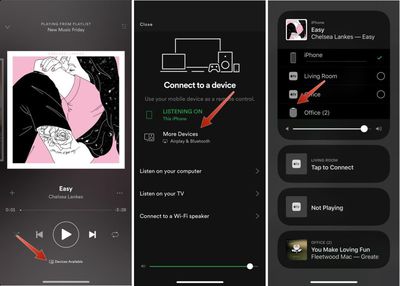
  1. Open Spotify and choose a track to play.
  2. On the main screen that shows song details, tap on "Devices Available."
  3. Choose "More Devices." spotifyairplayhomepod1
  4. Tap on the icon for your HomePod, and music will be streamed directly to it.
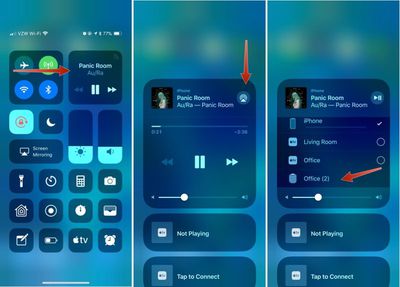
Here's an alternative method that works with Spotify and all other music apps:

  1. Start a song in Spotify or another app.
  2. Open the Control Center on the iPhone or iPad.
  3. 3D Touch or long press on the music widget.
  4. Tap on the AirPlay icon in the upper right side of the widget. spotifyairplayhomepod2
  5. Select the HomePod icon.

It will take a few seconds for the iPhone or iPad to connect to HomePod, but once it's connected, your music will be streamed to HomePod from your iPhone.

You generally need an Apple device to stream music to the HomePod because it requires AirPlay functionality, but some HTC phones support AirPlay, and there are unofficial third-party Android apps that work with AirPlay, so these devices may also work with the HomePod. You can't, however, connect devices to the HomePod over a Bluetooth connection.

When streaming music to HomePod through AirPlay, you're not going to have full Siri support, but you can use Siri to play/pause music, change the volume, and change music tracks.


Related Roundup: HomePod
Buyer's Guide: HomePod (Neutral)

Top Rated Comments

penajmz Avatar
106 months ago
Seems like a pain in the ass.

I'll stick with my Echo and Sonos.
Seriously? Lol
Score: 12 Votes (Like | Disagree)
106 months ago
Seems like a pain in the ass.

I'll stick with my Echo and Sonos.
Score: 7 Votes (Like | Disagree)
bpp85 Avatar
106 months ago
It’s amazing to see how fast technology has advanced that now we are like “omg I can’t activate my speaker by voice to play music through my app of choice so I have to use AirPlay :eek:“
Score: 4 Votes (Like | Disagree)
106 months ago
Just get Apple Music! You own an iPhone!
Apple Music sucks.

Specifically
- Music discovery sucks compared to Spotify
- Lack of year-end playlists (your most listened tracks etc.) and other fun features...sucks
- UI sucks
- Lack of free tier sucks for some people
- In conclusion, Apple Music sucks and the only reason to get it instead of Spotify is if you’re desperate to be as far up Apple’s #*@# as possible.
Score: 4 Votes (Like | Disagree)
GadgetBen Avatar
106 months ago
Just get Apple Music! You own an iPhone!
Score: 4 Votes (Like | Disagree)
106 months ago
Seems like a pain in the ass.

I'll stick with my Echo and Sonos.
The struggle is real.
Score: 4 Votes (Like | Disagree)

Popular Stories

iOS 26

iOS 26.4 Adds Two New Features to CarPlay

Tuesday March 24, 2026 1:55 pm PDT by
iOS 26.4 was released today, and it includes a couple of new features for CarPlay: an Ambient Music widget and support for voice-based chatbot apps. To update your iPhone 11 or newer to iOS 26.4, open the Settings app and tap on General → Software Update. CarPlay will automatically offer the new features so long as the iPhone connected to your vehicle is running iOS 26.4 or later....
Apple Business hero

Apple Unveils 'Apple Business' All-in-One Platform

Tuesday March 24, 2026 8:53 am PDT by
Apple today announced Apple Business, a new all-in-one platform that unifies device management, productivity tools, and customer outreach features. The service is designed to be a consolidated replacement for several of Apple's existing business-focused offerings, including Apple Business Essentials, Apple Business Manager, and Apple Business Connect. It provides organizations with a single...
AirPods Pro Firmware Feature

Apple Releases New Firmware for AirPods Pro 3, AirPods Pro 2 and AirPods 4

Tuesday March 24, 2026 12:31 pm PDT by
Apple today released new firmware for the AirPods Pro 2, AirPods Pro 3, and the AirPods 4. The firmware has a version number of 8B39, up from 8B34 on the AirPods Pro 3, 8B28 on the AirPods Pro 2, and 8B21 on the AirPods 4. There is no word on what's included in the firmware, but Apple has a support document with limited notes. Most updates are limited to bug fixes and performance...