macos finder iconIn a previous how-to, we explained how to add a special stack to your Mac's Dock that enables quick access to recently opened or favorite items.

This unique stack can be configured to show your most recently opened apps, documents, or servers, but what you can't do is make it show all your recent items, regardless of kind.

One solution is to add a recently opened items folder to your Dock instead. The following steps guide you through the process of creating one using Finder's smart folder feature.

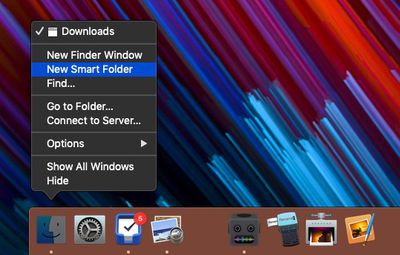
  1. Open a Finder window and select File -> New Smart Folder in the menu bar. Alternatively, right-click (or Ctrl-click) the Finder icon in your Dock and select New Smart Folder.
    create a recent items folder 1

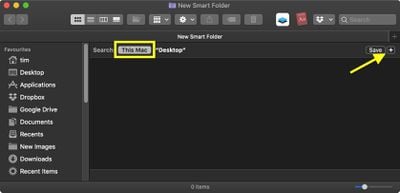
  2. In the Finder window that opens, make sure the search header is selected as This Mac, then click the plus icon in the upper right of the viewing area.
    how to create a recent items folder 01

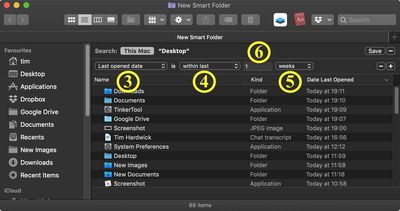
  3. Select Last opened date in the first search criteria dropdown.
  4. Select within last in the second dropdown.
  5. In the third and final dropdown, select how far back you'd like the folder to show recently opened items for. Your options are days, weeks, months, and years.
  6. In the input field to the left of your timescale selection, specify the number of days/weeks/months/years of recently opened files to show.
    how to create a recent items folder 02

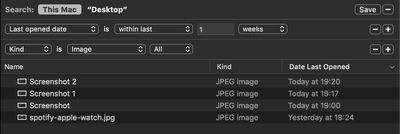
  7. To restrict your recent items folder to a certain kind of file – images, for example – click the plus button to add another row, then select a kind from the second dropdown. (Depending on the kind you select, you may be offered an additional dropdown to further limit the criteria.)
    create a recent items folder 04

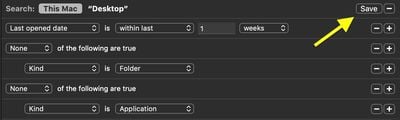
  8. Now, hold down the Option key. Note how the plus icon at the end of the row changes to an ellipsis. Click this, and you'll be able to add search parameters that exclude certain items like applications and folders from your recents list.
    create a recent items folder 03

  9. In the second row dropdown, select None of the following are true.
  10. In the third row, first dropdown, select Kind.
  11. In the third row, second dropdown, select the type of item you wish to exclude.
    how to create a recent items folder 05

  12. If you want to add more exclusion criteria, hold the Option key and click the ellipsis icon in the first row. When you're done, click Save in the upper right of the viewing area.
    how to create a recent items folder 06

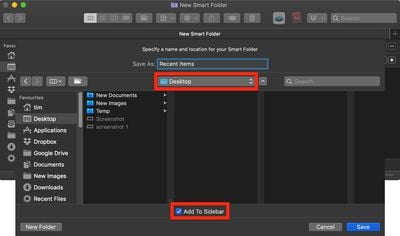
  13. In the save dialog that appears, give your smart folder a name, and select your Desktop as the location for your folder. You can also opt to include the folder in Finder's sidebar by checking the box next to Add to Sidebar.
    create a recent items folder 4

  14. Click Save.
  15. Switch to your Desktop and drag and drop your new smart folder to the right of the the Dock, which will automatically move any existing icons behind the divider to make space for it. (If you like, you can delete the same folder on your Desktop once it's safely docked.)
    create a recent items folder 5

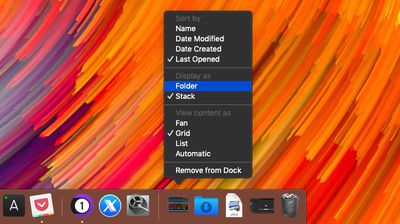
  16. Finally, right-click (or Ctrl-click) the docked smart folder and select Folder in the contextual menu.
    create a recent items folder 6

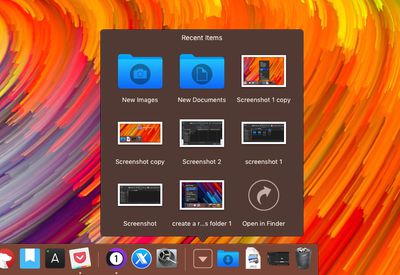
The last step gives your recently opened items folder a distinctive icon in the Dock.
create a recent items folder 7
Note that the same contextual menu also provides view and sort options to further customize the folder's behavior.


Top Rated Comments

ignatius345 Avatar
93 months ago
Great tip! I'm loving this series.


[LIST=1]
* In the Finder window that opens, click the plus icon in the upper right of the viewing area.


In this screenshot, wouldn't one want to search "This Mac" instead of just the Desktop? Otherwise it's going to be a pretty narrow set of results....


[LIST=1]
* In the save dialog that appears, give your smart folder a name, and select your Desktop as the location for your folder. You can also opt to include the folder in Finder's sidebar by checking the box next to Add to Sidebar.

You don't have to leave it on your Desktop if you don't want to. I chose to save the Smart Folder to my Documents folder where it's out of the way.

Oh, and if anybody's interested, you can edit the Saved Search by opening it in Finder and selecting "Show Search Criteria" from the little gear menu.

It's also worthwhile while doing the search criteria to add additional filters after you specify the date one. Lots of useful options there like restricting your Kind to Documents to filter out apps. You can stack up these search criteria as you see fit and see the results in real-time as you tweak. Worth futzing with, and you can always create separate smart searches for specific things, like "PDFs from the last 30 days with the name XXXXX" or whatever.


Attachment Image
Score: 3 Votes (Like | Disagree)
ignatius345 Avatar
93 months ago
Or, as he said “(If you like, you can delete the same folder on your Desktop once it's safely docked.)”
You're right, I missed that part. It is handy to keep that .savedsearch file around if you want to edit it, though, and I think you need to keep it somewhere if you want that sidebar shortcut to exist. Interestingly the Dock item is totally independent once you add it, and editing the .savedsearch file has no effect on the dock item.
Score: 2 Votes (Like | Disagree)
JosephAW Avatar
93 months ago
Did Apple drop the Finder setting for recent documents in Mojave? Tinker tool used to be able to toggle this without a smart folder.
Score: 1 Votes (Like | Disagree)
timmyh Avatar
93 months ago
In this screenshot, wouldn't one want to search "This Mac" instead of just the Desktop? Otherwise it's going to be a pretty narrow set of results....
Thanks, ignatius, for pointing this out. I'll replace the image and add another step.
Score: 1 Votes (Like | Disagree)

Popular Stories

Apple Logo Zoomed

Tim Cook Teases Plans for Apple's Upcoming 50th Anniversary

Thursday February 5, 2026 12:54 pm PST by
Apple turns 50 this year, and its CEO Tim Cook has promised to celebrate the milestone. The big day falls on April 1, 2026. "I've been unusually reflective lately about Apple because we have been working on what do we do to mark this moment," Cook told employees today, according to Bloomberg's Mark Gurman. "When you really stop and pause and think about the last 50 years, it makes your heart ...
Finder Siri Feature

Why Apple's iOS 26.4 Siri Upgrade Will Be Bigger Than Originally Promised

Friday February 6, 2026 3:06 pm PST by
In the iOS 26.4 update that's coming this spring, Apple will introduce a new version of Siri that's going to overhaul how we interact with the personal assistant and what it's able to do. The iOS 26.4 version of Siri won't work like ChatGPT or Claude, but it will rely on large language models (LLMs) and has been updated from the ground up. Upgraded Architecture The next-generation...
wwdc sans text feature

Apple Rumored to Announce New Product on February 19

Thursday February 5, 2026 12:22 pm PST by
Apple plans to announce the iPhone 17e on Thursday, February 19, according to Macwelt, the German equivalent of Macworld. The report, citing industry sources, is available in English on Macworld. Apple announced the iPhone 16e on Wednesday, February 19 last year, so the iPhone 17e would be unveiled exactly one year later if this rumor is accurate. It is quite uncommon for Apple to unveil...
iOS 26

iOS 26.3 and iOS 26.4 Will Add These New Features to Your iPhone

Tuesday February 3, 2026 7:47 am PST by
While the iOS 26.3 Release Candidate is now available ahead of a public release, the first iOS 26.4 beta is likely still at least a week away. Following beta testing, iOS 26.4 will likely be released to the general public in March or April. Below, we have recapped known or rumored iOS 26.3 and iOS 26.4 features so far. iOS 26.3 iPhone to Android Transfer Tool iOS 26.3 makes it easier...
iphone 17 pro dark blue 1

iPhone 18 Pro Max Rumored to Deliver Next-Level Battery Life

Friday February 6, 2026 5:14 am PST by
The iPhone 18 Pro Max will feature a bigger battery for continued best-in-class battery life, according to a known Weibo leaker. Citing supply chain information, the Weibo user known as "Digital Chat Station" said that the iPhone 18 Pro Max will have a battery capacity of 5,100 to 5,200 mAh. Combined with the efficiency improvements of the A20 Pro chip, made with TSMC's 2nm process, the...