Creating a photo slideshow on your iPhone is a fantastic way to showcase your memories in a dynamic and visually engaging way. Whether it's reliving a recent holiday, celebrating a family event, or sharing your artistic endeavors, a slideshow can bring your stories to life.
icloud photos
Available through the Photos app, the slideshow feature allows you to easily curate your images and present them in a polished, professional manner without needing any additional software.

Using the slideshow function also enhances your ability to share and enjoy memories, by offering a seamless way to compile and view your photos. It enables you to create a cinematic experience right on your ‌iPhone‌, complete with transitions and music. It's perfect for gatherings, where you can AirPlay a slideshow on a larger screen. Or you can use it for personal reflection and enjoy your favorite moments in a refreshing format.

Let's walk through the easy steps to create your own photo slideshow on ‌iPhone‌.

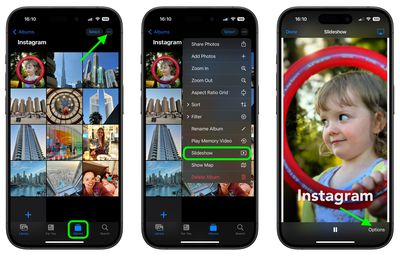
  1. Open the ‌Photos‌ app.
  2. Go to the Albums view and tap the desired album that you want to turn into a slideshow. Alternatively, in the Library view, choose Select and tap the pictures that you want to include in your slideshow.
  3. Tap the More icon (three dots) and select Slideshow from the dropdown menu.
    slideshow

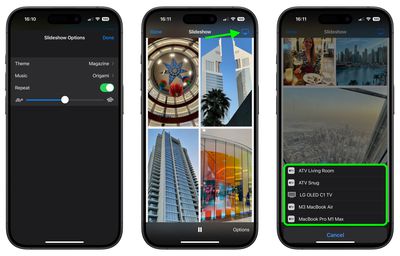
  4. As the slideshow plays, tap the screen and choose Options to adjust the speed, theme and music. (If you don't want to be limited to the default music options, you can choose a song from your Music library.)
  5. To stream your slideshow to a nearby Apple device or smart TV, tap the AirPlay icon in the top-right corner, then select the preferred device.
  6. To end the slideshow, tap the screen and select Done.
    slideshow

That's all there is to it. If you're looking for a more dynamic presentation of your photos that you can preserve for repeat vewing, consider creating a Memory Video (More ➝ Play Memory Video). In addition to music options, Memory Videos include filters (or "Looks"), title options, and the ability to save your memory.


Popular Stories

Apple Logo Zoomed

Tim Cook Teases Plans for Apple's Upcoming 50th Anniversary

Thursday February 5, 2026 12:54 pm PST by
Apple turns 50 this year, and its CEO Tim Cook has promised to celebrate the milestone. The big day falls on April 1, 2026. "I've been unusually reflective lately about Apple because we have been working on what do we do to mark this moment," Cook told employees today, according to Bloomberg's Mark Gurman. "When you really stop and pause and think about the last 50 years, it makes your heart ...
iOS 26

iOS 26.3 and iOS 26.4 Will Add These New Features to Your iPhone

Tuesday February 3, 2026 7:47 am PST by
While the iOS 26.3 Release Candidate is now available ahead of a public release, the first iOS 26.4 beta is likely still at least a week away. Following beta testing, iOS 26.4 will likely be released to the general public in March or April. Below, we have recapped known or rumored iOS 26.3 and iOS 26.4 features so far. iOS 26.3 iPhone to Android Transfer Tool iOS 26.3 makes it easier...
imac video apple feature

Apple Makes Its Second-Biggest Acquisition Ever

Tuesday February 3, 2026 12:45 pm PST by
Apple recently acquired Israeli startup Q.ai for close to $2 billion, according to Financial Times sources. That would make this Apple's second-biggest acquisition ever, after it paid $3 billion for the popular headphone maker Beats in 2014. This is also the largest known Apple acquisition since the company purchased Intel's smartphone modem business and patents for $1 billion in 2019....
wwdc sans text feature

Apple Rumored to Announce New Product on February 19

Thursday February 5, 2026 12:22 pm PST by
Apple plans to announce the iPhone 17e on Thursday, February 19, according to Macwelt, the German equivalent of Macworld. The report, citing industry sources, is available in English on Macworld. Apple announced the iPhone 16e on Wednesday, February 19 last year, so the iPhone 17e would be unveiled exactly one year later if this rumor is accurate. It is quite uncommon for Apple to unveil...
Finder Siri Feature

Why Apple's iOS 26.4 Siri Upgrade Will Be Bigger Than Originally Promised

Friday February 6, 2026 3:06 pm PST by
In the iOS 26.4 update that's coming this spring, Apple will introduce a new version of Siri that's going to overhaul how we interact with the personal assistant and what it's able to do. The iOS 26.4 version of Siri won't work like ChatGPT or Claude, but it will rely on large language models (LLMs) and has been updated from the ground up. Upgraded Architecture The next-generation...