Creating a photo slideshow on your iPhone is a fantastic way to showcase your memories in a dynamic and visually engaging way. Whether it's reliving a recent holiday, celebrating a family event, or sharing your artistic endeavors, a slideshow can bring your stories to life.
Available through the Photos app, the slideshow feature allows you to easily curate your images and present them in a polished, professional manner without needing any additional software.
Using the slideshow function also enhances your ability to share and enjoy memories, by offering a seamless way to compile and view your photos. It enables you to create a cinematic experience right on your iPhone, complete with transitions and music. It's perfect for gatherings, where you can AirPlay a slideshow on a larger screen. Or you can use it for personal reflection and enjoy your favorite moments in a refreshing format.
Let's walk through the easy steps to create your own photo slideshow on iPhone.
- Open the Photos app.
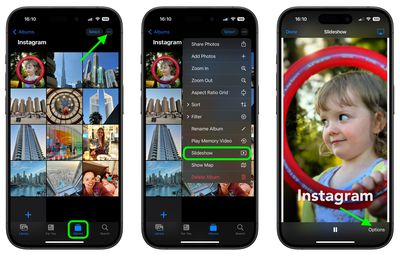
- Go to the Albums view and tap the desired album that you want to turn into a slideshow. Alternatively, in the Library view, choose Select and tap the pictures that you want to include in your slideshow.
- Tap the More icon (three dots) and select Slideshow from the dropdown menu.

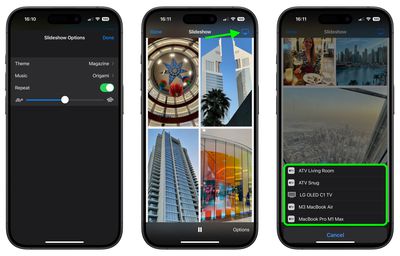
- As the slideshow plays, tap the screen and choose Options to adjust the speed, theme and music. (If you don't want to be limited to the default music options, you can choose a song from your Music library.)
- To stream your slideshow to a nearby Apple device or smart TV, tap the AirPlay icon in the top-right corner, then select the preferred device.
- To end the slideshow, tap the screen and select Done.
That's all there is to it. If you're looking for a more dynamic presentation of your photos that you can preserve for repeat vewing, consider creating a Memory Video (More ➝ Play Memory Video). In addition to music options, Memory Videos include filters (or "Looks"), title options, and the ability to save your memory.