How to Disable Inline Predictive Text on Mac - MacRumors
Skip to Content

How to Disable Inline Predictive Text on Mac

by

Apple in macOS Sonoma added inline predictive text. Here's how it works on the Mac, and how you can turn it off.
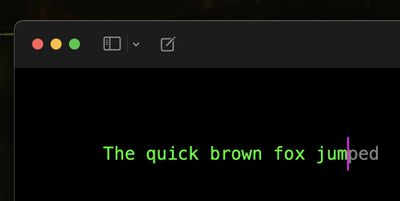
macos text prediction
Apple has improved its machine learning technology for Macs in an effort to make macOS a lot more helpful, and one of the features in which this tech has been deployed is inline predictive text.

Predictive text does just what it says - it predicts what you're going to type next. As you type, the predicted text appears ahead of the cursor. If it has accurately predicted what you want to type, all you need to do is press the spacebar and macOS will fill it in for you.

Apple says it has adopted a "transformer language model" that can personalize prediction for individual users, learning your personal preferences and word choices to be more useful when typing. After using ‌‌‌macOS Sonoma‌‌‌ for a few weeks, you should notice that the suggestions are much better at predicting what you want to say and presenting words for you to autofill.

If you don't find the inline predictive text feature useful, or if it's a distraction, don't worry. Simply follow the steps below to turn it off.

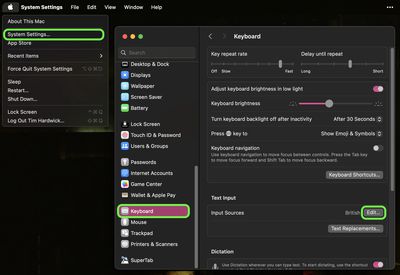
  1. Click the Apple symbol () in your Mac's menu bar and select System Settings... from the menu.
  2. Click Keyboard in the side column.
  3. Next to "Input Sources," click Edit....
    settings

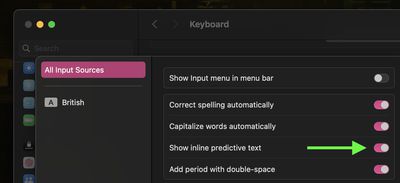
  4. In the next window, toggle off the switch next to Show inline predictive text.
    settings

That's all you need to do. Now when you type, you'll no longer be plagued by a ghostly presence trying to finish your sentences.


Popular Stories

iOS 26

iOS 26.4 Adds Two New Features to CarPlay

Tuesday March 24, 2026 1:55 pm PDT by
iOS 26.4 was released today, and it includes a couple of new features for CarPlay: an Ambient Music widget and support for voice-based chatbot apps. To update your iPhone 11 or newer to iOS 26.4, open the Settings app and tap on General → Software Update. CarPlay will automatically offer the new features so long as the iPhone connected to your vehicle is running iOS 26.4 or later....
Apple Business hero

Apple Unveils 'Apple Business' All-in-One Platform

Tuesday March 24, 2026 8:53 am PDT by
Apple today announced Apple Business, a new all-in-one platform that unifies device management, productivity tools, and customer outreach features. The service is designed to be a consolidated replacement for several of Apple's existing business-focused offerings, including Apple Business Essentials, Apple Business Manager, and Apple Business Connect. It provides organizations with a single...
AirPods Pro Firmware Feature

Apple Releases New Firmware for AirPods Pro 3, AirPods Pro 2 and AirPods 4

Tuesday March 24, 2026 12:31 pm PDT by
Apple today released new firmware for the AirPods Pro 2, AirPods Pro 3, and the AirPods 4. The firmware has a version number of 8B39, up from 8B34 on the AirPods Pro 3, 8B28 on the AirPods Pro 2, and 8B21 on the AirPods 4. There is no word on what's included in the firmware, but Apple has a support document with limited notes. Most updates are limited to bug fixes and performance...