Screen ShotIn Chrome 66, rolling out now for Mac and iOS, Google has added a password export option to the web browser so that you can easily migrate your login details to another browser via a third-party password manager app. In this article, we'll show you how to export your passwords from Chrome on Mac and iOS.

At the end of the process, you'll be left with a CSV file containing all your login credentials. Popular password managers like Enpass and 1Password accept CSV files for importing login data. Just be aware that the CSV file you export from Chrome is in plain text. That means your credentials could be read by anyone with access to it, so make sure you securely delete the file once you've imported the data into your password manager of choice.

How to Export Passwords From Chrome on Mac

  1. Launch Chrome browser on your Mac.

  2. Select Chrome -> Preferences... from the Chrome menu bar.

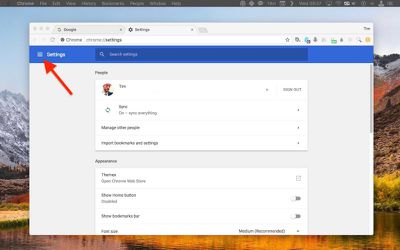
  3. Click the Settings button in the upper left corner of the tabbed Settings screen.
    1 export passwords chrome

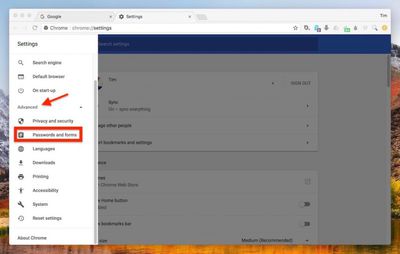
  4. Click Advanced in the Settings side panel.
    2 export passwords chrome

  5. Click Passwords and forms in the dropdown menu.

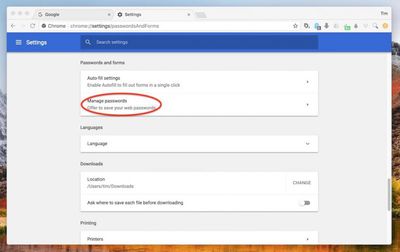
  6. Click Manage Passwords.
    3 export passwords chrome

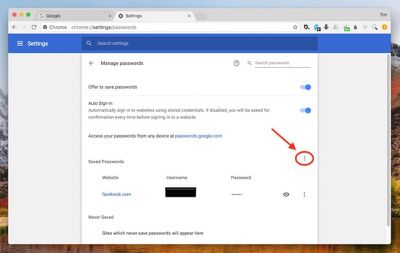
  7. Click the column of vertical dots at the top-right of your list of Save Passwords.
    4 export passwords chrome

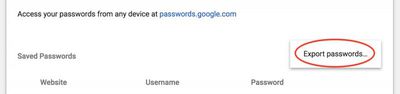
  8. Click Export passwords... in the pop-up.
    5 export passwords chrome

  9. Acknowledge the pop-up warning dialog by clicking the blue Export Passwords... button.

  10. Enter your system password if requested to do so.

  11. In the Export window, choose a location on your Mac to export the CSV file to, and click Save.
With the login data exported to your computer, open your password manager of choice and look for the import option, usually found in the app's menu bar under File. Once you've imported the data from the CSV file, be sure to delete it, preferably with a file shredding app like Secure Delete or Incinerator.

How to Export Chrome Passwords in iOS

  1. Launch the Chrome app on your iPhone or iPad.

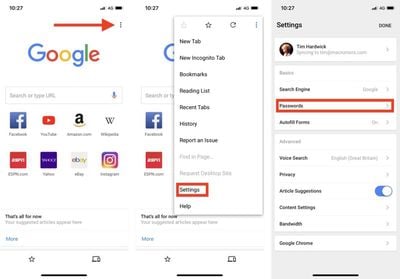
  2. Tap the three dots in the upper right of the browser tab.

  3. Tap Settings in the dropdown menu.

  4. Tap Passwords.
    export chrome passwords ios 1

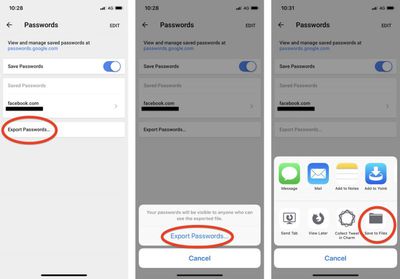
  5. Tap Export Passwords....

  6. Acknowledge the pop-up warning dialog by tapping Export Passwords....

  7. Using the Share Sheet, choose a secure method (i.e. not Mail) for exporting the CSV file. Tapping Save to Files lets you save it on your iOS device or in iCloud Drive, for example.
    export passwords chrome ios 2

Again, once you've imported the CSV file into your password manager of choice, be sure to delete the file.


Tags: Chrome, Google
Related Forum: macOS High Sierra

Top Rated Comments

butcherbird Avatar
102 months ago
I'd prefer it if Chrome worked with Keychain on Macs & iDevices.
Score: 2 Votes (Like | Disagree)
SetRen68 Avatar
102 months ago
Well, that sounds secure...NOT!
Score: 2 Votes (Like | Disagree)
PunditOne Avatar
102 months ago
Sounds good if you switching between browsers, but I it's weird imho - i've started using google chrome since it's beta version and still don't want to change it.
In Google all data saves linked to your account- so I just need to login in the browser via the acc and then always use it- and will have the same data on all devices. This way i have one chrome with all data on my PC at home, on my MacBook and on my android cell phone.
Score: 1 Votes (Like | Disagree)

Popular Stories

Apple Logo Zoomed

Tim Cook Teases Plans for Apple's Upcoming 50th Anniversary

Thursday February 5, 2026 12:54 pm PST by
Apple turns 50 this year, and its CEO Tim Cook has promised to celebrate the milestone. The big day falls on April 1, 2026. "I've been unusually reflective lately about Apple because we have been working on what do we do to mark this moment," Cook told employees today, according to Bloomberg's Mark Gurman. "When you really stop and pause and think about the last 50 years, it makes your heart ...
wwdc sans text feature

Apple Rumored to Announce New Product on February 19

Thursday February 5, 2026 12:22 pm PST by
Apple plans to announce the iPhone 17e on Thursday, February 19, according to Macwelt, the German equivalent of Macworld. The report, citing industry sources, is available in English on Macworld. Apple announced the iPhone 16e on Wednesday, February 19 last year, so the iPhone 17e would be unveiled exactly one year later if this rumor is accurate. It is quite uncommon for Apple to unveil...
Finder Siri Feature

Why Apple's iOS 26.4 Siri Upgrade Will Be Bigger Than Originally Promised

Friday February 6, 2026 3:06 pm PST by
In the iOS 26.4 update that's coming this spring, Apple will introduce a new version of Siri that's going to overhaul how we interact with the personal assistant and what it's able to do. The iOS 26.4 version of Siri won't work like ChatGPT or Claude, but it will rely on large language models (LLMs) and has been updated from the ground up. Upgraded Architecture The next-generation...
iOS 26

iOS 26.3 and iOS 26.4 Will Add These New Features to Your iPhone

Tuesday February 3, 2026 7:47 am PST by
While the iOS 26.3 Release Candidate is now available ahead of a public release, the first iOS 26.4 beta is likely still at least a week away. Following beta testing, iOS 26.4 will likely be released to the general public in March or April. Below, we have recapped known or rumored iOS 26.3 and iOS 26.4 features so far. iOS 26.3 iPhone to Android Transfer Tool iOS 26.3 makes it easier...
iphone 17 pro dark blue 1

iPhone 18 Pro Max Rumored to Deliver Next-Level Battery Life

Friday February 6, 2026 5:14 am PST by
The iPhone 18 Pro Max will feature a bigger battery for continued best-in-class battery life, according to a known Weibo leaker. Citing supply chain information, the Weibo user known as "Digital Chat Station" said that the iPhone 18 Pro Max will have a battery capacity of 5,100 to 5,200 mAh. Combined with the efficiency improvements of the A20 Pro chip, made with TSMC's 2nm process, the...