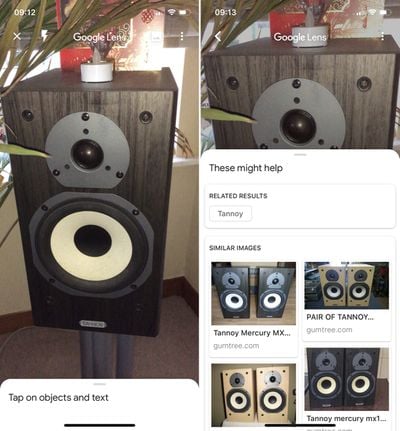
Google Lens can now recognize over a billion items in the world around us, the search engine giant announced this week.

That's four times as many things that the AI-powered feature could identify when it was first launched last year, thanks partly to a huge number of Google Shopping products which have been added to its knowledge base.
how to use google lens 5
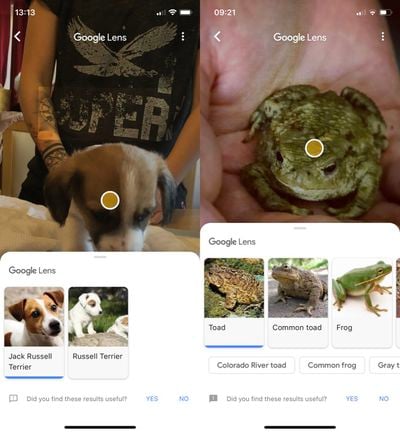
While its optical character recognition engine has been optimized to read more product labels, Google has also honed its machine learning and AI to recognize more animals, including common pet breeds.

how to use google lens 2
In addition, you can use Lens to get more information about places as well as word definitions and translations of words. Google Lens can now also recognize people, Wi-Fi network names for auto-connecting, and geometric shapes. And if it isn't sure what an object is, it will offer up similar photos that match.

Google Lens originally appeared on iOS as part of Google Photos and could only be used on pictures you'd taken. However, last week Google added the feature to its flagship search app, and this implementation is better since it allows you to aim your phone's camera at things in your environment in real time.
Follow the steps below if you'd like to give it a whirl.

How to Use Google Lens on iPhone

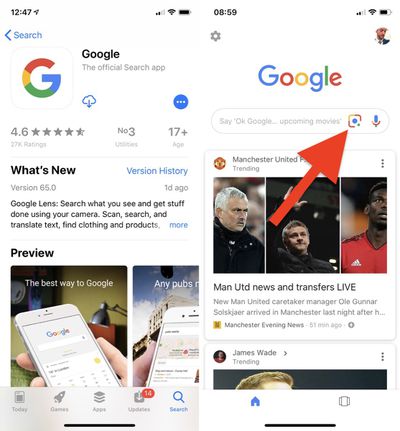
  1. If you don't have it already, download the Google app [Direct Link] from the App Store and launch it.
  2. Sign in with your Google credentials or create an account.

  3. Tap the Lens icon to the left of the microphone in the Search bar.
    how to use google lens 4

  4. Tap the blue button that says Turn on camera to use Lens.
  5. Tap OK in the permissions alert to allow Google to access your camera.
  6. Aim your device's camera at an object that you'd like more information about and tap on the circle that appears. If light is poor, you can activate your phone's flash using the lightning bolt button to illuminate whatever is in frame.
    how to use google lens 1

  7. If you want to use Google Lens on photos you've taken, tap the picture icon at the top right of the camera view, tap OK in the permissions alert to allow Google to access your photo library, then select a photo.
    how to use google lens 3

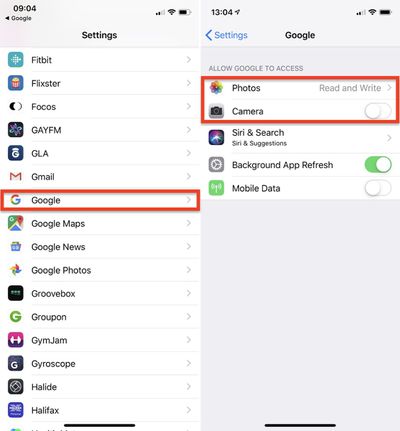
If you want to withdraw Google's access to your camera and photos you can do so anytime by following these steps.

How to Disable Google Search App Permissions

  1. Launch the Settings app.

  2. Select Google from the list of third-party apps.how to use google lens

  3. Turn off Google's access to your device's camera by toggling off the Camera switch.
  4. Tap Photos.
  5. Tap Never.
Tag: Google

Top Rated Comments

dominiongamma Avatar
93 months ago
One can only wonder (shudder) how Google monetizes you with every picture you take using this service.
While Google is actually making use of AR for real world uses, Apple is making kids games with it.
Score: 9 Votes (Like | Disagree)
burgman Avatar
93 months ago
Not hot dog, very useful.
Score: 8 Votes (Like | Disagree)
Kanyay Avatar
93 months ago
I pointed it at my wife's booty and it brought up her Wiki page. DAMN. Google's gone too far.
Score: 6 Votes (Like | Disagree)
iPlayStation Avatar
93 months ago
Yea...very accurate....

Attachment Image
Score: 6 Votes (Like | Disagree)
djlythium Avatar
93 months ago
“Son, looks like we need have to have another ‘privacy’ talk.”
Score: 5 Votes (Like | Disagree)
Lazrhog Avatar
93 months ago
Not sure this is worldwide. No lens icon in the uk as yet

Edit: icon appears after closing the app and reopening it as @ventmore suggested
Score: 4 Votes (Like | Disagree)

Popular Stories

Apple Logo Zoomed

Tim Cook Teases Plans for Apple's Upcoming 50th Anniversary

Thursday February 5, 2026 12:54 pm PST by
Apple turns 50 this year, and its CEO Tim Cook has promised to celebrate the milestone. The big day falls on April 1, 2026. "I've been unusually reflective lately about Apple because we have been working on what do we do to mark this moment," Cook told employees today, according to Bloomberg's Mark Gurman. "When you really stop and pause and think about the last 50 years, it makes your heart ...
wwdc sans text feature

Apple Rumored to Announce New Product on February 19

Thursday February 5, 2026 12:22 pm PST by
Apple plans to announce the iPhone 17e on Thursday, February 19, according to Macwelt, the German equivalent of Macworld. The report, citing industry sources, is available in English on Macworld. Apple announced the iPhone 16e on Wednesday, February 19 last year, so the iPhone 17e would be unveiled exactly one year later if this rumor is accurate. It is quite uncommon for Apple to unveil...
Finder Siri Feature

Why Apple's iOS 26.4 Siri Upgrade Will Be Bigger Than Originally Promised

Friday February 6, 2026 3:06 pm PST by
In the iOS 26.4 update that's coming this spring, Apple will introduce a new version of Siri that's going to overhaul how we interact with the personal assistant and what it's able to do. The iOS 26.4 version of Siri won't work like ChatGPT or Claude, but it will rely on large language models (LLMs) and has been updated from the ground up. Upgraded Architecture The next-generation...
iOS 26

iOS 26.3 and iOS 26.4 Will Add These New Features to Your iPhone

Tuesday February 3, 2026 7:47 am PST by
While the iOS 26.3 Release Candidate is now available ahead of a public release, the first iOS 26.4 beta is likely still at least a week away. Following beta testing, iOS 26.4 will likely be released to the general public in March or April. Below, we have recapped known or rumored iOS 26.3 and iOS 26.4 features so far. iOS 26.3 iPhone to Android Transfer Tool iOS 26.3 makes it easier...
iphone 17 pro dark blue 1

iPhone 18 Pro Max Rumored to Deliver Next-Level Battery Life

Friday February 6, 2026 5:14 am PST by
The iPhone 18 Pro Max will feature a bigger battery for continued best-in-class battery life, according to a known Weibo leaker. Citing supply chain information, the Weibo user known as "Digital Chat Station" said that the iPhone 18 Pro Max will have a battery capacity of 5,100 to 5,200 mAh. Combined with the efficiency improvements of the A20 Pro chip, made with TSMC's 2nm process, the...