
Apple in iOS 12 introduced Screen Time, which is designed to provide you with information on how you're using your time on your iPhone and iPad.

With Screen Time, you can see how often you pick up your iOS device, which apps you're using, which apps are sending the most notifications, and other details.

Accessing Screen Time

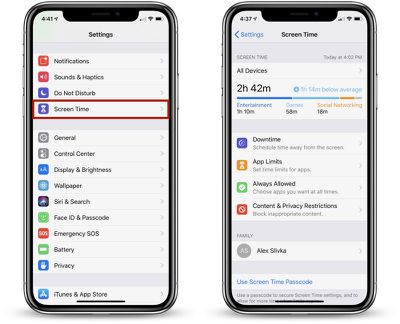
There's no dedicated app for Screen Time, so it might not be immediately obvious how it's accessed when you first install iOS 12. All Screen Time features are actually available in the Settings app.
screentimemainscreen

  1. Open up the Settings app.
  2. Scroll down to the "Screen Time" section that's grouped with Notifications, Sounds, and Do Not Disturb.
  3. Tap on "Screen Time" to see your usage statistics.

Screen Time Syncing

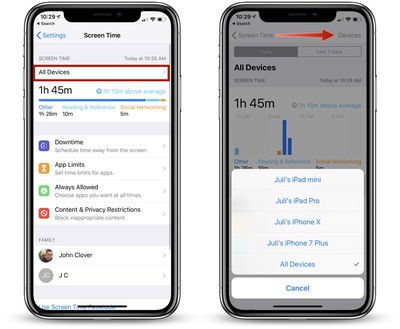
Screen Time statistics are collected from all iOS devices running iOS 12 where you're logged in with your iCloud account. That means it will aggregate data from all iPhones and iPads that you use during the course of a day.
multipledevices
You can view your data across all devices or on a per device basis. To view other devices, tap on the "All Devices" label on the main Screen Time screen and then choose "Devices" from the upper right hand corner.

Info Available in Screen Time

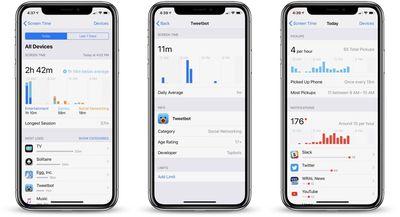
When you open up Screen Time, a chart is displayed with information on your last 24 hours of iPhone usage, organized by each individual app or which app category you've used the most, such as Productivity, Games, Creativity, or Messages.
screentimedata
If you tap on that chart, you can see even more information from either the last 24 hours or the last 7 days, including your longest usage setting, the number of times you picked up your device during the day, and how many notifications you got, along with details on which apps are sending you the most notifications.

Other Screen Time Features

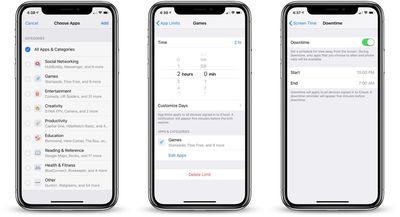
In the Screen Time section, you can set scheduled Downtime for yourself to restrict yourself (or a child) from using apps outside of those that have been allowed with App Limits, you can set specific time limits on app categories like social networking or games, and you can access Content & Privacy Restrictions, useful if you're managing a child's device.
screentimefeatures
If you use Family Sharing with a spouse, friend, or child, and you're the family manager, you'll also see family members' names listed under "Family" and will be able to see and control their app usage.

These features are relatively simple to use, but we'll be looking into them in more depth in future how tos.

Disabling Screen Time

If you don't want to use Screen Time, you can turn it off in the Settings app.
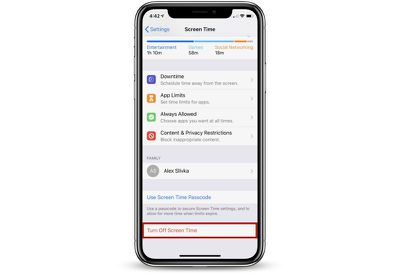
turningoffscreentime

  1. Open the Settings app.
  2. Tap "Screen Time."
  3. Scroll down to "Turn Off Screen Time" and tap it.

Turning off Screen Time on your device will delete all app, website, and notification history. You can re-enable Screen Time at any time, but it does not save data nor does it begin collecting data until enabled.


Related Forum: iOS 12

Top Rated Comments

scottct1 Avatar
99 months ago
Hopefully they fix it, as I installed the beta on my sons phone and turned on Screen time from my iPhone so he can't use his phone after 10pm at night.

He found two ways to disable it.

1) When Screentime goes on and it shuts off his apps, he can still get into settings then into Date and Time settings and change the time to a time when Screentime restrictions are not in place.

2) Even easier is he set his phone to be in 24 hour mode and for some reason Screentime does not understand 24 hour mode so Screentime never kicks in at 10pm, since its 22:00 instead.
Score: 5 Votes (Like | Disagree)
scottct1 Avatar
99 months ago
Yes bug report was submitted. ID # 41976021
Score: 3 Votes (Like | Disagree)
one more Avatar
97 months ago
Disabling it altogether is another great option. Spending extra time staring at the screen trying to figure out how much time we spend staring at the screen is kinda ironic!
Score: 2 Votes (Like | Disagree)
jonnysods Avatar
97 months ago
This is going to be handy to keep tabs on the kids and how much they use their devices.

Soon once we figure out some parameters I'll be able to help them get some control over their device usage. I even need that in my own life!
Score: 2 Votes (Like | Disagree)
BoranSama Avatar
95 months ago
My screen time data keeps resetting and erasing my progress for the day.
Same here. Whenever I open the screen time the statistics are gone, but before I open it I am able to see some statistics from the widgets. Are there any sollutions ?
Score: 1 Votes (Like | Disagree)
midkay Avatar
99 months ago
1) When Screentime goes on and it shuts off his apps, he can still get into settings then into Date and Time settings and change the time to a time when Screentime restrictions are not in place.

2) Even easier is he set his phone to be in 24 hour mode and for some reason Screentime does not understand 24 hour mode so Screentime never kicks in at 10pm, since its 22:00 instead.
Wow, hope you reported these bugs with Feedback. Those are both GLARING loopholes.
Score: 1 Votes (Like | Disagree)

Popular Stories

Apple Logo Zoomed

Tim Cook Teases Plans for Apple's Upcoming 50th Anniversary

Thursday February 5, 2026 12:54 pm PST by
Apple turns 50 this year, and its CEO Tim Cook has promised to celebrate the milestone. The big day falls on April 1, 2026. "I've been unusually reflective lately about Apple because we have been working on what do we do to mark this moment," Cook told employees today, according to Bloomberg's Mark Gurman. "When you really stop and pause and think about the last 50 years, it makes your heart ...
wwdc sans text feature

Apple Rumored to Announce New Product on February 19

Thursday February 5, 2026 12:22 pm PST by
Apple plans to announce the iPhone 17e on Thursday, February 19, according to Macwelt, the German equivalent of Macworld. The report, citing industry sources, is available in English on Macworld. Apple announced the iPhone 16e on Wednesday, February 19 last year, so the iPhone 17e would be unveiled exactly one year later if this rumor is accurate. It is quite uncommon for Apple to unveil...
Finder Siri Feature

Why Apple's iOS 26.4 Siri Upgrade Will Be Bigger Than Originally Promised

Friday February 6, 2026 3:06 pm PST by
In the iOS 26.4 update that's coming this spring, Apple will introduce a new version of Siri that's going to overhaul how we interact with the personal assistant and what it's able to do. The iOS 26.4 version of Siri won't work like ChatGPT or Claude, but it will rely on large language models (LLMs) and has been updated from the ground up. Upgraded Architecture The next-generation...
iOS 26

iOS 26.3 and iOS 26.4 Will Add These New Features to Your iPhone

Tuesday February 3, 2026 7:47 am PST by
While the iOS 26.3 Release Candidate is now available ahead of a public release, the first iOS 26.4 beta is likely still at least a week away. Following beta testing, iOS 26.4 will likely be released to the general public in March or April. Below, we have recapped known or rumored iOS 26.3 and iOS 26.4 features so far. iOS 26.3 iPhone to Android Transfer Tool iOS 26.3 makes it easier...
iphone 17 pro dark blue 1

iPhone 18 Pro Max Rumored to Deliver Next-Level Battery Life

Friday February 6, 2026 5:14 am PST by
The iPhone 18 Pro Max will feature a bigger battery for continued best-in-class battery life, according to a known Weibo leaker. Citing supply chain information, the Weibo user known as "Digital Chat Station" said that the iPhone 18 Pro Max will have a battery capacity of 5,100 to 5,200 mAh. Combined with the efficiency improvements of the A20 Pro chip, made with TSMC's 2nm process, the...















