

icloud keychainiCloud Keychain is a feature of your Apple account that you can use to keep your website login credentials, personal details, credit card details, and wireless network information up to date and available across all your Apple devices.

With so many usernames and passwords to remember these days, iCloud Keychain provides a convenient way of always having this information at hand. And with its AutoFill feature, iCloud Keychain can even enter your credentials for you when required.

It's also very secure, thanks to Apple's use of end-to-end encryption. This means that only you can access your information, and only on devices where you're signed in to iCloud. Keep reading to learn how to enable iCloud Keychain on your iOS devices.

How to Enable iCloud Keychain on Your iPhone or iPad

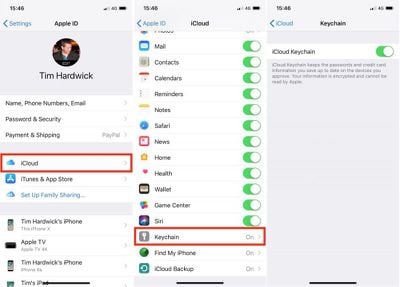
  1. Open the Settings app and tap your Apple ID banner at the top of the Settings menu.
  2. Tap iCloud.
  3. Scroll down the list and select Keychain.
  4. Toggle on the iCloud Keychain switch and enter your Apple ID password if prompted.
icloud keychain 1
If this is the first time you've enabled iCloud Keychain, you'll be asked to create an iCloud Security Code or use your existing device passcode. You'll also need to enter a phone number where you can receive SMS messages for authorization purposes. If you've already enabled iCloud Keychain in the past, you'll be prompted to enter the passcode that was used to set it up previously.

Accessing Your Login Details in iCloud Keychain

With iCloud Keychain enabled, Apple's Autofill feature will fill in your login credentials for you whenever you come across the relevant input fields on a website or in an app. On occasion, you may encounter a login screen that doesn't play nice with Autofill. In such cases, you'll need to copy and paste your username and password manually. Here's how it's done.

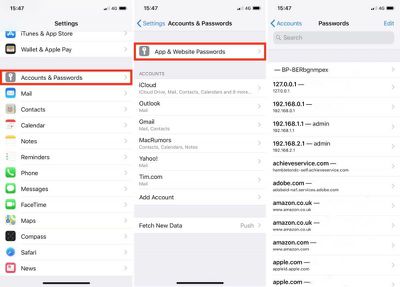
  1. Open the Settings app on your iOS device.
  2. Tap Accounts and Passwords.
  3. Tap App & Website Passwords and use Touch ID if prompted.
  4. Tap the relevant login entry in the list, or using the search field at the top of the Passwords screen, type in the name of the app or website for which you need login credentials.
  5. Long press on the username/password and tap the Copy pop-up option.
  6. Now navigate back to the relevant app or website, long press the username/password input field, and then tap the Paste pop-up option.
icloud keychain 2
Note that you can delete login credentials by tapping Edit at the top right of the Passwords screen. You can also tap a website entry and use the Edit option to change existing username and password fields.

Adding Credit Cards and Personal Information

You can add personal information and credit card information to iCloud Keychain at any time using your iPhone or iPad, after which it will be available across all of your devices. Simply follow these steps:

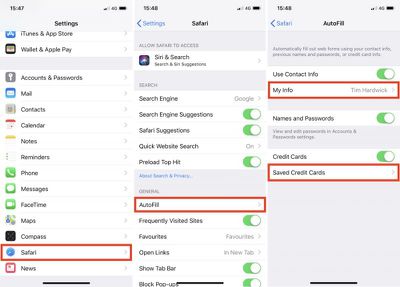
  1. Open the Settings app.
  2. Tap Safari.
  3. Tap AutoFill.
  4. To add personal information, tap My Info and select your contact card from the list of contacts. To add credit card details, tap Saved Credit Cards and then tap Add Credit Card.
icloud keychain 3
The last screen you see here also includes three toggles for selectively disabling/re-enabling AutoFill functions, which can come in handy if someone else is going to be using your iPhone or iPad.


Top Rated Comments

jclo Avatar
105 months ago
HomePod setup and use requires iCloud Keychain to be turned on. I’m gonna assume that’s why it was posted.
Yep, this is why we've posted this and our two-factor authentication how to. HomePod preparation. https://www.geekwebguides.com/how-to/apple-id-two-factor-authentication/
Score: 8 Votes (Like | Disagree)
gim Avatar
105 months ago
iCloud Keychain is awful. I‘ve been using this since release and years later it’s still an unreliable mess. I just had to sign in and out of iCloud on all my devices last weekend because keychain had stopped syncing new passwords, like usual. This has happened every couple of months over the last 4 years for me.
Score: 4 Votes (Like | Disagree)
Macaholic868 Avatar
105 months ago
Sure it’s a slow news day but these kinds of articles are helpful for both newbies and long time casual users / Apple news consumers who may not always be aware of everything their iPhone and the latest iOS release can do.
Score: 4 Votes (Like | Disagree)
DaPizzaMan Avatar
105 months ago
iCloud Keychain is awful. I‘ve been using this since release and years later it’s still an unreliable mess. I just had to sign in and out of iCloud on all my devices last weekend because keychain had stopped syncing new passwords, like usual. This has happened every couple of months over the last 4 years for me.
Never had this issue before.
Score: 3 Votes (Like | Disagree)
newyorksole Avatar
105 months ago
HomePod setup and use requires iCloud Keychain to be turned on. I’m gonna assume that’s why it was posted.
Score: 3 Votes (Like | Disagree)
picaman Avatar
105 months ago
Ugh. 1Password please.
Score: 2 Votes (Like | Disagree)

Popular Stories

maxresdefault

Apple Shows Off a Key Reason to Upgrade to the iPhone 17

Saturday February 7, 2026 9:26 am PST by
Apple today shared an ad that shows how the upgraded Center Stage front camera on the latest iPhones improves the process of taking a group selfie. "Watch how the new front facing camera on iPhone 17 Pro takes group selfies that automatically expand and rotate as more people come into frame," says Apple. While the ad is focused on the iPhone 17 Pro and iPhone 17 Pro Max, the regular iPhone...
Finder Siri Feature

Why Apple's iOS 26.4 Siri Upgrade Will Be Bigger Than Originally Promised

Friday February 6, 2026 3:06 pm PST by
In the iOS 26.4 update that's coming this spring, Apple will introduce a new version of Siri that's going to overhaul how we interact with the personal assistant and what it's able to do. The iOS 26.4 version of Siri won't work like ChatGPT or Claude, but it will rely on large language models (LLMs) and has been updated from the ground up. Upgraded Architecture The next-generation...
wwdc sans text feature

Apple Rumored to Announce New Product on February 19

Thursday February 5, 2026 12:22 pm PST by
Apple plans to announce the iPhone 17e on Thursday, February 19, according to Macwelt, the German equivalent of Macworld. The report, citing industry sources, is available in English on Macworld. Apple announced the iPhone 16e on Wednesday, February 19 last year, so the iPhone 17e would be unveiled exactly one year later if this rumor is accurate. It is quite uncommon for Apple to unveil...
apple wallet drivers license feature iPhone 15 pro

Apple Says These 7 U.S. States Plan to Offer iPhone Driver's Licenses

Monday February 9, 2026 6:24 am PST by
In select U.S. states, residents can add their driver's license or state ID to the Apple Wallet app on the iPhone and Apple Watch, and then use it to display proof of identity or age at select airports and businesses, and in select apps. The feature is currently available in 13 U.S. states and Puerto Rico, and it is expected to launch in at least seven more in the future. To set up the...
14 inch MacBook Pro Keyboard

New MacBook Pros Could Now Arrive in March

Sunday February 8, 2026 6:02 am PST by
New MacBook Pro models with the M5 Pro and M5 Max chips could arrive as soon as Monday, March 2, according to Bloomberg's Mark Gurman. In today's "Power On" newsletter, Gurman said that the release of new MacBook Pro models is tied to the release of macOS Tahoe 26.3. The launch is said to be slated for as early as the week of March 2. He added that the M4 Pro and M4 Max models on sale today...














