How to Learn Which Apps Will Stop Working on Your Mac When 32-Bit Support Ends - MacRumors
Skip to Content

How to Learn Which Apps Will Stop Working on Your Mac When 32-Bit Support Ends

by

Apple has begun the process of phasing out 32-bit applications on Macs, which is why many users who upgraded to macOS 10.13.4 or later will have come across the following warning message the first time they launch certain older apps.
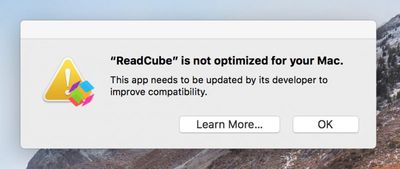
32 bit app warning message mac
This is the first of many warnings Apple plans to provide as it works to put an end to 32-bit apps on the Mac, as it did on iOS devices with the release of iOS 11. Apple has confirmed that macOS 10.14 Mojave, set for public release in the fall, will be the last version of macOS to allow 32-bit apps to run, but it will include more "aggressive" warnings about their use before they are phased out entirely.

In this article, we'll show how you can quickly find out which apps installed on your Mac are 64-bit and which are still living in the 32-bit age. If you don't rely on apps that fall in the latter camp, you can safely uninstall them. However, if you're a frequent user of one of these apps, try contacting the developer to find out if a 64-bit version is in the works. If one isn't planned, try and find an alternative app with similar functionality before the time comes when it refuses to launch.

How to Identify 32-Bit Apps on Your Mac

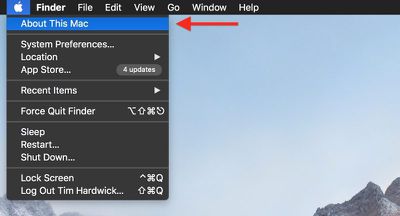
  1. Click the Apple symbol () in the menu bar on your Mac's desktop.
    check for 32 bit mac apps4

  2. Click About This Mac.

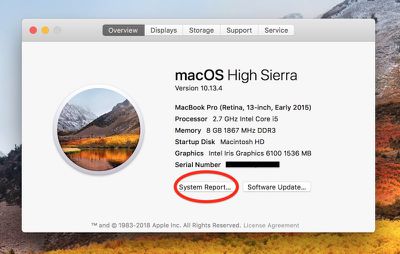
  3. In the macOS Overview pane that appears, click the System Report... button.
    check for 32 bit mac apps1

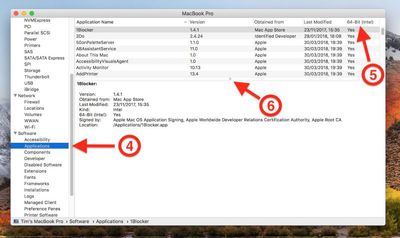
  4. In the information window that appears, scroll down the left column and click Applications under the Software list, then wait a moment while your Mac generates a list of installed apps.

  5. When the list of apps appears, click the 64-Bit (Intel) label to bring any 32-bit apps to the top of the column.

  6. Drag down the divider using the center dot to expand the viewable list of apps.
    check for 32 bit mac apps2

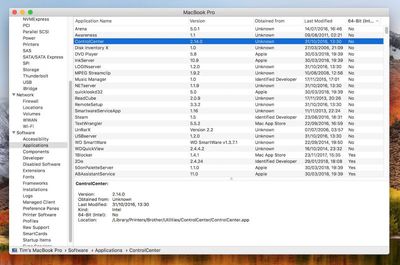
Anything in the list that has a "Yes" under the 64-Bit column is good to go, but there are several in our example listed as "No", which means they're 32-Bit and will stop working in a future version of macOS.
check for 32 bit mac apps3
Some popular apps in the above list, like Steam and Google Music Manager, will likely have 64-bit versions available in good time, but other items – old Brother printer drivers and utilities, for example – may not survive a forthcoming upgrade, and it could be a while before developers issue 64-bit versions of said software (assuming it's even still actively supported), so as our example shows, it pays to plan ahead.


Top Rated Comments

Eidorian Avatar
102 months ago
If your app isn't 64-bit by now, it means the developer abandoned it years ago.

It'll be nice to be 64-bit only. Means slimming down application packages for some.
Some of us still use those abandoned programs.
Score: 9 Votes (Like | Disagree)
Plutonius Avatar
102 months ago
If your app isn't 64-bit by now, it means the developer abandoned it years ago.
Please don't generalize. I have MacOS applications that are updated on regular basis that are not 64 bit. The issue is that some of the GUI libraries (third party) are not 64 bit and will never be updated. This means a lot of work for the application developer and some will not be willing to make their current applications 64 bit (it's not worth it for them).
Score: 6 Votes (Like | Disagree)
OldSchoolMacGuy Avatar
102 months ago
If your app isn't 64-bit by now, it means the developer abandoned it years ago.

It'll be nice to be 64-bit only. Means slimming down application packages for some.
Score: 6 Votes (Like | Disagree)
longofest Avatar
102 months ago
If your app isn't 64-bit by now, it means the developer abandoned it years ago.
Said by someone who is clearly not a developer.
Score: 3 Votes (Like | Disagree)
102 months ago
Soooo... I think that next MacOS version won't have the DVD player anymore o_O


Attachment Image
Score: 3 Votes (Like | Disagree)
monokakata Avatar
102 months ago
Do people really read entire ebooks on their computer? I can't imagine staring at my computer screen that long only reading text. 10 out of 10 times I'd read it on my Kindle instead of the app on my Mac.
If you create Kindles, as I do, you want to be able to complete the process and then have a look at it on the same computer.

I suppose I could ship it off to my iPad and examine it there, but a lot of Kindle (and generic e-book) creation is iterative. I'd have to have to add anything to my workflow.
Score: 2 Votes (Like | Disagree)

Popular Stories

iOS 26

iOS 26.4 Adds Two New Features to CarPlay

Tuesday March 24, 2026 1:55 pm PDT by
iOS 26.4 was released today, and it includes a couple of new features for CarPlay: an Ambient Music widget and support for voice-based chatbot apps. To update your iPhone 11 or newer to iOS 26.4, open the Settings app and tap on General → Software Update. CarPlay will automatically offer the new features so long as the iPhone connected to your vehicle is running iOS 26.4 or later....
Apple Business hero

Apple Unveils 'Apple Business' All-in-One Platform

Tuesday March 24, 2026 8:53 am PDT by
Apple today announced Apple Business, a new all-in-one platform that unifies device management, productivity tools, and customer outreach features. The service is designed to be a consolidated replacement for several of Apple's existing business-focused offerings, including Apple Business Essentials, Apple Business Manager, and Apple Business Connect. It provides organizations with a single...
AirPods Pro Firmware Feature

Apple Releases New Firmware for AirPods Pro 3, AirPods Pro 2 and AirPods 4

Tuesday March 24, 2026 12:31 pm PDT by
Apple today released new firmware for the AirPods Pro 2, AirPods Pro 3, and the AirPods 4. The firmware has a version number of 8B39, up from 8B34 on the AirPods Pro 3, 8B28 on the AirPods Pro 2, and 8B21 on the AirPods 4. There is no word on what's included in the firmware, but Apple has a support document with limited notes. Most updates are limited to bug fixes and performance...