Here's a Simple Parental Lock for Your Apple Watch - MacRumors
Skip to Content

Here's a Simple Parental Lock for Your Apple Watch

by

Anyone who looks after children knows how fascinating an illuminated display is to a baby or toddler. When it's an interactive touchscreen that's strapped to your wrist, the intrigue
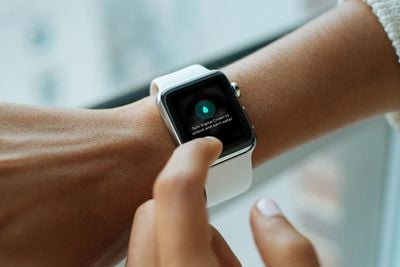
improvised parental lock apple watch
If your Apple Watch has proven a bit too attractive to little fingers and you're worried they'll unintentionally send a message, mess up your notification settings, or worse, here's a quick trick that you can use whenever their interest is piqued.

It only takes a second to perform, and with a little luck, it will make your smartwatch a little less interesting – until they get old enough to figure out how to reverse what you've done!

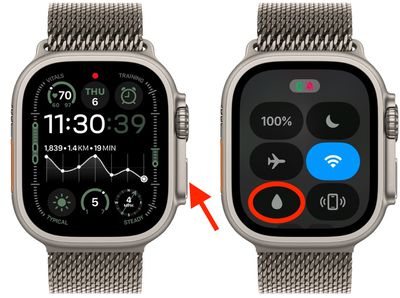
  1. Bring up the Control Center on your ‌Apple Watch by pressing the Side button.
  2. Tap the Water Lock icon (it looks like a water droplet).
    water lock

And that's it! Of course, we're improvising here by using the Water Lock feature, which is intended to be used when you're swimming (it locks the screen so you can swim without water activating it). But it works great as a quick parental lock, too, because your watch remains unresponsive to taps by tots for as long as it's enabled.

It's also easily turned off – if you know how. Simply press and hold the Digital Crown. You'll see an animation on the screen indicating that the speaker is being cleared of water after your "swim." Keep turning it until you hear the beeping tone rise in pitch, and your Apple Watch touchscreen will return to its normal responsive state.
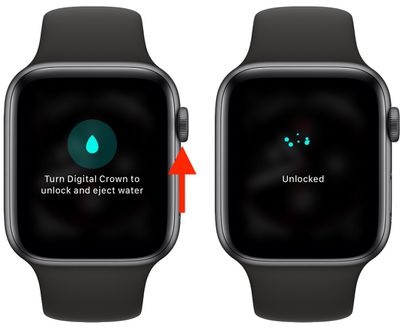
Apple Watch

If your little one got bored and is having a nap, just be sure to disable the Water Lock feature in another room, as it can be a bit noisy.


Popular Stories

iOS 26

iOS 26.4 Adds Two New Features to CarPlay

Tuesday March 24, 2026 1:55 pm PDT by
iOS 26.4 was released today, and it includes a couple of new features for CarPlay: an Ambient Music widget and support for voice-based chatbot apps. To update your iPhone 11 or newer to iOS 26.4, open the Settings app and tap on General → Software Update. CarPlay will automatically offer the new features so long as the iPhone connected to your vehicle is running iOS 26.4 or later....
Apple Business hero

Apple Unveils 'Apple Business' All-in-One Platform

Tuesday March 24, 2026 8:53 am PDT by
Apple today announced Apple Business, a new all-in-one platform that unifies device management, productivity tools, and customer outreach features. The service is designed to be a consolidated replacement for several of Apple's existing business-focused offerings, including Apple Business Essentials, Apple Business Manager, and Apple Business Connect. It provides organizations with a single...
AirPods Pro Firmware Feature

Apple Releases New Firmware for AirPods Pro 3, AirPods Pro 2 and AirPods 4

Tuesday March 24, 2026 12:31 pm PDT by
Apple today released new firmware for the AirPods Pro 2, AirPods Pro 3, and the AirPods 4. The firmware has a version number of 8B39, up from 8B34 on the AirPods Pro 3, 8B28 on the AirPods Pro 2, and 8B21 on the AirPods 4. There is no word on what's included in the firmware, but Apple has a support document with limited notes. Most updates are limited to bug fixes and performance...