

Apple offers its customers a self-service repair program for iPhone, which allows owners of iPhone 12, iPhone 13, and third-generation iPhone SE models to conduct certain repairs at home. This article explains how to initiate your own self-service repair.
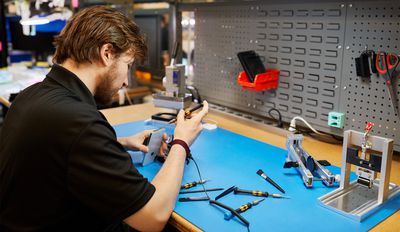
Apple in April 2022 launched a dedicated Self Service Repair program for iPhone that provides the repair manuals, parts, and tools necessary for fixing the display, battery, bottom speaker, camera, display, SIM Tray, and Taptic Engine.
Before Initiating a Self-Service Repair
Below is a list of models that the self-service repair program is available for, with links to Apple's downloadable repair manuals for each model. Be sure to read through the manual for your specific model so that you understand what the service entails before initiating a self-service repair.
- iPhone 12
- iPhone 12 mini
- iPhone 12 Pro
- iPhone 13
- iPhone 13 mini
- iPhone 13 Pro
- iPhone 13 Pro Max
- iPhone SE 3rd-Generation
Note that almost all of the repairs require specialized tools designed by Apple, and they can be obtained through renting one of Apple's repair kits. Repair kits are $49 to rent, but you have to put down a $1200 deposit to ensure you return the repair kit. It's worth remembering that if you have AppleCare+, there is no reason to even consider a self repair because every repair is $99 or under.
If you're comfortable with what's involved in the self-service repair and still want to go ahead with one, follow the steps below. Note that as of writing, Apple's self-service repair program for iPhones is only available to users in the United States, but Apple does have plans to launch the program in Europe later in 2022.
How to Initiate a Self-Service Repair
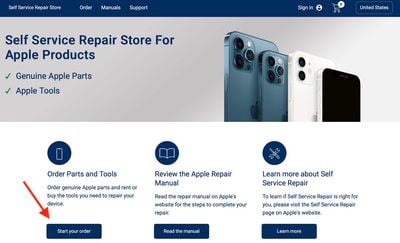
- Open a browser and visit the Self Service Repair Store operated by SPOT.
- Under "Order Parts and Tools," Click Start your order.

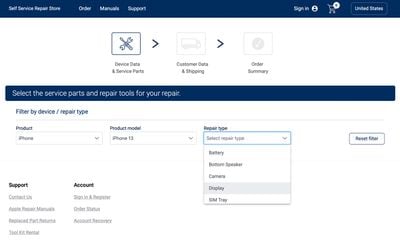
- Using the dropdown lists, select the service parts and repair tools required for your specific repair needs.
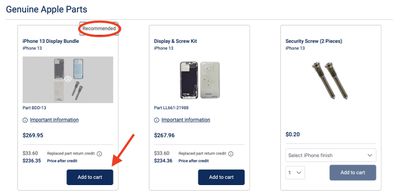
- Select the genuine Apple parts and/or tools that you need for your specific repair by clicking Add to cart. Note the "Recommended" listing for bundle kits. The Self Service Repair Store offers more than 200 parts and tools that can be purchased on a standalone basis.
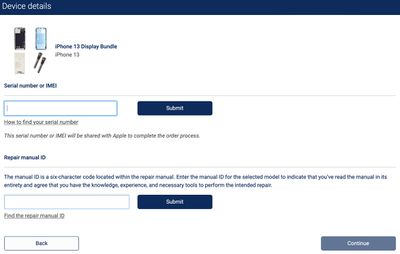
- Enter the device's serial number or IMEI into the first input field, then click Submit. (You can find the serial number or IMEI in Settings -> General -> About. If the device won't turn on, visit http://appleid.apple.com, enter the Apple ID credentials associated with the device, and choose the device from the Devices section to see its serial number or IMEI.)
- Enter the required repair manual ID into the second input field and click Submit. (The manual ID is a six-character code located within the repair manual.)
- Click Continue.
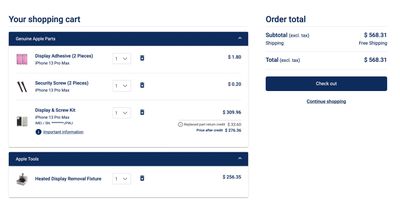
- With the selected items added to your cart, click the shopping cart icon at the top of the page and review your parts before hitting the Checkout button.
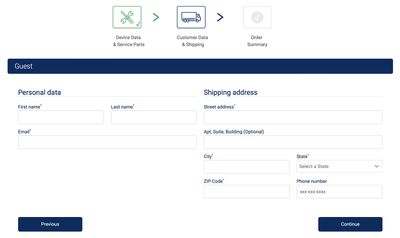
- On the next page, click either Create account or select the Guest tab, enter your personal details and shipping address, then click Continue. (Note that creating an account enables service tracking and minimizes checkout time.)
- Check your order summary on the next page. If everything is good, click Order.
You should receive your parts and/or tools Bear in mind that if you ordered a repair kit, you have seven days with it, after which it must be returned to Apple.
After installing new parts, many repairs require you to initiate the pairing process, known as System Configuration. To do this, you will need to contact the Self Service Repair Store's support team by chat or phone.
After you've completed a repair, the components that you've removed may be able to be sent back to Apple. If that's the case, and Apple is able to use those components, you can get a small discount on the cost of your repair. In the future, Apple plans to expand the Self Service Repair program to additional devices, including Apple silicon Macs.























![Apple Pulls Keynote, Pages and Numbers From App Store [Update: Back]](https://images.macrumors.com/t/Okb7kitB_gNr6qe5Pex9nQIysD8=/112x112/article-new/2026/01/Apple-Creator-Studio-iWork-suite.jpg)





















