
Apple's M1 Macs, which are the first to be powered by an Apple-designed Arm-based chip, are able to run iOS and iPadOS apps because of the common architecture between the different operating systems.


Some iOS developers have been updating their apps to make them compatible with macOS, but there are ways to download apps that haven't been optimized and even apps that developers have prevented from being available on macOS. Watch our YouTube video for instructions, or read through the steps below.

Installing iOS and iPadOS Apps From the Mac App Store

In the Mac App Store, you can download many of the apps you've previously purchased on your iPhone or your iPad.

  1. Open the ‌Mac App Store‌.
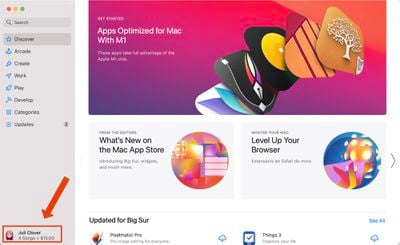
  2. Click on your profile in the bottom left of the app. mac app store profile
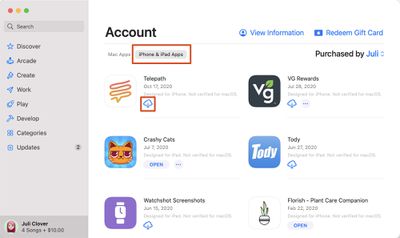
  3. Under account, choose "‌iPhone‌ & ‌iPad‌ Apps."
  4. Next to any app in the list, click on the download button. mac app store iphone ipad apps
  5. The iOS app will be installed like any other Mac app and can be opened up from Launchpad or the Applications folder.
Note that you can also search for ‌iPhone‌ and ‌iPad‌ app names in the ‌Mac App Store‌ and click on the "‌iPhone‌ & ‌iPad‌ Apps" tab under the results list to see apps that were originally designed for iOS devices.
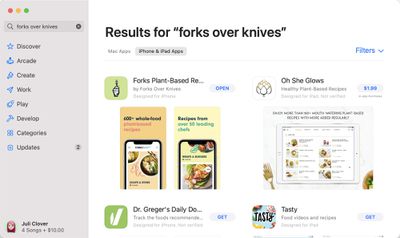
ios apps m1 search results macos
Some of the apps that you see in the ‌Mac App Store‌ are labeled with a warning that says "Not Verified for macOS," which means it is not optimized for use on a Mac.
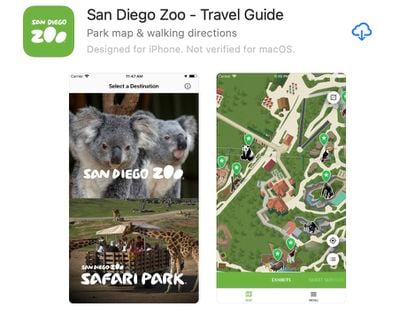
ios app not optimized macos
Other apps that do not have this wording have been checked over by the developer and should work well on an ‌M1‌ Mac, even if the design isn't perfect because it's iOS first and not Mac first.

Installing Apps Not Available Through the Mac App Store

App developers can choose not to make their ‌iPhone‌ and ‌iPad‌ apps available on ‌M1‌ Macs through the ‌Mac App Store‌, and many popular apps like Netflix, Hulu, and others have made this choice. There used to be a workaround for installing these apps using third-party software, but in January 2021, Apple disabled the sideloading of iPhone and iPad apps. The instructions below no longer work, but we've left them available in case Apple's policies change in the future. Here's how sideloading used to work with a third-party app like iMazing, which could be used to download app .ipa files.

  1. Download and launch iMazing.
  2. Plug your ‌iPhone‌ or ‌iPad‌ into your Mac.
  3. Select your device and then choose the Manage Apps feature.
  4. Select Library and then you'll see a list of all the apps that you own.
  5. Right click on an app and choose the Download option to download it to your Library.
  6. Right click on the same app again and then choose the Export .ipa option.
  7. Choose a destination for the export like the Applications folder.
  8. From the Applications folder, click on the app icon to install the app.

Apps installed this way are not optimized for ‌M1‌ Macs and macOS in any way and are designed for touchscreen devices, so expect to run into some bugs and issues when using them. For the most part, iOS apps seem to work well on the Mac even when not optimized.

If you're planning to download and use apps like Hulu and Netflix, be warned that there's no option to put these apps in fullscreen mode to watch content, but there is an option to download content for offline usage just like on an ‌iPhone‌ or ‌iPad‌.

In the future, we'll likely have far more iOS apps that are also designed with Macs in mind, but for now, these options provide ways to access and use your favorite iOS apps on Mac devices.


Top Rated Comments

Apple Knowledge Navigator Avatar
68 months ago
Oh no!
Now Cultured Code can’t charge us $50 for a Mac app (Things) that’s identical to the $10 iOS app!
:eek:
Score: 16 Votes (Like | Disagree)
now i see it Avatar
68 months ago
my fart app seems to be working fine but for some reason my flashlight app doesn't work
Score: 11 Votes (Like | Disagree)
whyamihere Avatar
68 months ago
I miss the good old days of iTunes saving your app files on the Mac automatically during backups. Thanks for removing that functionality, Apple!
Score: 10 Votes (Like | Disagree)
TestUs Avatar
68 months ago
I much prefer using Apple Configurator 2 to iMazing - it's both first party and works very quickly, downloading apps directly from Apple's servers.
Score: 8 Votes (Like | Disagree)
arn Avatar
68 months ago
Free trial worked for me. It did need my Apple ID login, though that made me uncomfortable, but now I have instagram on my Mac


Attachment Image
Score: 8 Votes (Like | Disagree)
rmoliv Avatar
68 months ago

whatsapp still doesn't run. says not supported.
WhatsApp has a Mac app why would you want the iOS version on your computer when you have an optimized app available in the Mac App Store?
Score: 7 Votes (Like | Disagree)

Popular Stories

Apple Logo Zoomed

Tim Cook Teases Plans for Apple's Upcoming 50th Anniversary

Thursday February 5, 2026 12:54 pm PST by
Apple turns 50 this year, and its CEO Tim Cook has promised to celebrate the milestone. The big day falls on April 1, 2026. "I've been unusually reflective lately about Apple because we have been working on what do we do to mark this moment," Cook told employees today, according to Bloomberg's Mark Gurman. "When you really stop and pause and think about the last 50 years, it makes your heart ...
wwdc sans text feature

Apple Rumored to Announce New Product on February 19

Thursday February 5, 2026 12:22 pm PST by
Apple plans to announce the iPhone 17e on Thursday, February 19, according to Macwelt, the German equivalent of Macworld. The report, citing industry sources, is available in English on Macworld. Apple announced the iPhone 16e on Wednesday, February 19 last year, so the iPhone 17e would be unveiled exactly one year later if this rumor is accurate. It is quite uncommon for Apple to unveil...
Finder Siri Feature

Why Apple's iOS 26.4 Siri Upgrade Will Be Bigger Than Originally Promised

Friday February 6, 2026 3:06 pm PST by
In the iOS 26.4 update that's coming this spring, Apple will introduce a new version of Siri that's going to overhaul how we interact with the personal assistant and what it's able to do. The iOS 26.4 version of Siri won't work like ChatGPT or Claude, but it will rely on large language models (LLMs) and has been updated from the ground up. Upgraded Architecture The next-generation...
maxresdefault

Apple Shows Off a Key Reason to Upgrade to the iPhone 17

Saturday February 7, 2026 9:26 am PST by
Apple today shared an ad that shows how the upgraded Center Stage front camera on the latest iPhones improves the process of taking a group selfie. "Watch how the new front facing camera on iPhone 17 Pro takes group selfies that automatically expand and rotate as more people come into frame," says Apple. While the ad is focused on the iPhone 17 Pro and iPhone 17 Pro Max, the regular iPhone...
iOS 26

iOS 26.3 and iOS 26.4 Will Add These New Features to Your iPhone

Tuesday February 3, 2026 7:47 am PST by
While the iOS 26.3 Release Candidate is now available ahead of a public release, the first iOS 26.4 beta is likely still at least a week away. Following beta testing, iOS 26.4 will likely be released to the general public in March or April. Below, we have recapped known or rumored iOS 26.3 and iOS 26.4 features so far. iOS 26.3 iPhone to Android Transfer Tool iOS 26.3 makes it easier...














