
How to Install iPhone or iPad Apps on an M1 Mac - GeekWebGuides
Skip to Content

How to Install iPhone or iPad Apps on an M1 Mac

by

Apple's M1 Macs, which are the first to be powered by an Apple-designed Arm-based chip, are able to run iOS and iPadOS apps because of the common architecture between the different operating systems.
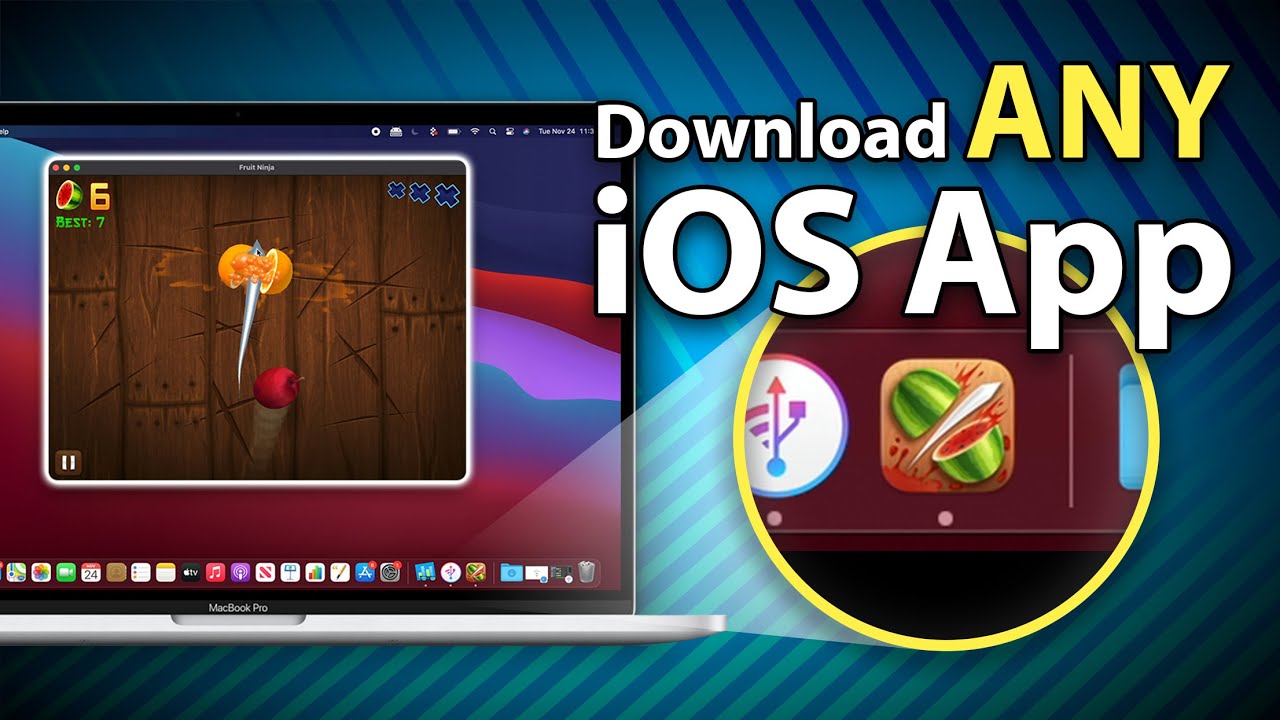

Some iOS developers have been updating their apps to make them compatible with macOS, but there are ways to download apps that haven't been optimized and even apps that developers have prevented from being available on macOS. Watch our YouTube video for instructions, or read through the steps below.

Installing iOS and iPadOS Apps From the Mac App Store

In the Mac App Store, you can download many of the apps you've previously purchased on your iPhone or your iPad.

  1. Open the ‌Mac App Store‌.
  2. Click on your profile in the bottom left of the app. mac app store profile
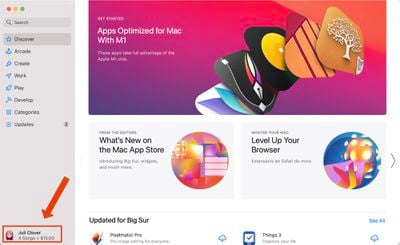
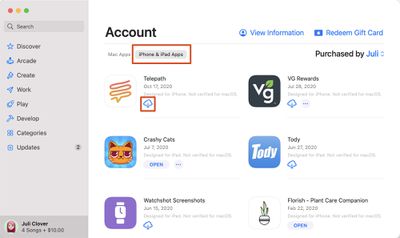
  3. Under account, choose "iPhone & ‌iPad‌ Apps."
  4. Next to any app in the list, click on the download button. mac app store iphone ipad apps
  5. The iOS app will be installed like any other Mac app and can be opened up from Launchpad or the Applications folder.
Note that you can also search for iPhone and ‌iPad‌ app names in the ‌Mac App Store‌ and click on the "iPhone & ‌iPad‌ Apps" tab under the results list to see apps that were originally designed for iOS devices.
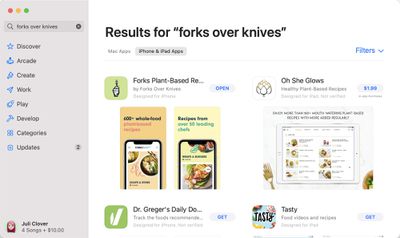
ios apps m1 search results macos
Some of the apps that you see in the ‌Mac App Store‌ are labeled with a warning that says "Not Verified for macOS," which means it is not optimized for use on a Mac.

ios app not optimized macos
Other apps that do not have this wording have been checked over by the developer and should work well on an ‌M1‌ Mac, even if the design isn't perfect because it's iOS first and not Mac first.

Installing Apps Not Available Through the Mac App Store

App developers can choose not to make their iPhone and ‌iPad‌ apps available on ‌M1‌ Macs through the ‌Mac App Store‌, and many popular apps like Netflix, Hulu, and others have made this choice. There used to be a workaround for installing these apps using third-party software, but in January 2021, Apple disabled the sideloading of iPhone and iPad apps. The instructions below no longer work, but we've left them available in case Apple's policies change in the future. Here's how sideloading used to work with a third-party app like iMazing, which could be used to download app .ipa files.

  1. Download and launch iMazing.
  2. Plug your iPhone or ‌iPad‌ into your Mac.
  3. Select your device and then choose the Manage Apps feature.
  4. Select Library and then you'll see a list of all the apps that you own.
  5. Right click on an app and choose the Download option to download it to your Library.
  6. Right click on the same app again and then choose the Export .ipa option.
  7. Choose a destination for the export like the Applications folder.
  8. From the Applications folder, click on the app icon to install the app.

Apps installed this way are not optimized for ‌M1‌ Macs and macOS in any way and are designed for touchscreen devices, so expect to run into some bugs and issues when using them. For the most part, iOS apps seem to work well on the Mac even when not optimized.

If you're planning to download and use apps like Hulu and Netflix, be warned that there's no option to put these apps in fullscreen mode to watch content, but there is an option to download content for offline usage just like on an iPhone or ‌iPad‌.

In the future, we'll likely have far more iOS apps that are also designed with Macs in mind, but for now, these options provide ways to access and use your favorite iOS apps on Mac devices.


Top Rated Comments

Apple Knowledge Navigator Avatar
77 months ago
Oh no!
Now Cultured Code can’t charge us $50 for a Mac app (Things) that’s identical to the $10 iOS app!
:eek:
Score: 16 Votes (Like | Disagree)
77 months ago
my fart app seems to be working fine but for some reason my flashlight app doesn't work
Score: 11 Votes (Like | Disagree)
whyamihere Avatar
77 months ago
I miss the good old days of iTunes saving your app files on the Mac automatically during backups. Thanks for removing that functionality, Apple!

Score: 10 Votes (Like | Disagree)
77 months ago
I much prefer using Apple Configurator 2 to iMazing - it's both first party and works very quickly, downloading apps directly from Apple's servers.

Score: 8 Votes (Like | Disagree)
arn Avatar
77 months ago
Free trial worked for me. It did need my Apple ID login, though that made me uncomfortable, but now I have instagram on my Mac


Attachment Image
Score: 8 Votes (Like | Disagree)
77 months ago

whatsapp still doesn't run. says not supported.
WhatsApp has a Mac app why would you want the iOS version on your computer when you have an optimized app available in the Mac App Store?
Score: 7 Votes (Like | Disagree)

Popular Stories

skyrim

Skyrim Comes to Apple Silicon Macs With New Unofficial Installer

Tuesday October 20, 2026 7:56 pm PDT by
Bethesda's beloved role-playing game "The Elder Scrolls V: Skyrim" has reached multiple generations of consoles since its 2011 debut, but it never officially came to the Mac. A new unofficial project called SkyrimMT now aims to make playing and modding it on Apple silicon Macs easier than ever. Mac owners have found ways to play Skyrim over the years, including installing Windows through...
M5 MacBook Pro

RIP, MacBook Ultra

Monday October 19, 2026 9:37 am PDT by
Apple today sent out invites for an experience in Los Angeles on Wednesday, October 28, and the "Pro and tell" tagline on the invitation likely means that the rumored MacBook models with touch-enabled OLED displays will stick with MacBook Pro branding instead of the once-rumored "MacBook Ultra" name. The long-rumored "iPhone Ultra" ended up being named iPhone Duo, so speculation that Apple...
iPhone Duo Trio

Here's What Apple's Apps Look Like on the iPhone Duo

Tuesday October 20, 2026 11:12 am PDT by
With just three days to go until the iPhone Duo is released, Apple is getting ready for the launch. Behind the scenes, the App Store now has screenshots of Apple's built-in apps running on the Duo. We've seen some apps in marketing materials, but images of the ones we haven't seen give us an idea of what it will be like using the iPhone Duo day to day. Many apps are shown in landscape...
Latest Stories
Apple Pulls Keynote, Pages and Numbers From App Store
21 minutes ago
Apple Updates More Apps With iPhone Duo Support
51 minutes ago
Apple Will Label Apps 'Made for iPhone Duo' in App Store
4 hours ago
Amazon Takes $49 Off iPad With Prices Starting at $399.99
4 hours ago
F1 on Apple TV Now Available in Dolby Atmos
5 hours ago
Apple Reveals More Than 50 Apps That Will Be Updated for iPhone Duo
5 hours ago
Apple Blocks Certificates That Could Help Attackers Fake Websites
7 hours ago
Giant iPhone Duo Installations Spotted at Apple Fifth Avenue
7 hours ago
iPhone Duo 2 Prototypes Include Under-Display Face ID
8 hours ago
Tesla App Gains iPad and iPhone Duo Support
12 hours ago
Apple Reportedly Boosts iPhone Duo Orders by 44%
12 hours ago
Fortnite Returning to Australian App Store After Court Ruling
12 hours ago
Apple Ordered to Open iPhone to Rival App Stores in Australia
13 hours ago
Apple Suppliers Face Hurdles Cutting Circuit Board Emissions
13 hours ago
Things Updated for iPhone Duo With Adaptive Layout
14 hours ago
Simplicity and Siri AI Are HomeView's Killer Features, Apple Says
14 hours ago
iPhone Duo Reviewers Really Miss Face ID
19 hours ago
Does the iPhone Duo Run Hot? Here's What Reviews Found
20 hours ago
Apple Music's New Look is Now Live on Apple's Website
21 hours ago
Anthropic Launches Claude Duet, a Proactive AI Agent
22 hours ago
What 32,000 Folds Did to the iPhone Duo's Hinge
22 hours ago
iPhone Duo's Hidden FaceTime Camera Takes 'Trash' Photos
1 day ago
iPhone Duo Has 'Edge Light' Feature That Debuted on Macs Last Year
1 day ago
Apple Support App Updated for iPhone Duo's Larger Display
1 day ago
Amazon Sweetens the Deal on Entry-Level 16-Inch MacBook Pro With $570 Off
1 day ago
iPhone Duo Tips Over on MagSafe Stands When Unfolded
1 day ago
Apple Music's New Look Officially Announced
1 day ago
iPhone Duo Supports Apple Pencil Starting With iOS 27.2
1 day ago
iPhone Duo Accessories Roundup: Cases and Screen Protectors From OtterBox, ZAGG, and More
1 day ago
Apple Stores Will Have 'Limited' Availability of iPhone Duo for Walk-In Customers
1 day ago









































