

After promising to release iOS and iPadOS 15 to the public in July, Apple today seeded new iOS and iPadOS 15 beta updates to its public beta testing group, giving them the opportunity to try out the new software ahead of its fall launch.
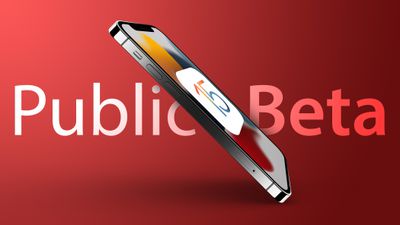
Signing up to get the iOS and iPadOS 15 beta is super easy, and can be done by enrolling an iPhone or iPad in Apple's free Apple Beta Software Program. Instructions are below.
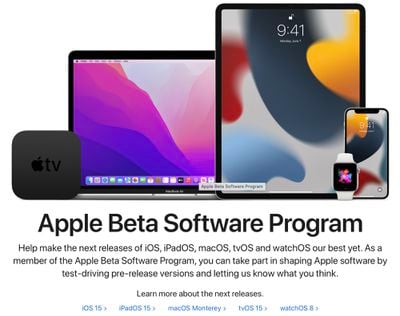
- On your iOS device, open up Safari and navigate to the Apple Beta Software Program website.
- Tap the Sign up button and enter your Apple ID credentials, or sign in with your Apple ID if you've signed up to beta test a previous update.
- Agree to the Apple Beta Software Program terms and conditions if required.
- After signing in, you'll see a main screen that's a Guide for Public Betas. Click on iOS (or iPadOS if you're installing on an iPad).
- Read through Apple's instructions carefully, and then using the link in the "Get Started" section, select "enroll your iOS device."
- Make sure to make an archived backup of your current version of iOS using Finder by following Apple's instructions or using our tutorial below. This will allow you to downgrade back to iOS 14 if necessary and is crucial if you don't enjoy the iOS 15 testing experience.
- Scroll down and tap on the "Download profile" button.
- When you see a popup that says the website is trying to download a configuration profile, tap on "Allow."
- Open up the Settings app on your iOS device and then tap on the "Profile Downloaded" section that's located right below your Apple ID information.
- In the upper right corner of the screen, tap on "Install."
- Enter your passcode and then tap "Install" again. If you have a prior beta profile installed, you may need to remove it at this point under General > Profile and redo the above steps. Otherwise, agree to the consent text and tap "Install" a third time.
- Tap Done.
- Your phone will prompt you to restart. From there, go back to the main Settings screen.
- Under "General," choose "Software Update" and then "Download and Install."
- Once the beta update has been downloaded you can tap on "Install Now" to get it set up, and from there, the iPhone will install the software, restart, and you'll be up and running with the iOS 15 software.
Compatibility
iOS 15 is compatible with all iPhones able to run iOS 14, so if you have iOS 14 installed, you can run iOS 15.
- All iPhone 12 models
- All iPhone 11 Models
- iPhone XS and XS Max
- iPhone XR
- iPhone X
- iPhone 8 and iPhone 8 Plus
- iPhone 7 and 7 Plus
- iPhone SE
- iPhone 6s and 6s Plus
- iPod touch (7th-generation)
iPadOS 15 is compatible with the iPads that are listed below.
- All iPad Pro models
- iPad Air 2, 3, and 4
- iPad 5, 6, 7, and 8
- iPad mini 4 and 5
How to Make an Archived Backup
As mentioned in our tutorial for installing the public beta, it's essential to make an archived backup of your device if you want to be able to downgrade to a version of iOS 14. Once you upgrade to iOS 15, an iOS 15 backup cannot be restored to the iOS 14 software, which is why you need to make a backup beforehand. Here's how on macOS Big Sur:
- Plug your iPhone, iPad, or iPod touch into your Mac using the supplied cable.
- Open a Finder window by clicking the Finder icon in the Dock.
- Click your iOS device's name in the sidebar.

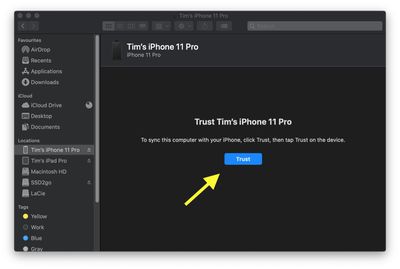
- If this is the first time connecting your device to your Mac, click Trust in the Finder window.
- Tap Trust on your device when prompted, then enter your passcode to confirm.
- In the General tab, click the circle next to where it says Back up all of the data on your [iPhone/iPad/iPod touch] to this Mac.
- If you don't want to create an encrypted backup, or you've already set up encrypted backups, click Back Up Now at the bottom of the General tab.
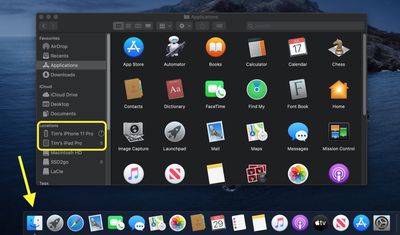
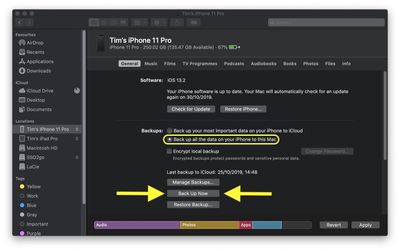
When the backup is finished, you can find the date and time of the last backup in the General tab, just above the Manage Backups button.
iOS 15 Features
iOS 15 is a huge update with tons of new features to explore. There's a Focus mode that helps you stay on task and cut down on distraction, SharePlay features for watching movies with friends over FaceTime, new Privacy settings, and ID card support for the Wallet app, text recognition in images, and new features for apps like Safari, Maps, Weather, and Notes. We have a full overview of everything new in iOS 15 in our iOS 15 roundup, and if you're installing iPadOS, we have a roundup for iPadOS 15 too.
Some of the iOS 15 features are not yet functional and won't be implemented until later in the beta testing period, which is something to be aware of. iOS and iPadOS 15 will be in beta testing for several months as Apple refines and updates the software ahead of its fall release.





















Top Rated Comments
1. DON’T