
As part of its digital health initiative in iOS 12, Apple has introduced some improvements to the way app notifications can be managed, enabling users to more easily reduce the number of daily distractions their iPhone or iPad throws their way.

One of these new features is called Instant Tuning, which allows you to quickly adjust the future behavior of app notifications whenever they appear in the Lock Screen or the Notifications Center. Here's how to make the most of it.

How to Use Instant Tuning in iOS 12

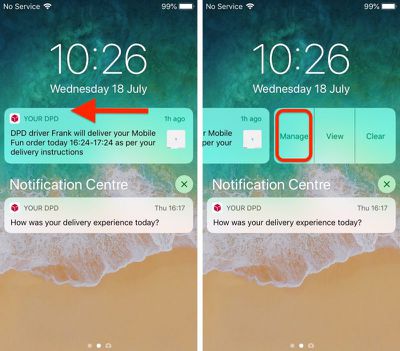
Next time an alert appears in your device's Notifications Center or on the Lock Screen, swipe left on it, then tap Manage. Alternatively, if your device supports 3D Touch, hard press on the alert and then tap the three dots in the upper right corner of the expanded notification.
ios 12 notifications instant tuning 1
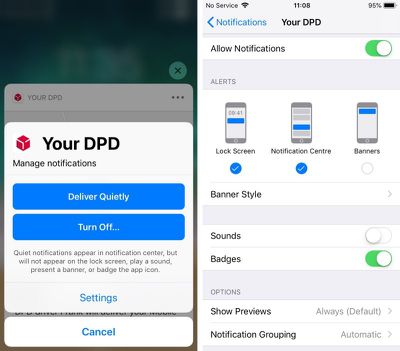
A Manage Notifications pop-up will appear on the screen featuring two blue button options. Deliver Quietly ensures future alerts from this app only appear in the Notification Center (accessed by swiping down from the top of your device's screen).

Note that selecting this option means alerts will no longer show in the Lock Screen and you won't see any banner notifications on any other screens. Deliver Quietly also turns off any sound or vibration alerts set for the associated app.

If you tap Deliver Quietly and then decide you'd rather not stick with the setting, open the Manage Notifications pop-up again in the same way and tap the Deliver Prominently button to reinstate the previous settings.
ios 12 fine tuning notifications 2
The second option, Turn Off..., completely disables all notifications for the related app. Tap this button and you will be prompted to confirm it's what you want.

Below the two large blue buttons is a less prominent Settings button that takes you to the individual app's various notification options, usually accessed via the main Settings app.

From here you can adjust where alerts should appear (if at all), enable or disable sounds and badges, select alert preview options (Always, When Unlocked, Never) and choose how notifications should be grouped (Automatic, By App, Off).


Related Forum: iOS 12

Top Rated Comments

mdelvecchio Avatar
99 months ago
Why on earth would you want quiet notifications?

The only difference between quiet notifications and no notifications is that quiet notifications adds them to a hidden app with no proper UI. The only time I ever open notification center is if I saw a banner that I was reading that hid itself too quickly. Without having it appear on the lock screen or as a banner, I'd never even know to open notification center to look for anything.
Is it really so hard to imagine? There are plenty of things that I'd like to know about but are not time sensitive and therefore do not wish to bother me with a chime or alert.
Score: 6 Votes (Like | Disagree)
jonnysods Avatar
99 months ago
I'm wondering when they are going to redesign iOS. Look at the DPD buttons. Two blue, two plain at the bottom. So much text. Sometimes it strikes me as odd.
Score: 5 Votes (Like | Disagree)
Mr Lizard Avatar
99 months ago
Why on earth would you want quiet notifications?

The only difference between quiet notifications and no notifications is that quiet notifications adds them to a hidden app with no proper UI. The only time I ever open notification center is if I saw a banner that I was reading that hid itself too quickly. Without having it appear on the lock screen or as a banner, I'd never even know to open notification center to look for anything.
Surprise! Different people use their phones in different ways.

I’m loving this feature in the beta. I’ve changed most of my notifications to Deliver Quietly. I’m definately less distracted as a result, and when I want to catch up on what I’ve missed I just swipe down to reveal Notification Center and everything is there in one place. I can then either tap to open the relevant app or just dismiss the notifications if they’re not worthy of my time.
Score: 3 Votes (Like | Disagree)
JohnnyW2K1 Avatar
99 months ago
Nifty feature. Agree about the redesign. I’ve never liked the look of Jony Ive’s iOS, although it’s improved as time has passed.
Score: 3 Votes (Like | Disagree)
ignatius345 Avatar
99 months ago
Yes, I get that you don't want to be bombarded with banners and sounds. In that case, you set the app to only display the badge on its icon, which Quiet Notifications disables.

With the badge, you know how many notifications you have waiting for you in the app, plus that little reminder that the app exists and has useful data. And then you launch it and it has a nice UI for showing you whatever it has.

With Notification Center, you don't know what's in there until you open it. You have no reminders that it exists or that it needs to be checked. And should you open it, the UI is garbage. Checking your email from a command line has a better UI than Notification Center.
So... don't use Quiet Notifications. Problem solved. I myself will probably for some things, but you are definitely not being forced to.
Score: 3 Votes (Like | Disagree)
NetMage Avatar
99 months ago
The only time I ever open notification center is if I saw a banner that I was reading that hid itself too quickly. Without having it appear on the lock screen or as a banner, I'd never even know to open notification center to look for anything.
A reasonable assumption would be that if a rational person enabled Quiet Notifications for some Apps, they would periodically open Notification Center at a time of their choice when convenient to check for those Notifications, much like I periodically open email to check for mail since I have push/timed pull disabled (or else I would get non-stop email notices).
Score: 1 Votes (Like | Disagree)

Popular Stories

Apple Logo Zoomed

Tim Cook Teases Plans for Apple's Upcoming 50th Anniversary

Thursday February 5, 2026 12:54 pm PST by
Apple turns 50 this year, and its CEO Tim Cook has promised to celebrate the milestone. The big day falls on April 1, 2026. "I've been unusually reflective lately about Apple because we have been working on what do we do to mark this moment," Cook told employees today, according to Bloomberg's Mark Gurman. "When you really stop and pause and think about the last 50 years, it makes your heart ...
wwdc sans text feature

Apple Rumored to Announce New Product on February 19

Thursday February 5, 2026 12:22 pm PST by
Apple plans to announce the iPhone 17e on Thursday, February 19, according to Macwelt, the German equivalent of Macworld. The report, citing industry sources, is available in English on Macworld. Apple announced the iPhone 16e on Wednesday, February 19 last year, so the iPhone 17e would be unveiled exactly one year later if this rumor is accurate. It is quite uncommon for Apple to unveil...
Finder Siri Feature

Why Apple's iOS 26.4 Siri Upgrade Will Be Bigger Than Originally Promised

Friday February 6, 2026 3:06 pm PST by
In the iOS 26.4 update that's coming this spring, Apple will introduce a new version of Siri that's going to overhaul how we interact with the personal assistant and what it's able to do. The iOS 26.4 version of Siri won't work like ChatGPT or Claude, but it will rely on large language models (LLMs) and has been updated from the ground up. Upgraded Architecture The next-generation...
iOS 26

iOS 26.3 and iOS 26.4 Will Add These New Features to Your iPhone

Tuesday February 3, 2026 7:47 am PST by
While the iOS 26.3 Release Candidate is now available ahead of a public release, the first iOS 26.4 beta is likely still at least a week away. Following beta testing, iOS 26.4 will likely be released to the general public in March or April. Below, we have recapped known or rumored iOS 26.3 and iOS 26.4 features so far. iOS 26.3 iPhone to Android Transfer Tool iOS 26.3 makes it easier...
iphone 17 pro dark blue 1

iPhone 18 Pro Max Rumored to Deliver Next-Level Battery Life

Friday February 6, 2026 5:14 am PST by
The iPhone 18 Pro Max will feature a bigger battery for continued best-in-class battery life, according to a known Weibo leaker. Citing supply chain information, the Weibo user known as "Digital Chat Station" said that the iPhone 18 Pro Max will have a battery capacity of 5,100 to 5,200 mAh. Combined with the efficiency improvements of the A20 Pro chip, made with TSMC's 2nm process, the...















