
In iOS and iPadOS, Apple includes a feature in Notes that allows you to quickly scan all kinds of documents so you can keep track of everything from receipts to recipes and photos.
iOS 17 General Notes Feature
The Document Scanner detects the edges of a document, aligns things properly, and removes all glare and tilt so you get a clean scan every time. Apple's document scanning tools are well engineered and impressive, with excellent performance on everything from photos to documents.

The feature is available on both iPhone and iPad. Here's how to use it:

  1. Open the Notes app and create a new note.
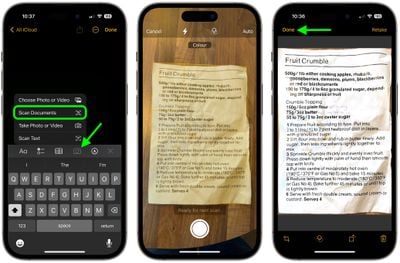
  2. Tap the Camera icon, then choose Scan Documents.
  3. Once the document scanning interface is open, you can optionally tap the three circles at the top to choose color, grayscale, black and white, or photo for your scan. The default option is color.
  4. Tap on the flash icon if you need to adjust the flash options. The default is auto, which will cause the flash to go off if you're in a room with low light.
  5. Focus the camera on your document, making sure the yellow box is lined up with the edges of your document.
  6. When it's aligned, press on the camera button to snap a photo. The Notes app will automatically correct for any tilting. If you don't press the camera button and the Auto shutter option is on, after a few moments the document will be automatically scanned.
  7. If the scan is to your liking, tap Done. If you want to try again, choose Retake.
notes

The Document Scanner is set up to take multiple scans in a row, so once you tap "Keep Scan," it returns to the scanning interface. To get back to Notes after you've scanned all of your documents, you'll need to tap on "Save."

Your scanned document is inserted into the current note, where it can be edited. To edit, simply tap on the scan. Editing tools include adding an additional scan, cropping, changing the color, changing the orientation, and opening up the Share sheet to send it to Messages, Mail, social networks, and other apps.


Tag: Notes

Top Rated Comments

hank moody Avatar
109 months ago
I love it but it LACKS “save as pdf”.
I am still using Scanbot because i need this.
Score: 10 Votes (Like | Disagree)
AstroRob Avatar
109 months ago
I love it but it LACKS “save as pdf”.
I am still using Scanbot because i need this.
Actually if you hit the share option when you click on the scanned doc, one of the option is to make PDF, which I assume also lets you combine multiple pages from a single scan session.
Score: 5 Votes (Like | Disagree)
gwhizkids Avatar
109 months ago
It does a great job, especially at an angle. I wish, though, that this were a standalone capability. Don't want to create (and then delete) a note, just to get a scanned document. Relatively minor nit, but a nit, nonetheless.
Score: 4 Votes (Like | Disagree)
iapplelove Avatar
109 months ago
Forgive me cause I’m slow lol but what’s the difference between this and taking a photo?
Score: 3 Votes (Like | Disagree)
Weaselboy Avatar
109 months ago
Really? Scanner Pro is still way better. the scan itself is darker and easier to read, it scans text (OCR) automatically so it is easily searchable and it saves as .pdf in any location you want.
I agree. I just used Notes to do a couple tests and Scanner Pro gets a PDF scanned and in my ~/Documents folder with fewer steps.

I think using Notes for this will be okay for the occasional user who does not have something like Scanner Pro, but Scanner Pro seems more streamlined for this purpose.
Score: 3 Votes (Like | Disagree)
phamilyphriend Avatar
109 months ago
Where do you store your notes? I think you need to use iCloud or similar. Exchange or similar do not have these options.

I like the scanning, and it is surprisingly crisp even in poor conditions. Now some kind of OCR possibility would be even greater.
Thank you! I was using notes in yahoo and not iCloud. Now it works!
[doublepost=1506106995][/doublepost]
I had this problem when they updated it to RTF. I think I had to turn on iCloud notes. I could be wrong though. I can’t remember how I got it to work. I checked my settings to see if there was something obvious. I didn’t see it.

Should look like this.
Thank you! It works with iCloud notes and not with Yahoo.
Score: 2 Votes (Like | Disagree)

Popular Stories

Apple Logo Zoomed

Tim Cook Teases Plans for Apple's Upcoming 50th Anniversary

Thursday February 5, 2026 12:54 pm PST by
Apple turns 50 this year, and its CEO Tim Cook has promised to celebrate the milestone. The big day falls on April 1, 2026. "I've been unusually reflective lately about Apple because we have been working on what do we do to mark this moment," Cook told employees today, according to Bloomberg's Mark Gurman. "When you really stop and pause and think about the last 50 years, it makes your heart ...
Finder Siri Feature

Why Apple's iOS 26.4 Siri Upgrade Will Be Bigger Than Originally Promised

Friday February 6, 2026 3:06 pm PST by
In the iOS 26.4 update that's coming this spring, Apple will introduce a new version of Siri that's going to overhaul how we interact with the personal assistant and what it's able to do. The iOS 26.4 version of Siri won't work like ChatGPT or Claude, but it will rely on large language models (LLMs) and has been updated from the ground up. Upgraded Architecture The next-generation...
wwdc sans text feature

Apple Rumored to Announce New Product on February 19

Thursday February 5, 2026 12:22 pm PST by
Apple plans to announce the iPhone 17e on Thursday, February 19, according to Macwelt, the German equivalent of Macworld. The report, citing industry sources, is available in English on Macworld. Apple announced the iPhone 16e on Wednesday, February 19 last year, so the iPhone 17e would be unveiled exactly one year later if this rumor is accurate. It is quite uncommon for Apple to unveil...
iOS 26

iOS 26.3 and iOS 26.4 Will Add These New Features to Your iPhone

Tuesday February 3, 2026 7:47 am PST by
While the iOS 26.3 Release Candidate is now available ahead of a public release, the first iOS 26.4 beta is likely still at least a week away. Following beta testing, iOS 26.4 will likely be released to the general public in March or April. Below, we have recapped known or rumored iOS 26.3 and iOS 26.4 features so far. iOS 26.3 iPhone to Android Transfer Tool iOS 26.3 makes it easier...
iphone 17 pro dark blue 1

iPhone 18 Pro Max Rumored to Deliver Next-Level Battery Life

Friday February 6, 2026 5:14 am PST by
The iPhone 18 Pro Max will feature a bigger battery for continued best-in-class battery life, according to a known Weibo leaker. Citing supply chain information, the Weibo user known as "Digital Chat Station" said that the iPhone 18 Pro Max will have a battery capacity of 5,100 to 5,200 mAh. Combined with the efficiency improvements of the A20 Pro chip, made with TSMC's 2nm process, the...















