Play Ambient Background Sounds on iPhone to Stay Focused - MacRumors
Skip to Content

Play Ambient Background Sounds on iPhone to Stay Focused

by

On iPhone and iPad, one of several accessibility features that Apple includes is Background Sounds. The sounds are designed to help you stay focused, stay calm, and help you minimize distractions while you are busy with something.
Background Sounds Water Feature
The Background Sounds on offer include balanced, bright, and dark noise, as well as natural sounds like ocean, rain, and stream. All of the sounds can be set to play in the background to mask unwanted environmental or external noise, and the sounds mix into or duck under other audio and system sounds.

Enabling Background Sounds on iPhone and iPad

The following steps explain how to enable Background Sounds on iPhones and iPads running iOS 15/iPadOS 15 and later.

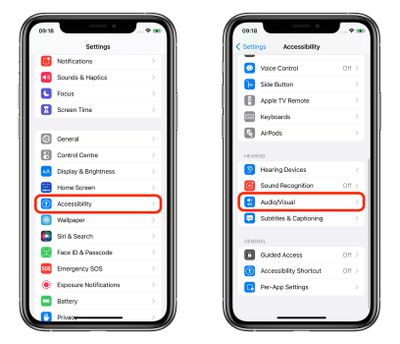
  1. Launch the Settings app on your iPhone or ‌iPad‌.
  2. Tap Accessibility.
  3. Under "Hearing," tap Audio/Visual.
    settings

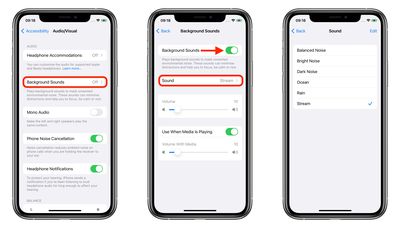
  4. Tap Background Sounds.
  5. Tap the switch to turn on Background Sounds.
  6. Tap Sound to choose a sound effect.
  7. Choose from Balanced Noise, Bright Noise, Dark Noise, Ocean, Rain, and Stream.
    settings

Your device will need to download individual sound effects when you play them for the first time, so make sure you have an internet connection, but after that you can play the background sound whether or not you're online.

Control Center Access

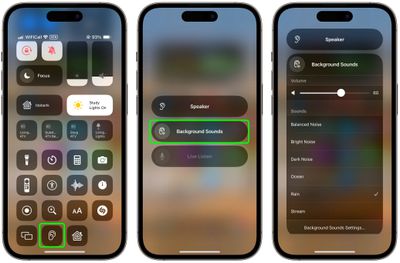
Once you have downloaded the background sounds, you can get fast access them from the Control Center. To do this, you need to have the Hearing item added to Control Center (go to Settings -> Control Center and add Hearing to the included list), then follow these steps.

  1. Open Control Center by dragging down diagonally from the top-right of your device's screen.
  2. Tap the Hearing button, then choose Background Sounds.
  3. Tap the Background Sounds button to start playing.
  4. Tap the name of the current sound to view other sounds, then tap a sound name to listen to a preview. After you choose a sound, tap Background Sounds to go back.
  5. Tap the background to go back to Control Center.
control center

Background sounds are also available on Macs running macOS Ventura or later. Check out our dedicated how-to article for all the details.


Top Rated Comments

62 months ago
It’s actually much simpler to access if you add the ‘Hearing’ shortcut to Control Center. From there, you can access it from within any app.

Attachment Image
Score: 20 Votes (Like | Disagree)
62 months ago
I'm pretty sure it's under Accessibility for a good reason.


I don’t see the point in it
Then you can count yourself lucky. Not everybody can say of themselves that they do not need the Accessibility settings. To be honest, I find your comment a bit tone deaf.
Score: 17 Votes (Like | Disagree)
62 months ago


In iOS 15 and iPadOS 15, one of several new accessibility features that Apple has introduced is Background Sounds, which is designed to minimize distractions and help you stay focused, stay calm, and minimize distractions with the help of your iPhone or iPad.
You're definitely going to need this feature when you see the pricing for the new iPhones in September.
Score: 14 Votes (Like | Disagree)
iDento Avatar
62 months ago
I like this, but I don’t see as an accessibility feature. Dark noise helps me sleep.
Score: 12 Votes (Like | Disagree)
62 months ago

I like this, but I don’t see as an accessibility feature. Dark noise helps me sleep.
filing under Accessibility is odd
Score: 9 Votes (Like | Disagree)
Apple_Robert Avatar
62 months ago
MR is one big daily distraction. :P
Score: 9 Votes (Like | Disagree)

Popular Stories

iOS 26

iOS 26.4 Adds Two New Features to CarPlay

Tuesday March 24, 2026 1:55 pm PDT by
iOS 26.4 was released today, and it includes a couple of new features for CarPlay: an Ambient Music widget and support for voice-based chatbot apps. To update your iPhone 11 or newer to iOS 26.4, open the Settings app and tap on General → Software Update. CarPlay will automatically offer the new features so long as the iPhone connected to your vehicle is running iOS 26.4 or later....
Apple Business hero

Apple Unveils 'Apple Business' All-in-One Platform

Tuesday March 24, 2026 8:53 am PDT by
Apple today announced Apple Business, a new all-in-one platform that unifies device management, productivity tools, and customer outreach features. The service is designed to be a consolidated replacement for several of Apple's existing business-focused offerings, including Apple Business Essentials, Apple Business Manager, and Apple Business Connect. It provides organizations with a single...
AirPods Pro Firmware Feature

Apple Releases New Firmware for AirPods Pro 3, AirPods Pro 2 and AirPods 4

Tuesday March 24, 2026 12:31 pm PDT by
Apple today released new firmware for the AirPods Pro 2, AirPods Pro 3, and the AirPods 4. The firmware has a version number of 8B39, up from 8B34 on the AirPods Pro 3, 8B28 on the AirPods Pro 2, and 8B21 on the AirPods 4. There is no word on what's included in the firmware, but Apple has a support document with limited notes. Most updates are limited to bug fixes and performance...