
Apple in iOS 17 has introduced a handy new camera feature that helps to straighten up your shooting angle before you even hit the shutter. Running the iOS 17 beta? Then keep reading to learn how to take advantage of the new Level option.
iPhone 14 Pro Rear Camera
For a while now, Apple's Camera app has included a few optional settings that can help you line up your shots. There's a Grid that can be overlaid on the viewfinder to help apply the rule of thirds, and a somewhat-hidden leveling feature for top-down photos that displays a floating crosshair to help you line up your subject properly.

With iOS 17, Apple has further enhanced the camera leveling functionality by separating it out from the Grid mode. By making it an individual option, Apple has also included an additional horizontal level for more traditional straight-on photos.

ios 17 camera level no
Turning the Level option on will pop up a broken horizontal line on the screen when your iPhone senses you're lining up for a straight-on shot and you tilt your device slightly out of horizontal. The line appears white while your phone is out of level and then turns yellow once you achieve a level orientation to indicate success.

ios 17 camera level

How to Enable the Camera Level

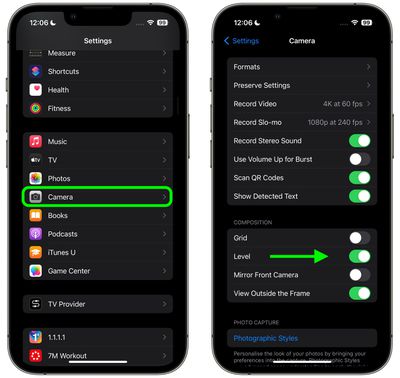
The new Level option is off by default if you don't have Grid mode enabled. You can turn it on manually by following these steps.

  1. Open the Settings app on your ‌iPhone‌.
  2. Scroll down and select Camera.
  3. Under the "Composition" section, toggle on the switch next to Level.
settings

Now open the Camera app and try shooting a subject at a straight angle, and you should see the broken horizontal lines in the center of the viewfinder. Straighten your angle up to connect the lines and make a single yellow line.

The leveling pop-up only appears briefly and only within a narrow range of angles close to horizontal (in either portrait or landscape orientation), so it won't intrusively pop up when you're intentionally trying to take a photo at an angle.


Related Forums: iOS 17, iPadOS 17

Top Rated Comments

Solomani Avatar
34 months ago
I like it, and will likely use the feature once I update to iOS 17. However... according to article, the feature is toggled/enabled in the iPhone Camera Settings section.

IMHO, it could be better if they let us toggle it ON/OFF within the camera app itself.
Score: 4 Votes (Like | Disagree)
yaxomoxay Avatar
34 months ago

I don't have the level tick box in my camera settings app. am I missing something? 14 pro max latest iOS
Do you have iOS17 beta?
Score: 2 Votes (Like | Disagree)
svish Avatar
34 months ago
Good article. Useful feature of camera app.
Score: 2 Votes (Like | Disagree)
Solomani Avatar
34 months ago

I'm not sure. Seems to me the vast majority of typical users would not use this if it existed, or even understand the point of it. And lots of people would accidentally turn it on, then start complaining to Support that their camera "has these weird lines all over the picture."

Burying it in Settings probably stops millions of Apple Support and cluttering Apple Store visits from happening.

ETA: I could even see myself accidentally turning it on and being perplexed.
OK that's fair enough.

Although.... to put into perspective, I too personally find several "features" within the camera app as clutter, things I would never use, things that get me thinking "What the hell is this? And why is it there for me to accidentally press toggle ON? Do pro photographers even use this? Or is this something for the Snapchat kids? All I wanna do is shoot right away (spontaneous shot, not a second to waste)...and these things just get in the way."


So yes, I do get your point. One man's "necessary feature" is another man's clutter.

I guess we leave it to Apple to decide (based on their research?) as to which features are absolutely necessary for the majority of users, so that it gets to be available within the camera app itself.
Score: 2 Votes (Like | Disagree)
BigJohno Avatar
34 months ago
I don't have the level tick box in my camera settings app. am I missing something? 14 pro max latest iOS
Score: 1 Votes (Like | Disagree)
SoldOnApple Avatar
34 months ago
Or Apple could just up the resolution of the camera and let us crop/straighten it in post, perhaps even automatically offering straightened suggestion. People rag on super high resolution cameras, but they help a lot for things like this, and offer a lot of effective digital zoom. Needing to frame your photos perfectly because you only have 12MP camera takes longer than quickly cropping a 48MP photo later. Like if you need a photo of a sandwich to send to a graphic designer for your cafe, it is handier being able to take the photo at a distance and crop it way down while still having a high resolution enough image of the sandwich itself to use for your Facebook ad or menu flyer or whatever.
Score: 1 Votes (Like | Disagree)

Popular Stories

Apple Logo Zoomed

Tim Cook Teases Plans for Apple's Upcoming 50th Anniversary

Thursday February 5, 2026 12:54 pm PST by
Apple turns 50 this year, and its CEO Tim Cook has promised to celebrate the milestone. The big day falls on April 1, 2026. "I've been unusually reflective lately about Apple because we have been working on what do we do to mark this moment," Cook told employees today, according to Bloomberg's Mark Gurman. "When you really stop and pause and think about the last 50 years, it makes your heart ...
iOS 26

iOS 26.3 and iOS 26.4 Will Add These New Features to Your iPhone

Tuesday February 3, 2026 7:47 am PST by
While the iOS 26.3 Release Candidate is now available ahead of a public release, the first iOS 26.4 beta is likely still at least a week away. Following beta testing, iOS 26.4 will likely be released to the general public in March or April. Below, we have recapped known or rumored iOS 26.3 and iOS 26.4 features so far. iOS 26.3 iPhone to Android Transfer Tool iOS 26.3 makes it easier...
imac video apple feature

Apple Makes Its Second-Biggest Acquisition Ever

Tuesday February 3, 2026 12:45 pm PST by
Apple recently acquired Israeli startup Q.ai for close to $2 billion, according to Financial Times sources. That would make this Apple's second-biggest acquisition ever, after it paid $3 billion for the popular headphone maker Beats in 2014. This is also the largest known Apple acquisition since the company purchased Intel's smartphone modem business and patents for $1 billion in 2019....
wwdc sans text feature

Apple Rumored to Announce New Product on February 19

Thursday February 5, 2026 12:22 pm PST by
Apple plans to announce the iPhone 17e on Thursday, February 19, according to Macwelt, the German equivalent of Macworld. The report, citing industry sources, is available in English on Macworld. Apple announced the iPhone 16e on Wednesday, February 19 last year, so the iPhone 17e would be unveiled exactly one year later if this rumor is accurate. It is quite uncommon for Apple to unveil...
Finder Siri Feature

Why Apple's iOS 26.4 Siri Upgrade Will Be Bigger Than Originally Promised

Friday February 6, 2026 3:06 pm PST by
In the iOS 26.4 update that's coming this spring, Apple will introduce a new version of Siri that's going to overhaul how we interact with the personal assistant and what it's able to do. The iOS 26.4 version of Siri won't work like ChatGPT or Claude, but it will rely on large language models (LLMs) and has been updated from the ground up. Upgraded Architecture The next-generation...















