
Make Your iPhone Display Flash for Alerts - MacRumors
Skip to Content

Make Your iPhone Display Flash for Alerts

by

Unlike some Android phones, iPhones don't have a dedicated notification LED that lights up when you get a call, text, or other alert. What iPhones do include is an optional Accessibility feature for the deaf and hard of hearing that blinks the rear camera flash and provides a visual cue for incoming notifications. And in iOS 26.2, Apple has added the ability to flash the front display, too.
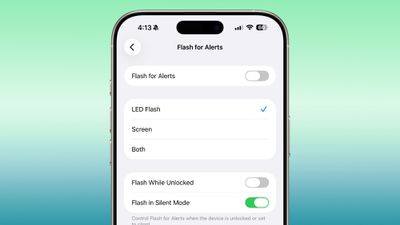
ios 26 2 flash alert
Even if your hearing is fine, having a visual cue for incoming alerts can be handy to have if, say, you're in a quiet environment like a library and don't want to create a disturbance. What's more, in iOS 26.2, you can choose for both the display and the camera LED to flash. That way, you'll see the alert flash whichever way your iPhone is lying on a table.

How to Enable Flash for Alerts

Follow the steps below to turn on screen flash for alerts on your ‌iPhone‌ running iOS 26.2.

  1. Open the Settings app on your iPhone, then tap Accessibility.
  2. Under "Hearing," tap Audio & Visual.
  3. Scroll to the bottom and tap Flash for Alerts.
  4. Toggle on Flash for Alerts, then tap LED Flash, Screen, or Both.

You'll see that the last menu includes toggle switches so that you can control whether the flash happens when your device is unlocked, as well as if it should flash when in silent mode.


Top Rated Comments

turbineseaplane Avatar
14 weeks ago

If it is in my pocket and I have AirPods, can I have it whisper in Siri's voice that I have a message?
(Siri, whispering in a very low volume)

"pssst..."
"you there?"
"here's what I found for you on the web"
Score: 5 Votes (Like | Disagree)
krspkbl Avatar
14 weeks ago
no thanks.

people who have their camera flash every time they get a message are so annoying.

if you're disabled i get it but c'mon. can't wait to see how it takes before their entire phone, front and back, starts lighting up to let everyone in the room know they got a message.
Score: 5 Votes (Like | Disagree)
14 weeks ago
Flashing the camera flash for alerts has been there since iPhone 4 by the way.


no thanks.

people who have their camera flash every time they get a message are so annoying.

if you're disabled i get it but c'mon. can't wait to see how it takes before their entire phone, front and back, starts lighting up to let everyone in the room know they got a message.
This is one aspect of certain Android phones that I like: a small subtle notification LED in the front.
Score: 3 Votes (Like | Disagree)
14 weeks ago

Feels like vibrate is still a better option than this. Wouldn't it be easier to feel or see a vibration?
Feeling the vibration, yes. Seeing it, no. I'm not Deaf and I won't speak in their place, but a vibrating phone (that is not in the pocket) will not be noticeable. You won't always be attached to the desk where it's vibrating, so you won't always feel the phone.

A lot of Deaf people will probably appreciate this as an enhancement to quality of life. They'll probably be able to notice notifications more easily, especially if their device is at a distance. ... If I'm understanding it correctly, anyway.
Score: 2 Votes (Like | Disagree)
14 weeks ago
Sure. Not for every one. But I like it.
Score: 2 Votes (Like | Disagree)
14 weeks ago
The last thing I need in my life is even more alerts, tweets, beeps, chimes, rings, reminders, or “flashing screens.”
Score: 2 Votes (Like | Disagree)

Popular Stories

iOS 26

iOS 26.4 Adds Two New Features to CarPlay

Tuesday March 24, 2026 1:55 pm PDT by
iOS 26.4 was released today, and it includes a couple of new features for CarPlay: an Ambient Music widget and support for voice-based chatbot apps. To update your iPhone 11 or newer to iOS 26.4, open the Settings app and tap on General → Software Update. CarPlay will automatically offer the new features so long as the iPhone connected to your vehicle is running iOS 26.4 or later....
Apple Business hero

Apple Unveils 'Apple Business' All-in-One Platform

Tuesday March 24, 2026 8:53 am PDT by
Apple today announced Apple Business, a new all-in-one platform that unifies device management, productivity tools, and customer outreach features. The service is designed to be a consolidated replacement for several of Apple's existing business-focused offerings, including Apple Business Essentials, Apple Business Manager, and Apple Business Connect. It provides organizations with a single...
AirPods Pro Firmware Feature

Apple Releases New Firmware for AirPods Pro 3, AirPods Pro 2 and AirPods 4

Tuesday March 24, 2026 12:31 pm PDT by
Apple today released new firmware for the AirPods Pro 2, AirPods Pro 3, and the AirPods 4. The firmware has a version number of 8B39, up from 8B34 on the AirPods Pro 3, 8B28 on the AirPods Pro 2, and 8B21 on the AirPods 4. There is no word on what's included in the firmware, but Apple has a support document with limited notes. Most updates are limited to bug fixes and performance...















