
iOS 26: Make Your iPhone Wait on Hold for You - MacRumors
Skip to Content

iOS 26: Make Your iPhone Wait on Hold for You

by

If you make a call and are placed on hold, a new feature in ‌iOS 26‌ will do the waiting for you so you can do other things. Hold Assist listens for hold music playing, and then alerts you when a person comes on the line so you can pick up the call.
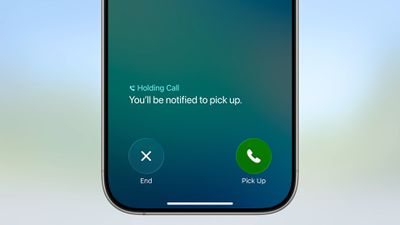
iOS 26 Hold Assist
Hold Assist is available on any iPhone that supports iOS 26 (i.e. it's not an Apple Intelligence feature). The feature works automatically on demand – there are no settings to toggle and no setup required. Still, there are a few things worth knowing. Here's what to expect when the time comes to use it.

Enabling Hold Assist on a Call

When you're placed on hold during a phone call, Hold Assist will launch automatically after 10 to 15 seconds. You'll know about it when a notification appears on your screen asking "Hold this Call?" Tap the Hold button to activate Hold Assist, or tap the X to dismiss the notification and stay on the line yourself.

hold assist button ios

While Hold Assist Is Active

Once you tap Hold, you'll return to your iPhone's Home screen. A notification will appear briefly, confirming that you're on hold and that you'll be alerted when it's time to pick up the call.

You can continue with whatever else you were doing on your iPhone, and the call will continue in the background. On iPhones with a Dynamic Island, you'll see this as a Live Activity. On other models, the time in the upper left corner appears in a green bubble, which is also what you see when you exit the Phone app during calls.

When Hold Assist detects that a live person has answered, you'll receive a notification. Simply tap it to return to the call.
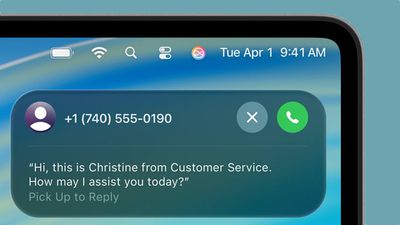
macos tahoe hold assist

Hold Assist displays on macOS Tahoe, too.

Note that Hold Assist works by detecting hold music, so it may struggle with voice-based automated messages or music with distinct lyrics. You'll see a transcript of any spoken words, so this should help you know when an actual person is on the line.

Manually Activating Hold Assist

If you initially dismissed the Hold Assist notification and now want to activate it, you can do so manually. During an active call where you're on hold, simply tap the More button (three dots), then tap Hold Assist from the menu.


Top Rated Comments

NightFox Avatar
24 weeks ago
I get that it shows a transcript, but I'd imagine that on a long-hold there'd be that many "Your call is important to us, please continue to hold" messages that I'd start ignoring them, and/or when somebody did finally pick-up I'd be too slow to respond and they'd terminate the call.
Score: 14 Votes (Like | Disagree)
24 weeks ago
It was useless when I used it the other day. It rang me every 2 minutes whenever a voice told me which number I was in line.
Score: 10 Votes (Like | Disagree)
Rachid Vàzquez Avatar
24 weeks ago

Note that Hold Assist works by detecting hold music, so it may struggle with voice-based automated messages or music with distinct lyrics. You'll see a transcript of any spoken words, so this should help you know when an actual person is on the line.
That’s precisely why the feature is unusable. I strongly recommend everyone avoid using it, it’s extremely frustrating...
Score: 8 Votes (Like | Disagree)
lazygolfer666 Avatar
24 weeks ago
Tried the other day in the UK.. it was useful for around 27 min.. as soon as someone replied the screen got frozen and I wouldn't be able to pick up the call! 🤣
Score: 5 Votes (Like | Disagree)
24 weeks ago

I get that it shows a transcript, but I'd imagine that on a long-hold there'd be that many "Your call is important to us, please continue to hold" messages that I'd start ignoring them, and/or when somebody did finally pick-up I'd be too slow to respond and they'd terminate the call.
This is what I worry about. When you spend 45 minutes on hold (sadly, not uncommon in these days of "unusually high call volume" lol), the very last thing you want to do is accidentally miss the operator.
Score: 4 Votes (Like | Disagree)
24 weeks ago
The one time I tried it, I lost the call on hold. I guess maybe the rep came on line and no one was there so they hung up. FAILURE!
Score: 4 Votes (Like | Disagree)

Popular Stories

iOS 26

iOS 26.4 Adds Two New Features to CarPlay

Tuesday March 24, 2026 1:55 pm PDT by
iOS 26.4 was released today, and it includes a couple of new features for CarPlay: an Ambient Music widget and support for voice-based chatbot apps. To update your iPhone 11 or newer to iOS 26.4, open the Settings app and tap on General → Software Update. CarPlay will automatically offer the new features so long as the iPhone connected to your vehicle is running iOS 26.4 or later....
Apple Business hero

Apple Unveils 'Apple Business' All-in-One Platform

Tuesday March 24, 2026 8:53 am PDT by
Apple today announced Apple Business, a new all-in-one platform that unifies device management, productivity tools, and customer outreach features. The service is designed to be a consolidated replacement for several of Apple's existing business-focused offerings, including Apple Business Essentials, Apple Business Manager, and Apple Business Connect. It provides organizations with a single...
AirPods Pro Firmware Feature

Apple Releases New Firmware for AirPods Pro 3, AirPods Pro 2 and AirPods 4

Tuesday March 24, 2026 12:31 pm PDT by
Apple today released new firmware for the AirPods Pro 2, AirPods Pro 3, and the AirPods 4. The firmware has a version number of 8B39, up from 8B34 on the AirPods Pro 3, 8B28 on the AirPods Pro 2, and 8B21 on the AirPods 4. There is no word on what's included in the firmware, but Apple has a support document with limited notes. Most updates are limited to bug fixes and performance...















