In iOS 26, Apple's Live Translation feature can turn your iPhone into a real-time interpreter during phone calls. Whether you're talking business with international clients or chatting with family abroad, the Phone app can now handle translation automatically (with a few exceptions).
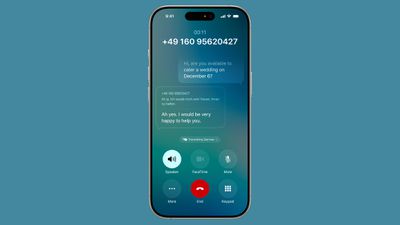
As of writing, Live Translation in the Phone app works with one-to-one phone calls and supports English (UK and US), French (France), German, Portuguese (Brazil), and Spanish (Spain). The feature requires Apple Intelligence, so you'll need an iPhone 15 Pro or later running iOS 26.
Enable Apple Intelligence
Before using Live Translation, make sure Apple Intelligence is enabled on your iPhone:
- Open the Settings app and tap Apple Intelligence & Siri.
- Toggle on Apple Intelligence.
Using Live Translation in a Call
When you're on a phone call, activating Live Translation takes just a few taps, though keep in mind that language downloads happen the first time you select each language pair, so having a Wi-Fi connection for initial setup is recommended.
- During your call, tap the More button (three dots).
- Tap Live Translation.
- Select your From and To languages.
- Tap Start Translation.

Your iPhone will now provide spoken translations in both directions. You'll hear what the other person says translated into your language, and they'll hear your words translated into theirs. A "Translating [language]" indicator will appear at the bottom of your screen while the feature is active.
Stopping Translation
To end Live Translation while staying on your call:
- Tap Translating [language] at the bottom of the translation window.
- Tap Stop Translation.
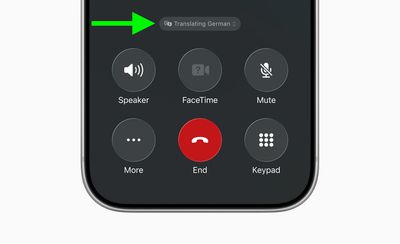
This will return your call to normal without disconnecting.
Things to Know
Live Translation processes speech locally on your iPhone using Apple Intelligence's generative models, so translation quality can vary. In that sense, it's worth checking important information for accuracy.
Also, if you're using mobile data instead of Wi-Fi, be aware that downloading language packs and using the feature may incur network charges depending on your carrier plan.
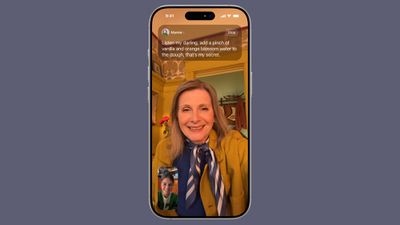
In iOS 26, Apple's Live Translation feature is also available in Messages and FaceTime, meaning you can communicate across languages whether you're texting, talking, or video calling.