
iOS 26: Turn Photos Into 3D Spatial Scenes - MacRumors
Skip to Content

iOS 26: Turn Photos Into 3D Spatial Scenes

by

In iOS 26, Apple's Spatial Scenes feature can transform ordinary photos into dynamic, three-dimensional pictures that respond to your movements. By adding depth and subtle motion to flat images, this clever AI-powered feature can bring to life photos in your iPhone's library – and your iPhone doesn't need Apple Intelligence to make use of it.
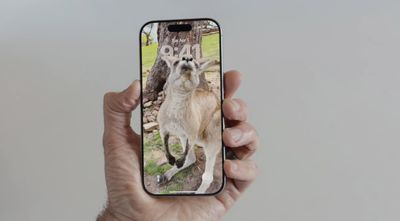
spatial scenes 1

Spatial Scenes in the Photos App

Spatial Scenes works by intelligently separating subjects from backgrounds in your photos. When you move your iPhone, the foreground elements stay relatively stable while background elements shift slightly. This creates a parallax effect that mimics how your eyes naturally perceive depth.

The feature works using generative AI that analyzes your photos to identify different elements and create depth maps. Importantly, it doesn't require Apple Intelligence to function, meaning Spatial Scenes works on iPhone 12 and newer models.
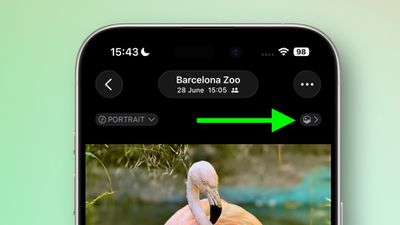
photos ios spatial scene
Unlike spatial photos captured using iPhone 16 models, Spatial Scenes works with virtually any existing photo that has a clear subject. Open any compatible image in the Photos app and look for a small hexagon icon in the upper right corner. Tap this icon, and your photo instantly gains the depth effect.

Once enabled, gently move your phone back and forth to see the spatial effect in action. The movement doesn't need to be dramatic – small tilts and shifts are enough to reveal the added depth.

Lock Screen Spatial Scenes

spatial scenes lock screen
It's not just the Photos app where Spatial Scenes can be experienced. Your iPhone's Lock Screen wallpaper can have that same engaging depth whenever you glance at the screen.

When you're browsing Lock Screen wallpaper options, iOS automatically suggests photos from your library that are compatible with the feature. And if you manually select a Lock Screen photo that supports Spatial Scenes, you'll see a toggle on the customization screen that lets you enable or disable the effect.
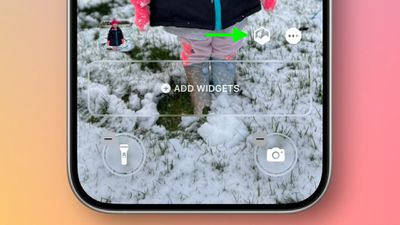
spatial scenes lock screen customize
Apple is in the final testing phase for iOS 26, and is expected to roll out a general release in the coming weeks.


Top Rated Comments

cnnyy20p Avatar
7 months ago
Very fun feature indeed!
Will the new iPhone come with 3D display? 👀

Attachment Image
Score: 11 Votes (Like | Disagree)
Apple Mac Daz Avatar
7 months ago
Dumb you can’t save them
Score: 8 Votes (Like | Disagree)
7 months ago
As useful as the beer drinking app on the OG iPhone.
Score: 7 Votes (Like | Disagree)
7 months ago
It sounds really dumb…. Until you use it. It’s utterly pointless but a lot of fun to play around with. With the right images and a good mix of framing it looks amazing.

Once you’ve done it a few times you find yourself actively considering how an image might in spatial before you take it
Score: 6 Votes (Like | Disagree)
DrJR Avatar
7 months ago
This is a totally underrated feature IMO. It is one of those “nod yes and smile meme” moments…. Tasteful, delicious and totally Apple thing to do.
Score: 6 Votes (Like | Disagree)
slippery-pete Avatar
7 months ago

If that was what so many people were taking pictures of, it wouldn't be narcissistic. But alas, that is not the case. Taking pictures of yourself, your dinner, taking videos of yourself, etc. to post on social media is the reason why so many people care about camera quality anymore. I'm not sure it is possible for me to rewrite my OP to make it make more sense than it already does. Like I said before, what a sad state of affairs.
That is your opinion "But alas, that is not the case", but that is far from factual. People take photos of many things, not just selfies to post online. That is where, whatever point you are trying to make, gets lost. It's clear, you don't like people taking and posting selfies on social media.


You realize that 93% of all photos taken worldwide are taken by smartphones?? Majority of them are not selfies?
Score: 5 Votes (Like | Disagree)

Popular Stories

iOS 26

iOS 26.4 Adds Two New Features to CarPlay

Tuesday March 24, 2026 1:55 pm PDT by
iOS 26.4 was released today, and it includes a couple of new features for CarPlay: an Ambient Music widget and support for voice-based chatbot apps. To update your iPhone 11 or newer to iOS 26.4, open the Settings app and tap on General → Software Update. CarPlay will automatically offer the new features so long as the iPhone connected to your vehicle is running iOS 26.4 or later....
Apple Business hero

Apple Unveils 'Apple Business' All-in-One Platform

Tuesday March 24, 2026 8:53 am PDT by
Apple today announced Apple Business, a new all-in-one platform that unifies device management, productivity tools, and customer outreach features. The service is designed to be a consolidated replacement for several of Apple's existing business-focused offerings, including Apple Business Essentials, Apple Business Manager, and Apple Business Connect. It provides organizations with a single...
AirPods Pro Firmware Feature

Apple Releases New Firmware for AirPods Pro 3, AirPods Pro 2 and AirPods 4

Tuesday March 24, 2026 12:31 pm PDT by
Apple today released new firmware for the AirPods Pro 2, AirPods Pro 3, and the AirPods 4. The firmware has a version number of 8B39, up from 8B34 on the AirPods Pro 3, 8B28 on the AirPods Pro 2, and 8B21 on the AirPods 4. There is no word on what's included in the firmware, but Apple has a support document with limited notes. Most updates are limited to bug fixes and performance...















