iOS 18: Use the Controls Gallery to Customize Control Center - MacRumors
Skip to Content

iOS 18: Use the Controls Gallery to Customize Control Center

by

There's a completely overhauled Control Center in iOS 18 and iPadOS 18 that lets users customize the interface in ways never possible before. You can reorder, resize, and remove buttons, but in this article we are going to focus on what the new Controls Gallery adds to the UI.
ios 18 control center gallery
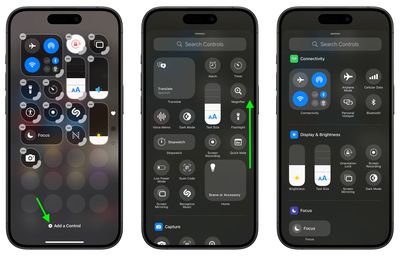
Control Center buttons are now organized into a scrollable gallery that can be accessed from the Control Center interface, allowing you to add the buttons that are most useful to you. Here's how to get to the Control Center gallery in iOS 18:

  1. Swipe down from the top-right corner of your ‌iPhone‌ or ‌iPad‌ screen to open Control Center.
  2. Long press on the display or use the "+" button to enter editing mode. Tap "Add a Control" at the bottom of the screen.
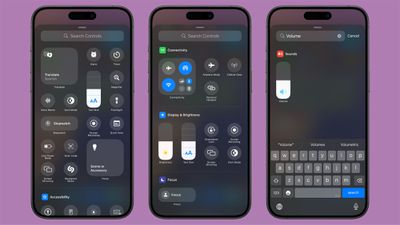
  3. To search for something specific, type a word or phrase into the input field at the top. Alternatively, drag upwards to see the options organized into categories.
  4. Tap the control to add it.

control center

At the top of the gallery are suggested common buttons, but if you scroll down you will see several categories for the Control Center, which are as follows:

  • Capture
  • Clock
  • Connectivity
  • Display & Brightness
  • Focus
  • Home
  • Notes
  • Now Playing
  • Remote
  • Shortcuts
  • Sounds
  • Translate
  • Utilities
  • Voice Memos
  • Wallet
  • Watch
  • Accessibility
  • Hearing Accessibility
  • Motor Accessibility
  • Vision Accessibility

In ‌iOS 18‌ and iPadOS 18, the Control Center also lets you set up multiple screens for your controls. Click the link for all the information in our dedicated how-to series.


Popular Stories

imac video apple feature

Apple Released Yet Another New Product Today

Friday March 20, 2026 2:39 pm PDT by
Apple has unveiled a whopping nine new products so far this March, including an iPhone 17e, iPad Air models with the M4 chip, MacBook Air models with the M5 chip, MacBook Pro models with M5 Pro and M5 Max chips, the all-new MacBook Neo, an updated Studio Display, a higher-end Studio Display XDR, AirPods Max 2, and now the Nike Powerbeats Pro 2. iPhone 17e features the same overall design as...
iOS 26

iOS 26.4 Adds Two New Features to CarPlay

Tuesday March 24, 2026 1:55 pm PDT by
iOS 26.4 was released today, and it includes a couple of new features for CarPlay: an Ambient Music widget and support for voice-based chatbot apps. To update your iPhone 11 or newer to iOS 26.4, open the Settings app and tap on General → Software Update. CarPlay will automatically offer the new features so long as the iPhone connected to your vehicle is running iOS 26.4 or later....
HomePod mini and Apple TV Sage

New Apple TV and HomePod Mini Remain 'Ready' to Launch

Sunday March 22, 2026 6:33 am PDT by
Apple has unveiled nine new products this month, but the wait continues for the next-generation Apple TV 4K and HomePod mini models. In his Power On newsletter today, Bloomberg's Mark Gurman said new versions of the Apple TV and HomePod mini have been "ready" since last year, but he reiterated that Apple has held off on releasing them until the more personalized version of Siri and other...