
Apple's iOS 18 brings a significant redesign to the Photos app, introducing a unified Library View that consolidates all sections into a single, scrollable interface. While this new layout aims to streamline navigation, you may want to tailor it to your preferences. Here's how you can customize and reorder collections in the new Photos app.
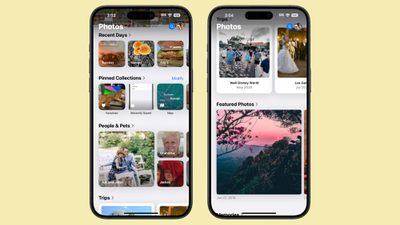
ios 18 photos app collections

Understanding Collections in Photos

In iOS 18, everything outside the main photo grid in the Photos app is considered a "Collection." These include:

  • Recent Days: Chronological view of your latest photos, similar to the previous iOS 17 Days view. Tap to see your entire library sorted by date.
  • Albums: Access all your created albums, including those shared with others.
  • People and Pets: AI-organized albums of individuals and animals. New Group feature automatically clusters frequent companions, with manual creation option.
  • Memories: Auto-generated slideshows, now featuring Apple Intelligence Memory Maker for enhanced presentations.
  • Trips: Location-based photo collections. View your travels organized by year.
  • Shared Albums: Collaborative photo collections shared between users.
  • Pinned Collections: Quick access to your most important albums or collections.
  • Featured Photos: AI-curated showcase of your best shots, updated regularly.
  • Media Types: Filter photos by capture mode (e.g., Live Photos, Portrait, Panoramas) or file type (e.g., Screenshots, Screen Recordings).
  • Utilities: Smart filters for practical image types like handwritten notes or receipts.
  • Wallpaper Suggestions: AI-selected images optimized for device wallpapers, with customizable visual elements.

Each collection offers different ways to view and organize your photos, from auto-generated slideshows to filters for specific types of images.
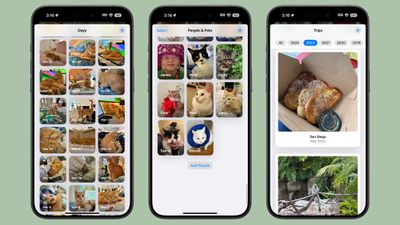
ios 18 collections

How to Customize and Reorder Collections

You can easily change the order of collections and choose which ones to display. By customizing your collections, you can prioritize the features you use most often, making your photo browsing experience more tailored to your needs. To do so, simply follow these steps:

  1. Open the Photos app.
  2. Scroll all the way down to the bottom of the main view.
  3. Tap the Customize and Reorder option.
  4. In the customization menu, you can deselect the checkmark next to a collection to remove it from view, and tap and hold the three bars next to a collection, then drag to rearrange its position.
  5. Once you're satisfied with your changes, tap the "X" in the top right corner to exit and return to the main Photos view.
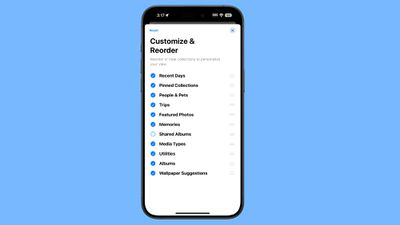
ios 18 collections reorder

Remember, you can always return to this menu to make further adjustments as your preferences change. As you explore the redesigned Photos app, take some time to experiment with different collection arrangements. You might discover new ways to interact with your photo library that enhance the overall experience.


Top Rated Comments

DMG35 Avatar
18 months ago
The photos app is a mess. Whatever intern that was allowed to design this atrocity needs to go back to the mail room.
Score: 50 Votes (Like | Disagree)
PhoenixAnhart Avatar
18 months ago
Photos seems to still be something that even Apple has been unable to reduce the complexity of. It's way more confusing and annoying than the previous design.
Score: 20 Votes (Like | Disagree)
Mac Fly (film) Avatar
18 months ago
Turned them all off. Better, but still, now have this ? in the way. Photos in iOS 17 was nicer with a good implementation for communicating total photo and video count. Bottom tab bar should have stayed with "Recents" album renamed as "Library" and set as default view and leftmost menu item. With the other two tab bar buttons as "Albums" and "Search". The buttons could be draggable/editable with a long press to enter edit mode. Users could have up to five items on the bar with the leftmost changing default view—personalised app with a clean result.


Attachment Image
Score: 14 Votes (Like | Disagree)
RemedyRabbit Avatar
18 months ago
I like the customisation options for the albums etc, I just wish they’d left the main library in a separate tab.
Score: 14 Votes (Like | Disagree)
TechnoTiger3000 Avatar
18 months ago
I agree that it’s a mess now more than ever, the fact that you have to swipe down twice to get your roll rolling is infuriating.

Yet basic functionality is in decline for years now.
Score: 13 Votes (Like | Disagree)
macbookj0e Avatar
18 months ago
This app has stopped me updating to ios18 and will likely for a very long time.
Score: 12 Votes (Like | Disagree)

Popular Stories

Apple Logo Zoomed

Tim Cook Teases Plans for Apple's Upcoming 50th Anniversary

Thursday February 5, 2026 12:54 pm PST by
Apple turns 50 this year, and its CEO Tim Cook has promised to celebrate the milestone. The big day falls on April 1, 2026. "I've been unusually reflective lately about Apple because we have been working on what do we do to mark this moment," Cook told employees today, according to Bloomberg's Mark Gurman. "When you really stop and pause and think about the last 50 years, it makes your heart ...
wwdc sans text feature

Apple Rumored to Announce New Product on February 19

Thursday February 5, 2026 12:22 pm PST by
Apple plans to announce the iPhone 17e on Thursday, February 19, according to Macwelt, the German equivalent of Macworld. The report, citing industry sources, is available in English on Macworld. Apple announced the iPhone 16e on Wednesday, February 19 last year, so the iPhone 17e would be unveiled exactly one year later if this rumor is accurate. It is quite uncommon for Apple to unveil...
Finder Siri Feature

Why Apple's iOS 26.4 Siri Upgrade Will Be Bigger Than Originally Promised

Friday February 6, 2026 3:06 pm PST by
In the iOS 26.4 update that's coming this spring, Apple will introduce a new version of Siri that's going to overhaul how we interact with the personal assistant and what it's able to do. The iOS 26.4 version of Siri won't work like ChatGPT or Claude, but it will rely on large language models (LLMs) and has been updated from the ground up. Upgraded Architecture The next-generation...
iOS 26

iOS 26.3 and iOS 26.4 Will Add These New Features to Your iPhone

Tuesday February 3, 2026 7:47 am PST by
While the iOS 26.3 Release Candidate is now available ahead of a public release, the first iOS 26.4 beta is likely still at least a week away. Following beta testing, iOS 26.4 will likely be released to the general public in March or April. Below, we have recapped known or rumored iOS 26.3 and iOS 26.4 features so far. iOS 26.3 iPhone to Android Transfer Tool iOS 26.3 makes it easier...
iphone 17 pro dark blue 1

iPhone 18 Pro Max Rumored to Deliver Next-Level Battery Life

Friday February 6, 2026 5:14 am PST by
The iPhone 18 Pro Max will feature a bigger battery for continued best-in-class battery life, according to a known Weibo leaker. Citing supply chain information, the Weibo user known as "Digital Chat Station" said that the iPhone 18 Pro Max will have a battery capacity of 5,100 to 5,200 mAh. Combined with the efficiency improvements of the A20 Pro chip, made with TSMC's 2nm process, the...















