
iOS 18: How to Customize and Reorder the Photos App - MacRumors
Skip to Content

iOS 18: How to Customize and Reorder the Photos App

by

Apple's iOS 18 brings a significant redesign to the Photos app, introducing a unified Library View that consolidates all sections into a single, scrollable interface. While this new layout aims to streamline navigation, you may want to tailor it to your preferences. Here's how you can customize and reorder collections in the new Photos app.
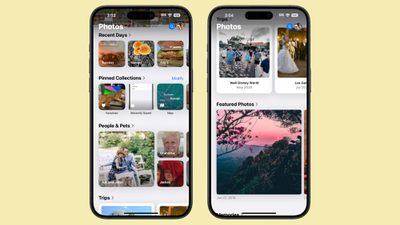
ios 18 photos app collections

Understanding Collections in Photos

In iOS 18, everything outside the main photo grid in the Photos app is considered a "Collection." These include:

  • Recent Days: Chronological view of your latest photos, similar to the previous iOS 17 Days view. Tap to see your entire library sorted by date.
  • Albums: Access all your created albums, including those shared with others.
  • People and Pets: AI-organized albums of individuals and animals. New Group feature automatically clusters frequent companions, with manual creation option.
  • Memories: Auto-generated slideshows, now featuring Apple Intelligence Memory Maker for enhanced presentations.
  • Trips: Location-based photo collections. View your travels organized by year.
  • Shared Albums: Collaborative photo collections shared between users.
  • Pinned Collections: Quick access to your most important albums or collections.
  • Featured Photos: AI-curated showcase of your best shots, updated regularly.
  • Media Types: Filter photos by capture mode (e.g., Live Photos, Portrait, Panoramas) or file type (e.g., Screenshots, Screen Recordings).
  • Utilities: Smart filters for practical image types like handwritten notes or receipts.
  • Wallpaper Suggestions: AI-selected images optimized for device wallpapers, with customizable visual elements.

Each collection offers different ways to view and organize your photos, from auto-generated slideshows to filters for specific types of images.
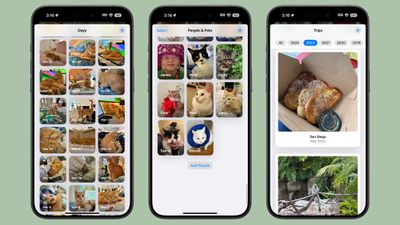
ios 18 collections

How to Customize and Reorder Collections

You can easily change the order of collections and choose which ones to display. By customizing your collections, you can prioritize the features you use most often, making your photo browsing experience more tailored to your needs. To do so, simply follow these steps:

  1. Open the Photos app.
  2. Scroll all the way down to the bottom of the main view.
  3. Tap the Customize and Reorder option.
  4. In the customization menu, you can deselect the checkmark next to a collection to remove it from view, and tap and hold the three bars next to a collection, then drag to rearrange its position.
  5. Once you're satisfied with your changes, tap the "X" in the top right corner to exit and return to the main Photos view.
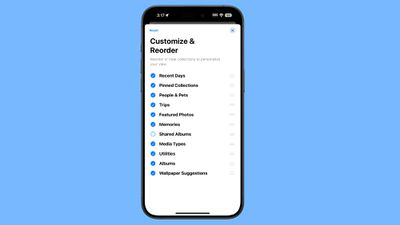
ios 18 collections reorder

Remember, you can always return to this menu to make further adjustments as your preferences change. As you explore the redesigned Photos app, take some time to experiment with different collection arrangements. You might discover new ways to interact with your photo library that enhance the overall experience.

Top Rated Comments

DMG35 Avatar
27 months ago
The photos app is a mess. Whatever intern that was allowed to design this atrocity needs to go back to the mail room.
Score: 50 Votes (Like | Disagree)
27 months ago
Photos seems to still be something that even Apple has been unable to reduce the complexity of. It's way more confusing and annoying than the previous design.
Score: 20 Votes (Like | Disagree)
27 months ago
I like the customisation options for the albums etc, I just wish they’d left the main library in a separate tab.
Score: 14 Votes (Like | Disagree)
Mac Fly (film) Avatar
27 months ago
Turned them all off. Better, but still, now have this 👇 in the way. Photos in iOS 17 was nicer with a good implementation for communicating total photo and video count. Bottom tab bar should have stayed with "Recents" album renamed as "Library" and set as default view and leftmost menu item. With the other two tab bar buttons as "Albums" and "Search". The buttons could be draggable/editable with a long press to enter edit mode. Users could have up to five items on the bar with the leftmost changing default view—personalised app with a clean result.




Attachment Image
Score: 14 Votes (Like | Disagree)
27 months ago
I agree that it’s a mess now more than ever, the fact that you have to swipe down twice to get your roll rolling is infuriating.

Yet basic functionality is in decline for years now.
Score: 13 Votes (Like | Disagree)
CaféPicasso Avatar
27 months ago
Turned them all off, too. When I open the app, I hate to see this huge "Customise & Reorder"-Button with all this white space around it instead of my photos. That's really bad design.
Score: 12 Votes (Like | Disagree)

Popular Stories

iphone duo colors

Apple Shares Photos Shot on iPhone Duo

Thursday October 1, 2026 1:37 pm PDT by
Apple on Instagram today shared a curated gallery of six photos shot on the iPhone Duo. The photos were shot by American photographers Jake Michaels and Jason Nocito, as part of a project commissioned by Apple. iPhone Duo is equipped with four cameras:A rear 48-megapixel Fusion Main camera A rear 48-megapixel Ultra Wide camera A front 12-megapixel Center Stage camera in the outer display A...
google photos wardrobe

Google Photos Wardrobe Feature Comes to iOS

Thursday September 24, 2026 1:33 pm PDT by
Google today said its digital wardrobe option is available in the Google Photos iOS app in the U.S., India, and Brazil. Google first announced the feature back in April, but it was limited to Android users until now. The wardrobe option uses AI to pull images of clothing from the Google Photos library, organizing them into a digital closet. Users can put items together to create outfits ...
iphone duo facetime

iPhone Duo's Hidden FaceTime Camera Takes 'Trash' Photos

Wednesday October 21, 2026 11:36 am PDT by
The iPhone Duo's inner screen has an under-display front camera that's largely hidden from view. It's the first time we've seen an under-display camera on an iPhone, and it turns out there's a reason Apple hasn't used the technology before. Apple said the camera offers 1080p video recording, but didn't mention photo quality. Gizmodo said it's a 4-megapixel camera and described the photos as...
Latest Stories
Giant iPhone Duo Displays Coming to Four Apple Stores
56 minutes ago
Apple Pulls Keynote, Pages and Numbers From App Store
2 hours ago
Apple Updates More Apps With iPhone Duo Support
2 hours ago
Apple Will Label Apps 'Made for iPhone Duo' in App Store
5 hours ago
Amazon Takes $49 Off iPad With Prices Starting at $399.99
6 hours ago
F1 on Apple TV Now Available in Dolby Atmos
6 hours ago
Apple Reveals More Than 50 Apps That Will Be Updated for iPhone Duo
7 hours ago
Apple Blocks Certificates That Could Help Attackers Fake Websites
8 hours ago
Giant iPhone Duo Installations Spotted at Apple Fifth Avenue
9 hours ago
iPhone Duo 2 Prototypes Include Under-Display Face ID
9 hours ago
Tesla App Gains iPad and iPhone Duo Support
13 hours ago
Apple Reportedly Boosts iPhone Duo Orders by 44%
13 hours ago
Fortnite Returning to Australian App Store After Court Ruling
14 hours ago
Apple Ordered to Open iPhone to Rival App Stores in Australia
14 hours ago
Apple Suppliers Face Hurdles Cutting Circuit Board Emissions
15 hours ago
Things Updated for iPhone Duo With Adaptive Layout
15 hours ago
Simplicity and Siri AI Are HomeView's Killer Features, Apple Says
15 hours ago
iPhone Duo Reviewers Really Miss Face ID
20 hours ago
Does the iPhone Duo Run Hot? Here's What Reviews Found
22 hours ago
Apple Music's New Look is Now Live on Apple's Website
22 hours ago
Anthropic Launches Claude Duet, a Proactive AI Agent
23 hours ago
What 32,000 Folds Did to the iPhone Duo's Hinge
1 day ago
iPhone Duo's Hidden FaceTime Camera Takes 'Trash' Photos
1 day ago
iPhone Duo Has 'Edge Light' Feature That Debuted on Macs Last Year
1 day ago
Apple Support App Updated for iPhone Duo's Larger Display
1 day ago
Amazon Sweetens the Deal on Entry-Level 16-Inch MacBook Pro With $570 Off
1 day ago
iPhone Duo Tips Over on MagSafe Stands When Unfolded
1 day ago
Apple Music's New Look Officially Announced
1 day ago
iPhone Duo Supports Apple Pencil Starting With iOS 27.2
1 day ago
iPhone Duo Accessories Roundup: Cases and Screen Protectors From OtterBox, ZAGG, and More
1 day ago









































