iOS 18.1: Generate an Apple Intelligence Report - MacRumors
Skip to Content

iOS 18.1: Generate an Apple Intelligence Report

by

If you're curious about how Apple Intelligence is working on your iPhone, iOS 18.1 offers transparency through the new ‌Apple Intelligence‌ Report feature. Here's how to generate your own report.
Apple Intelligence General Feature 2
Baked into iOS 18, ‌Apple Intelligence‌ can create language and images, take action across apps, and draw from personal context to simplify and accelerate everyday tasks, all through the use of on-device large language models. And with Private Cloud Compute, Apple can deliver AI based on privacy, with the ability to flex and scale computational capacity between on-device processing and larger, server-based models that run on dedicated Apple silicon servers.

When you make a request on your iPhone, ‌Apple Intelligence‌ analyzes whether it can be processed on the device. For more complex requests, it can draw on Private Cloud Compute. Only the data that is relevant to your request is processed on Apple's servers before it's removed. When requests are routed to Private Cloud Compute, your data is not stored or made accessible to Apple, and is only used to fulfill the request.

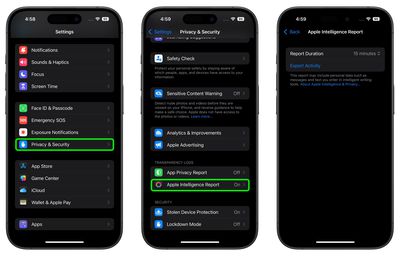
You can generate a report on your iPhone of requests your device has sent to Private Cloud Compute for the last 15 minutes or 7 days. The following steps show you how it's done.

  1. Open Settings on your iPhone or iPad.
  2. Tap Privacy & Security.
  3. Tap Apple Intelligence Report near the bottom of the menu.
  4. Choose a Report Duration: 15 minutes, 7 days, or Off.
  5. Tap Export Activity.

settings

You can open and view the file using any text editor or reader app. For more information about ‌Apple Intelligence‌, be sure to check out our dedicated guide.

Popular Stories

iOS 26

iOS 26.4 Adds Two New Features to CarPlay

Tuesday March 24, 2026 1:55 pm PDT by
iOS 26.4 was released today, and it includes a couple of new features for CarPlay: an Ambient Music widget and support for voice-based chatbot apps. To update your iPhone 11 or newer to iOS 26.4, open the Settings app and tap on General → Software Update. CarPlay will automatically offer the new features so long as the iPhone connected to your vehicle is running iOS 26.4 or later....
Apple Business hero

Apple Unveils 'Apple Business' All-in-One Platform

Tuesday March 24, 2026 8:53 am PDT by
Apple today announced Apple Business, a new all-in-one platform that unifies device management, productivity tools, and customer outreach features. The service is designed to be a consolidated replacement for several of Apple's existing business-focused offerings, including Apple Business Essentials, Apple Business Manager, and Apple Business Connect. It provides organizations with a single...
AirPods Pro Firmware Feature

Apple Releases New Firmware for AirPods Pro 3, AirPods Pro 2 and AirPods 4

Tuesday March 24, 2026 12:31 pm PDT by
Apple today released new firmware for the AirPods Pro 2, AirPods Pro 3, and the AirPods 4. The firmware has a version number of 8B39, up from 8B34 on the AirPods Pro 3, 8B28 on the AirPods Pro 2, and 8B21 on the AirPods 4. There is no word on what's included in the firmware, but Apple has a support document with limited notes. Most updates are limited to bug fixes and performance...