
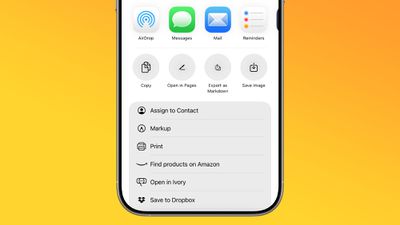
In iOS 26, currently in beta, Apple Notes has gained new Markdown support, letting you seamlessly import and export files in the popular plain-text formatting language. Whether you're a developer, writer, or content creator, this long-awaited feature should bridge the gap between your existing Markdown workflow and Apple's native note-taking app.
ios 26 notes app markdown
For those unfamiliar with Markdown, it's a simple way of writing that uses plain text symbols (like ** for bold or # for headings) to format documents without complicated menus. It's popular because the same text works both as easy-to-read notes and as polished, styled content when exported.

In Apple's Notes app, the new functionality works both ways: you can bring existing Markdown files into Notes while preserving formatting like headings, links, and lists, or export your Notes content as Markdown for use in other apps. The following steps show you how to do both.

Bear in mind that Notes doesn't display Markdown syntax while you're writing – it continues to show rich text formatting as usual. The Markdown conversion happens during the import and export process, so you'll see the plain text formatting only when viewing the file outside of Notes.

Import Markdown Files into Notes

  1. Locate your Markdown (.md) file on your iPhone (e.g., in Files or your writing app).
  2. Open the file, tap Share, then choose Notes.
  3. Tap Import at the prompt to save the file to an Imported Notes folder.
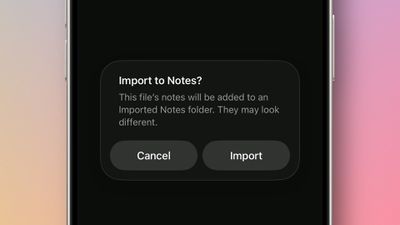
import markdown notes ios

If you're working in the Notes app on an iPad running iPadOS 26, you can also choose File ➝ Import to Notes… from the Notes menu bar (accessed with a swipe down from the top of the screen). Select your Markdown file from the files interface, then tap Import to confirm the import.

Once the note is imported, look for the Imported Notes folder where your note will be saved. Then you can verify that key formatting has been preserved in the note. When you import a Markdown file, Notes automatically converts the plain text formatting into rich text, preserving headings, links, bulleted lists, and text styling like bold and italics.

Export Notes in Markdown Format

  1. In Notes, open the note you want to export.
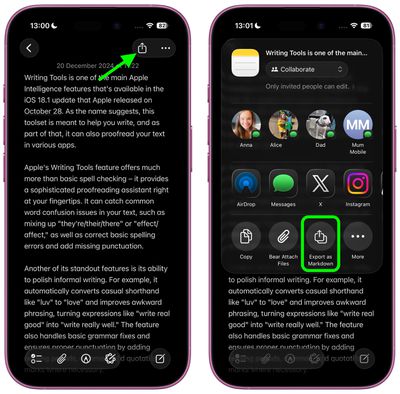
  2. Tap the Share icon in the top-right corner.
  3. Select Export as Markdown.
  4. Choose where to share or save the markdown file from the share sheet options.
settings

The exported file retains the note's structure and formatting as standard Markdown syntax, making it compatible with text editors, documentation tools, and publishing platforms that support the format.

Apple is expected to officially release iOS 26 in September.

Top Rated Comments

TheDailyApple Avatar
23 weeks ago

I'm glad they're doing this for interoperability, but on a practical level I only care to use Markdown when I can hide the cluttery _formatting_ *characters* as much as possible. Conceptually, I think Markdown is very elegant, but I don't want to have the "how the sausage is made" part in my face all the time. I use Ulysses a lot and it does let me dial down the color of the Markdown so it's not visible, but it still junks up the spacing and flow of text. I have used another app (forgetting the name) which optionally will entirely hide Markdown tags, and I think that's the best way to go IMO.
I highly recommend Obsidian. It completely hides the markdown formatting characters, and is generally one of the more elegant applications I've used. It's also free.
Score: 6 Votes (Like | Disagree)
ignatius345 Avatar
23 weeks ago

Can we finally bulk export notes?
Just tested this. In the Tahoe beta, you can multiple select notes and export to PDF or Markdown. The individual exported notes appear as separate files within a folder.
Score: 5 Votes (Like | Disagree)
MakeAppleAwesomeAgain Avatar
23 weeks ago
Quite funny that this is the year they added Markdown support but ditched John Gruber as interviewer ?
Score: 4 Votes (Like | Disagree)
novagamer Avatar
23 weeks ago

Here's what I get:


BTW, I'm finding running the beta in a virtual machine is a nice way to play around with it without subjecting my Mac to potential bugs. VirtualBuddy is very easy for this (and free).
Maybe my input didn’t have the spaces, thank you!! I will try this later. Much appreciated. :)

edit: works great. Huge time saver, this might be my favorite iOS26 feature.
Score: 1 Votes (Like | Disagree)
Korb3n_Dallas Avatar
23 weeks ago
What is nice for all the people who use discord is we can format messages in notes and then export it in markup for discord posts.
Score: 1 Votes (Like | Disagree)
ignatius345 Avatar
23 weeks ago
I'm glad they're doing this for interoperability, but on a practical level I only care to use Markdown when I can hide the cluttery _formatting_ *characters* as much as possible. Conceptually, I think Markdown is very elegant, but I don't want to have the "how the sausage is made" part in my face all the time. I use Ulysses a lot and it does let me dial down the color of the Markdown so it's not visible, but it still junks up the spacing and flow of text. I have used another app (forgetting the name) which optionally will entirely hide Markdown tags, and I think that's the best way to go IMO.
Score: 1 Votes (Like | Disagree)

Popular Stories

Apple Logo Zoomed

Tim Cook Teases Plans for Apple's Upcoming 50th Anniversary

Thursday February 5, 2026 12:54 pm PST by
Apple turns 50 this year, and its CEO Tim Cook has promised to celebrate the milestone. The big day falls on April 1, 2026. "I've been unusually reflective lately about Apple because we have been working on what do we do to mark this moment," Cook told employees today, according to Bloomberg's Mark Gurman. "When you really stop and pause and think about the last 50 years, it makes your heart ...
iOS 26

iOS 26.3 and iOS 26.4 Will Add These New Features to Your iPhone

Tuesday February 3, 2026 7:47 am PST by
While the iOS 26.3 Release Candidate is now available ahead of a public release, the first iOS 26.4 beta is likely still at least a week away. Following beta testing, iOS 26.4 will likely be released to the general public in March or April. Below, we have recapped known or rumored iOS 26.3 and iOS 26.4 features so far. iOS 26.3 iPhone to Android Transfer Tool iOS 26.3 makes it easier...
imac video apple feature

Apple Makes Its Second-Biggest Acquisition Ever

Tuesday February 3, 2026 12:45 pm PST by
Apple recently acquired Israeli startup Q.ai for close to $2 billion, according to Financial Times sources. That would make this Apple's second-biggest acquisition ever, after it paid $3 billion for the popular headphone maker Beats in 2014. This is also the largest known Apple acquisition since the company purchased Intel's smartphone modem business and patents for $1 billion in 2019....
wwdc sans text feature

Apple Rumored to Announce New Product on February 19

Thursday February 5, 2026 12:22 pm PST by
Apple plans to announce the iPhone 17e on Thursday, February 19, according to Macwelt, the German equivalent of Macworld. The report, citing industry sources, is available in English on Macworld. Apple announced the iPhone 16e on Wednesday, February 19 last year, so the iPhone 17e would be unveiled exactly one year later if this rumor is accurate. It is quite uncommon for Apple to unveil...
Finder Siri Feature

Why Apple's iOS 26.4 Siri Upgrade Will Be Bigger Than Originally Promised

Friday February 6, 2026 3:06 pm PST by
In the iOS 26.4 update that's coming this spring, Apple will introduce a new version of Siri that's going to overhaul how we interact with the personal assistant and what it's able to do. The iOS 26.4 version of Siri won't work like ChatGPT or Claude, but it will rely on large language models (LLMs) and has been updated from the ground up. Upgraded Architecture The next-generation...
















