iOS 26: Keep AirPods Connected When You Get in Your Car - MacRumors
Skip to Content

iOS 26: Keep AirPods Connected When You Get in Your Car

by

If you wear AirPods during your commute but don't want your podcast or music suddenly blasting through the car speakers when you start the engine, there's a new setting in iOS 26 that can ensure it doesn't happen.
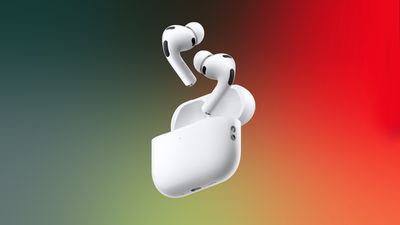
airpods pro 3 prime day
Apple has thoughtfully added a new "Keep Audio with Headphones" setting that prevents your iPhone from automatically switching audio to CarPlay or other Bluetooth speakers when you're already listening through AirPods. Here's how to toggle it on.

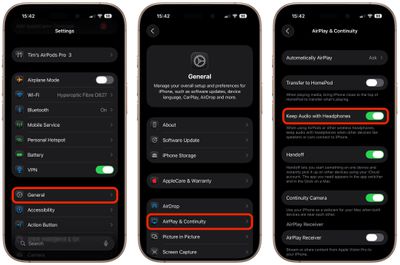
How to Keep Audio in Your AirPods

  1. Open the Settings app on your iPhone.
  2. Tap General.
  3. Select AirPlay & Continuity.
  4. Toggle on Keep Audio with Headphones.

settings

With the setting enabled, your music, podcasts, or calls will continue playing in your AirPods even after your iPhone connects to your car's Bluetooth system. Note that you can always manually switch to car speakers through Control Center or CarPlay if needed.

The feature also works with other wireless headphones, plus it's useful beyond in-car scenarios, since it stops audio from jumping to nearby Bluetooth speakers in your home, too.


Top Rated Comments

24 weeks ago
In many countries it's illegal to drive with any kind of headphones and there are fines for not using hands free setup.
Score: 15 Votes (Like | Disagree)
CrazedVW Avatar
24 weeks ago

It varies state to state, but it's fully legal in 34 states.
Just because it's legal doesn't mean it's a good idea. I cringe every time I see somebody driving with them in.
Score: 13 Votes (Like | Disagree)
24 weeks ago
I *kind* of get it... I'm on a call, I step in to my car, and I want to keep participating in the call... but what are we doing?
If you're starting your car, and enabling carplay anyway, get the headphones out of your ears. Time to focus on the road first and foremost... transparency mode be damned.
The feature is right there....keep audio on wireless headphones when a car is connected, but I don't understand the use if I'm behind the wheel.... maybe someone else is driving?
Score: 10 Votes (Like | Disagree)
goobot Avatar
24 weeks ago
Isn’t it illegal to drive with headphones in?
Score: 8 Votes (Like | Disagree)
24 weeks ago
All the people screaming "you should not drive with earphones" have clearly never unlocked a CarPlay vehicle to grab something from it while on a phone call using AirPods. Or cleaned or worked on their car for a while during a phone call. Or had someone else wait in the unlocked car while running a nearby errand and calling somebody using AirPods.

In all of these cases, the call will eventually transfer to the car, and sometimes repeatedly so, depending on how the vehicle's head unit is implemented. It's super annoying.

Even just getting into the car with the intention of moving the call to the vehicle works much better this way, because the call will not be transferred the moment the head unit's CarPlay integration is started up, but maybe not active yet (or the volume setting isn't right). Instead of a few seconds (or more) of no audio and a "hello, hello?" back and forth with the person on the other end of the line, the transfer now seamlessly happens when you take the AirPods out of your ears and put them in the case, which any responsible driver of course does after having buckled up, and before driving off.

This is a great feature; thank you, Apple.
Score: 5 Votes (Like | Disagree)
WarmWinterHat Avatar
24 weeks ago

Just because it's legal doesn't mean it's a good idea. I cringe every time I see somebody driving with them in.
Agreed!
Score: 5 Votes (Like | Disagree)

Popular Stories

iOS 26

iOS 26.4 Adds Two New Features to CarPlay

Tuesday March 24, 2026 1:55 pm PDT by
iOS 26.4 was released today, and it includes a couple of new features for CarPlay: an Ambient Music widget and support for voice-based chatbot apps. To update your iPhone 11 or newer to iOS 26.4, open the Settings app and tap on General → Software Update. CarPlay will automatically offer the new features so long as the iPhone connected to your vehicle is running iOS 26.4 or later....
Apple Business hero

Apple Unveils 'Apple Business' All-in-One Platform

Tuesday March 24, 2026 8:53 am PDT by
Apple today announced Apple Business, a new all-in-one platform that unifies device management, productivity tools, and customer outreach features. The service is designed to be a consolidated replacement for several of Apple's existing business-focused offerings, including Apple Business Essentials, Apple Business Manager, and Apple Business Connect. It provides organizations with a single...
AirPods Pro Firmware Feature

Apple Releases New Firmware for AirPods Pro 3, AirPods Pro 2 and AirPods 4

Tuesday March 24, 2026 12:31 pm PDT by
Apple today released new firmware for the AirPods Pro 2, AirPods Pro 3, and the AirPods 4. The firmware has a version number of 8B39, up from 8B34 on the AirPods Pro 3, 8B28 on the AirPods Pro 2, and 8B21 on the AirPods 4. There is no word on what's included in the firmware, but Apple has a support document with limited notes. Most updates are limited to bug fixes and performance...