

Writing Tools is one of the main Apple Intelligence features that's available in the iOS 18.1 update that Apple released on October 28. As the name suggests, this toolset is meant to help you write, and as part of that, it can also proofread your text in various apps.

Apple's Writing Tools feature offers much more than basic spell checking – it provides a sophisticated proofreading assistant right at your fingertips. It can catch common word confusion issues in your text, such mixing up "they're/their/there" or "effect/affect," as well as correct basic spelling errors and add missing punctuation.
Another of its standout features is its ability to polish informal writing. For example, it automatically converts casual shorthand like "luv" to "love" and improves awkward phrasing, turning expressions like "write real good" into "write really well." The feature also handles basic grammar fixes and ensures proper punctuation by adding missing periods, commas, and quotation marks where necessary.
In an app like Notes or Pages, you can simply select text and then tap the Writing Tools option. Apps like Notes also have a Writing Tools interface built-in, so you can also get to Writing Tools from the in-app toolbar. The option to Proofread the selected text will appear above the keyboard.
You can use Writing Tools anywhere there's text on your iPhone, as it's a system-wide feature. You can use it in third-party apps, too. Just select the text and then choose the same Writing Tools option in the contextual menu.
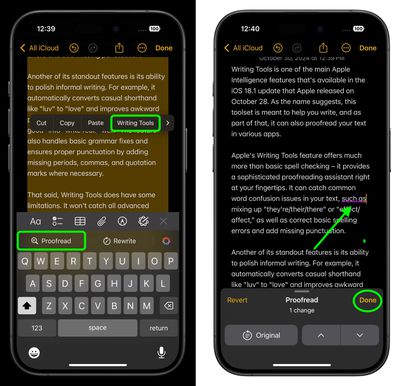
Bear in mind that Writing Tools does have some limitations. For example, it won't catch all advanced punctuation issues, particularly with semicolons, colons, or ellipses. Perhaps its biggest drawback is that corrections are applied as a complete package. In other words, you can't approve or reject changes individually. Instead, Writing Tools presents a fully corrected version of your text, which you can then copy, use to replace your original, or share.
For longer texts, it's worth taking the time to compare the original and corrected versions side by side, since Writing Tools doesn't highlight individual changes. Overall, this automated assistant can significantly improve your writing, but it works best as part of a thorough proofreading process that includes your own careful review.























![Apple Pulls Keynote, Pages and Numbers From App Store [Update: Back]](https://images.macrumors.com/t/Okb7kitB_gNr6qe5Pex9nQIysD8=/112x112/article-new/2026/01/Apple-Creator-Studio-iWork-suite.jpg)





















