Apple's iOS 26 update, currently in beta, introduces a striking visual overhaul with its new Liquid Glass design language. However, if the translucent elements are causing readability issues or you simply prefer a more opaque interface, there's a quick accessibility setting that can help tone things down.
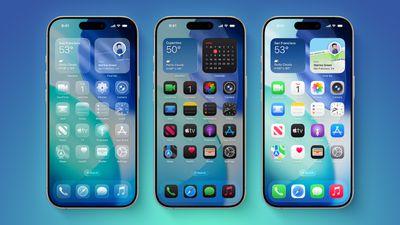
iOS 26 on Three iPhones
The Liquid Glass design brings transparency effects throughout the system interface and stock apps. On the Home Screen, you'll notice the search bar, dock, and app folders all feature translucent backgrounds. App icons themselves now sport a new layered glass appearance that adds visual depth and dimension to your device – plus there's a new Clear appearance option that ups the ante even more.

While visually impressive, these transparency effects can sometimes interfere with readability, especially for anyone with certain visual needs. Fortunately, Apple has included accessibility options to make the interface more accessible.

How to Reduce Transparency

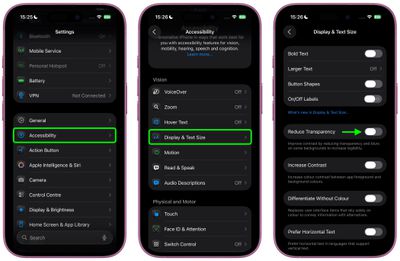
The quickest way to make iOS 26's interface more opaque is through the Reduce Transparency setting:

  1. Open Settings on your iPhone.
  2. Tap Accessibility.
  3. Select Display & Text Size.
  4. Toggle on Reduce Transparency.

settings

This setting adds darker backgrounds to translucent areas like Control Center, app icons, and app folders, so you should see increased contrast between elements throughout the system.

Note that Reduce Transparency doesn't completely eliminate all translucent elements or change button shapes – it simply makes translucent areas more opaque while maintaining the overall iOS 26 aesthetic.

Add Reduce Transparency to Control Center

For quick access to this setting, you can add it to your Accessibility Shortcuts to get to it from the Control Center interface:

  1. Go to Settings ➝ Accessibility.
  2. Scroll down and tap Accessibility Shortcut.
  3. Select Reduce Transparency in the list.
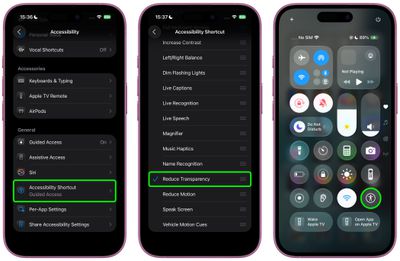
settings

If you like, you can add the Accessibility Shortcut button to Control Center (long press a space between the interface's buttons, then tap Add Control). After you've done that, you can quickly toggle the setting on and off directly from Control Center, making it easy to switch between the full Liquid Glass experience and a more opaque interface as needed.

Additional Contrast Options

If you're still having legibility issues after enabling Reduce Transparency, return to Settings ➝ Accessibility ➝ Display & Text Size, then toggle on Increase Contrast. Note that enabling both Reduce Transparency and Increase Contrast will cause icons to lose most of their translucency.

The Liquid Glass design is still in beta, so Apple will likely continue refining the visual effects based on feedback. A wider official rollout of iOS 26 is expected sometime in September.


Top Rated Comments

turbineseaplane Avatar
25 weeks ago
Shamefully bad UI team.

Users shouldn't need to enable a whole bunch of accessibility settings to get basic legibility and clarity.
Score: 78 Votes (Like | Disagree)
sjalfr Avatar
25 weeks ago

Shamefully bad UI team.

Users shouldn't need to enable a whole bunch of accessibility settings to get basic legibility and clarity.
Right. Now I feel like it's my fault that I can't see anything on the washed out default screen. What are they thinking? I wish they'd stop making things so white and polished just because it looks slick and cool at the price of readability and functionality.
Score: 38 Votes (Like | Disagree)
bmark Avatar
25 weeks ago
Apple UI overhaul team is probably the same team behind Siri!
Score: 28 Votes (Like | Disagree)
Alphanumeric Character Avatar
25 weeks ago
Essential tweak for me. It looks so much better.
Score: 26 Votes (Like | Disagree)
Astuces iOS Avatar
25 weeks ago

Shamefully bad UI team.

Users shouldn't need to enable a whole bunch of accessibility settings to get basic legibility and clarity.
True at this point it should be an option on general or something
Score: 23 Votes (Like | Disagree)
VulchR Avatar
25 weeks ago
Honestly I wish Apple would spend more time on more important issues in iOS, like using AI better to correct grammar and spelling mistakes by looking at the semantic content of text rather than looking a word at a time (which misses 'tot he' for 'to the' for instance). Indeed, you'd think the new computing power in iPhones, iOS would use simple AI to learn the kinds of typing mistakes one makes and correct them (possibly even adjusting the sizes and positions of keys to reduce errors - e.g., I keep hitting n instead of space, so why not make the n smaller and nudge it away from space by a few pixels?) rather than faffing about with GUI features that actually reduce visibility. We all want elegant design, but part of elegance is functionality. Just my two cents.
Score: 19 Votes (Like | Disagree)

Popular Stories

Apple Logo Zoomed

Tim Cook Teases Plans for Apple's Upcoming 50th Anniversary

Thursday February 5, 2026 12:54 pm PST by
Apple turns 50 this year, and its CEO Tim Cook has promised to celebrate the milestone. The big day falls on April 1, 2026. "I've been unusually reflective lately about Apple because we have been working on what do we do to mark this moment," Cook told employees today, according to Bloomberg's Mark Gurman. "When you really stop and pause and think about the last 50 years, it makes your heart ...
wwdc sans text feature

Apple Rumored to Announce New Product on February 19

Thursday February 5, 2026 12:22 pm PST by
Apple plans to announce the iPhone 17e on Thursday, February 19, according to Macwelt, the German equivalent of Macworld. The report, citing industry sources, is available in English on Macworld. Apple announced the iPhone 16e on Wednesday, February 19 last year, so the iPhone 17e would be unveiled exactly one year later if this rumor is accurate. It is quite uncommon for Apple to unveil...
Finder Siri Feature

Why Apple's iOS 26.4 Siri Upgrade Will Be Bigger Than Originally Promised

Friday February 6, 2026 3:06 pm PST by
In the iOS 26.4 update that's coming this spring, Apple will introduce a new version of Siri that's going to overhaul how we interact with the personal assistant and what it's able to do. The iOS 26.4 version of Siri won't work like ChatGPT or Claude, but it will rely on large language models (LLMs) and has been updated from the ground up. Upgraded Architecture The next-generation...
iOS 26

iOS 26.3 and iOS 26.4 Will Add These New Features to Your iPhone

Tuesday February 3, 2026 7:47 am PST by
While the iOS 26.3 Release Candidate is now available ahead of a public release, the first iOS 26.4 beta is likely still at least a week away. Following beta testing, iOS 26.4 will likely be released to the general public in March or April. Below, we have recapped known or rumored iOS 26.3 and iOS 26.4 features so far. iOS 26.3 iPhone to Android Transfer Tool iOS 26.3 makes it easier...
iphone 17 pro dark blue 1

iPhone 18 Pro Max Rumored to Deliver Next-Level Battery Life

Friday February 6, 2026 5:14 am PST by
The iPhone 18 Pro Max will feature a bigger battery for continued best-in-class battery life, according to a known Weibo leaker. Citing supply chain information, the Weibo user known as "Digital Chat Station" said that the iPhone 18 Pro Max will have a battery capacity of 5,100 to 5,200 mAh. Combined with the efficiency improvements of the A20 Pro chip, made with TSMC's 2nm process, the...