iOS 26: Reduce Transparency of Apple's Liquid Glass Design - MacRumors
Skip to Content

iOS 26: Reduce Transparency of Apple's Liquid Glass Design

by

Apple's iOS 26 update, currently in beta, introduces a striking visual overhaul with its new Liquid Glass design language. However, if the translucent elements are causing readability issues or you simply prefer a more opaque interface, there's a quick accessibility setting that can help tone things down.
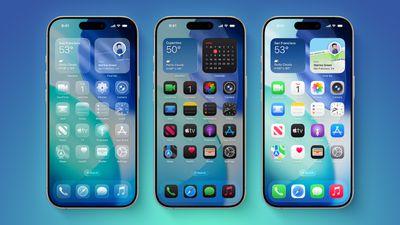
iOS 26 on Three iPhones
The Liquid Glass design brings transparency effects throughout the system interface and stock apps. On the Home Screen, you'll notice the search bar, dock, and app folders all feature translucent backgrounds. App icons themselves now sport a new layered glass appearance that adds visual depth and dimension to your device – plus there's a new Clear appearance option that ups the ante even more.

While visually impressive, these transparency effects can sometimes interfere with readability, especially for anyone with certain visual needs. Fortunately, Apple has included accessibility options to make the interface more accessible.

How to Reduce Transparency

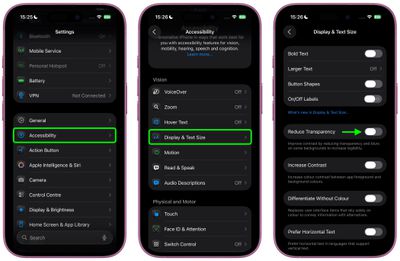
The quickest way to make iOS 26's interface more opaque is through the Reduce Transparency setting:

  1. Open Settings on your iPhone.
  2. Tap Accessibility.
  3. Select Display & Text Size.
  4. Toggle on Reduce Transparency.

settings

This setting adds darker backgrounds to translucent areas like Control Center, app icons, and app folders, so you should see increased contrast between elements throughout the system.

Note that Reduce Transparency doesn't completely eliminate all translucent elements or change button shapes – it simply makes translucent areas more opaque while maintaining the overall iOS 26 aesthetic.

Add Reduce Transparency to Control Center

For quick access to this setting, you can add it to your Accessibility Shortcuts to get to it from the Control Center interface:

  1. Go to Settings ➝ Accessibility.
  2. Scroll down and tap Accessibility Shortcut.
  3. Select Reduce Transparency in the list.
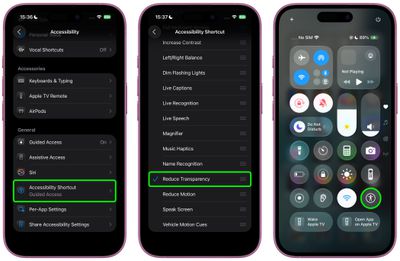
settings

If you like, you can add the Accessibility Shortcut button to Control Center (long press a space between the interface's buttons, then tap Add Control). After you've done that, you can quickly toggle the setting on and off directly from Control Center, making it easy to switch between the full Liquid Glass experience and a more opaque interface as needed.

Additional Contrast Options

If you're still having legibility issues after enabling Reduce Transparency, return to Settings ➝ Accessibility ➝ Display & Text Size, then toggle on Increase Contrast. Note that enabling both Reduce Transparency and Increase Contrast will cause icons to lose most of their translucency.

The Liquid Glass design is still in beta, so Apple will likely continue refining the visual effects based on feedback. A wider official rollout of iOS 26 is expected sometime in September.


Top Rated Comments

turbineseaplane Avatar
15 months ago
Shamefully bad UI team.

Users shouldn't need to enable a whole bunch of accessibility settings to get basic legibility and clarity.
Score: 78 Votes (Like | Disagree)
sjalfr Avatar
15 months ago

Shamefully bad UI team.

Users shouldn't need to enable a whole bunch of accessibility settings to get basic legibility and clarity.
Right. Now I feel like it's my fault that I can't see anything on the washed out default screen. What are they thinking? I wish they'd stop making things so white and polished just because it looks slick and cool at the price of readability and functionality.
Score: 38 Votes (Like | Disagree)
15 months ago
Apple UI overhaul team is probably the same team behind Siri!
Score: 28 Votes (Like | Disagree)
15 months ago
Essential tweak for me. It looks so much better.

Score: 26 Votes (Like | Disagree)
Astuces iOS Avatar
15 months ago

Shamefully bad UI team.

Users shouldn't need to enable a whole bunch of accessibility settings to get basic legibility and clarity.
True at this point it should be an option on general or something
Score: 23 Votes (Like | Disagree)
VulchR Avatar
15 months ago
Honestly I wish Apple would spend more time on more important issues in iOS, like using AI better to correct grammar and spelling mistakes by looking at the semantic content of text rather than looking a word at a time (which misses 'tot he' for 'to the' for instance). Indeed, you'd think the new computing power in iPhones, iOS would use simple AI to learn the kinds of typing mistakes one makes and correct them (possibly even adjusting the sizes and positions of keys to reduce errors - e.g., I keep hitting n instead of space, so why not make the n smaller and nudge it away from space by a few pixels?) rather than faffing about with GUI features that actually reduce visibility. We all want elegant design, but part of elegance is functionality. Just my two cents.
Score: 19 Votes (Like | Disagree)

Popular Stories

M5 MacBook Pro

RIP, MacBook Ultra

Monday October 19, 2026 9:37 am PDT by
Apple today sent out invites for an experience in Los Angeles on Wednesday, October 28, and the "Pro and tell" tagline on the invitation likely means that the rumored MacBook models with touch-enabled OLED displays will stick with MacBook Pro branding instead of the once-rumored "MacBook Ultra" name. The long-rumored "iPhone Ultra" ended up being named iPhone Duo, so speculation that Apple...
iPhone Duo Trio

Here's What Apple's Apps Look Like on the iPhone Duo

Tuesday October 20, 2026 11:12 am PDT by
With just three days to go until the iPhone Duo is released, Apple is getting ready for the launch. Behind the scenes, the App Store now has screenshots of Apple's built-in apps running on the Duo. We've seen some apps in marketing materials, but images of the ones we haven't seen give us an idea of what it will be like using the iPhone Duo day to day. Many apps are shown in landscape...
apple pro tell logo

Apple Announcing New Products Next Week: 'Pro and Tell'

Monday October 19, 2026 9:05 am PDT by
Apple's Greg Joswiak today hinted at new product announcements coming next week, sharing a social media post that says "Can't wait to pro and tell next week." Rumors suggest Apple is planning to debut the new MacBook Pro with an OLED touchscreen display, an M6 entry-level MacBook Pro, an M6 iMac, an iPad mini with an OLED display. Can't wait to pro and tell next week....
Latest Stories
Giant iPhone Duo Displays Coming to Four Apple Stores
38 minutes ago
Apple Pulls Keynote, Pages and Numbers From App Store
1 hour ago
Apple Updates More Apps With iPhone Duo Support
2 hours ago
Apple Will Label Apps 'Made for iPhone Duo' in App Store
5 hours ago
Amazon Takes $49 Off iPad With Prices Starting at $399.99
5 hours ago
F1 on Apple TV Now Available in Dolby Atmos
6 hours ago
Apple Reveals More Than 50 Apps That Will Be Updated for iPhone Duo
6 hours ago
Apple Blocks Certificates That Could Help Attackers Fake Websites
8 hours ago
Giant iPhone Duo Installations Spotted at Apple Fifth Avenue
8 hours ago
iPhone Duo 2 Prototypes Include Under-Display Face ID
9 hours ago
Tesla App Gains iPad and iPhone Duo Support
13 hours ago
Apple Reportedly Boosts iPhone Duo Orders by 44%
13 hours ago
Fortnite Returning to Australian App Store After Court Ruling
14 hours ago
Apple Ordered to Open iPhone to Rival App Stores in Australia
14 hours ago
Apple Suppliers Face Hurdles Cutting Circuit Board Emissions
14 hours ago
Things Updated for iPhone Duo With Adaptive Layout
15 hours ago
Simplicity and Siri AI Are HomeView's Killer Features, Apple Says
15 hours ago
iPhone Duo Reviewers Really Miss Face ID
20 hours ago
Does the iPhone Duo Run Hot? Here's What Reviews Found
21 hours ago
Apple Music's New Look is Now Live on Apple's Website
22 hours ago
Anthropic Launches Claude Duet, a Proactive AI Agent
23 hours ago
What 32,000 Folds Did to the iPhone Duo's Hinge
23 hours ago
iPhone Duo's Hidden FaceTime Camera Takes 'Trash' Photos
1 day ago
iPhone Duo Has 'Edge Light' Feature That Debuted on Macs Last Year
1 day ago
Apple Support App Updated for iPhone Duo's Larger Display
1 day ago
Amazon Sweetens the Deal on Entry-Level 16-Inch MacBook Pro With $570 Off
1 day ago
iPhone Duo Tips Over on MagSafe Stands When Unfolded
1 day ago
Apple Music's New Look Officially Announced
1 day ago
iPhone Duo Supports Apple Pencil Starting With iOS 27.2
1 day ago
iPhone Duo Accessories Roundup: Cases and Screen Protectors From OtterBox, ZAGG, and More
1 day ago