
In iOS 26, Apple has added a new feature to its Home screen customization options that can match the color of your app icons with the actual color of your iPhone. The image below demonstrates the effect on the new iPhone 17 Pro in Cosmic Orange.
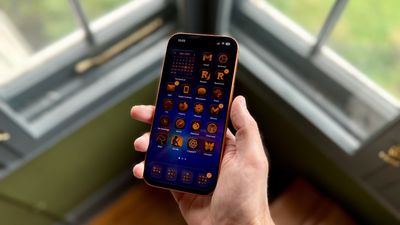
tinted app icons match iphone 17 cosmic orange
In iOS 18, Apple introduced Tinted app icons. The option applies a color filter over app icons, widgets, and even system UI elements, and with iOS 26, Apple has built on the theme with a new option that matches the color of your iPhone model.

iOS 26 knows the exact finish and color variant of your iPhone – Deep Blue, Sage, or Lavender, for example – because Apple has the device's SKU mapped at the firmware level (SKUs are a unique identifier that companies use to track and manage inventory). This allows iOS to identify your model and match a precise color profile.

This filter uses a base color taken from your iPhone's chassis color, then automatically adjusts brightness, saturation, and contrast so icons remain legible while still reflecting the hardware's tone. The following steps show you how it's done.

  1. On your iPhone's Home screen, long press a space between app icons.
  2. Tap Edit in the top-left corner, then select Customize from the popup menu.
  3. Choose Tinted from the options panel that appears, then tap the far-left iPhone button under the two horizontal color sliders.
  4. Select Light, Dark, or Auto, based on your preferences.
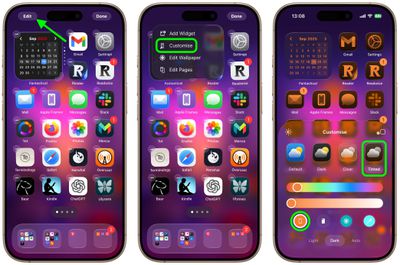
home screen

That's all there is to it. We've heard of the iPhone color matching option not working for some users who have updated older iPhone models to iOS 26. This is likely a bug that Apple will hopefully fix in a forthcoming update.

Match App Icons With Your iPhone's Case Color

If you press the button immediately right of the new iPhone color tint option, iOS 26 will even match app icon colors to your iPhone's case color. However, this only works with official Apple MagSafe cases that include a small NFC chip with color variant information.

Note that Tinted mode looks different in iOS 26 than it did in iOS 18. Rather than icons featuring a black background with colored graphics, icons adopt the full color that you select with white graphics in Light Mode. In ‌Dark Mode‌, backgrounds are a much darker shade of the color you choose, but aren't entirely black.

Top Rated Comments

turbineseaplane Avatar
20 weeks ago
This feature still has never appealed to me.

I guess I’m older or something, but I really like the color and personality of different icons.

It also makes it very easy to differentiate them and quickly find them visually.
Score: 38 Votes (Like | Disagree)
macjaffa Avatar
20 weeks ago
While you’re at it, take the opportunity to change your default iphone system language to Russian*. Now as well as finding it difficult to see and differentiate your icons, you will now also not be able to read or understand anything on your screen. Brilliant!

*Apologies to Russian readers.
Score: 14 Votes (Like | Disagree)
FSMBP Avatar
20 weeks ago

This feature still has never appealed to me.

I guess I’m older or something, but I really like the color and personality of different icons.

It also makes it very easy to differentiate them and quickly find them visually.
Exactly...this seems fun in theory but awful in practice. Basically, a basic human way of visual scanning for icons gets more difficult.
Score: 13 Votes (Like | Disagree)
bradman83 Avatar
20 weeks ago
I'm old enough to remember the days of Classic Mac OS when you could use extensions/control panels like Kaleidoscope to create a highly personalized, if not barely usable user interface experience for yourself. I'm glad to see Apple is inching back in that direction.


Attachment Image
Score: 12 Votes (Like | Disagree)
ericesque Avatar
20 weeks ago
Thanks, I hate it.
Score: 10 Votes (Like | Disagree)
S.B.G Avatar
20 weeks ago
I think it looks cool to tint the icons to match the color of the device, but only for a minute or so. After that it gets difficult for me to tell apps apart. So I just leave the icons in normal color, with dark mode on.
Score: 9 Votes (Like | Disagree)

Popular Stories

Apple Logo Zoomed

Tim Cook Teases Plans for Apple's Upcoming 50th Anniversary

Thursday February 5, 2026 12:54 pm PST by
Apple turns 50 this year, and its CEO Tim Cook has promised to celebrate the milestone. The big day falls on April 1, 2026. "I've been unusually reflective lately about Apple because we have been working on what do we do to mark this moment," Cook told employees today, according to Bloomberg's Mark Gurman. "When you really stop and pause and think about the last 50 years, it makes your heart ...
wwdc sans text feature

Apple Rumored to Announce New Product on February 19

Thursday February 5, 2026 12:22 pm PST by
Apple plans to announce the iPhone 17e on Thursday, February 19, according to Macwelt, the German equivalent of Macworld. The report, citing industry sources, is available in English on Macworld. Apple announced the iPhone 16e on Wednesday, February 19 last year, so the iPhone 17e would be unveiled exactly one year later if this rumor is accurate. It is quite uncommon for Apple to unveil...
Finder Siri Feature

Why Apple's iOS 26.4 Siri Upgrade Will Be Bigger Than Originally Promised

Friday February 6, 2026 3:06 pm PST by
In the iOS 26.4 update that's coming this spring, Apple will introduce a new version of Siri that's going to overhaul how we interact with the personal assistant and what it's able to do. The iOS 26.4 version of Siri won't work like ChatGPT or Claude, but it will rely on large language models (LLMs) and has been updated from the ground up. Upgraded Architecture The next-generation...
iOS 26

iOS 26.3 and iOS 26.4 Will Add These New Features to Your iPhone

Tuesday February 3, 2026 7:47 am PST by
While the iOS 26.3 Release Candidate is now available ahead of a public release, the first iOS 26.4 beta is likely still at least a week away. Following beta testing, iOS 26.4 will likely be released to the general public in March or April. Below, we have recapped known or rumored iOS 26.3 and iOS 26.4 features so far. iOS 26.3 iPhone to Android Transfer Tool iOS 26.3 makes it easier...
iphone 17 pro dark blue 1

iPhone 18 Pro Max Rumored to Deliver Next-Level Battery Life

Friday February 6, 2026 5:14 am PST by
The iPhone 18 Pro Max will feature a bigger battery for continued best-in-class battery life, according to a known Weibo leaker. Citing supply chain information, the Weibo user known as "Digital Chat Station" said that the iPhone 18 Pro Max will have a battery capacity of 5,100 to 5,200 mAh. Combined with the efficiency improvements of the A20 Pro chip, made with TSMC's 2nm process, the...















