
iOS 26: Track Emailed Orders in Apple Wallet - MacRumors
Skip to Content

iOS 26: Track Emailed Orders in Apple Wallet

by

In iOS 26, Apple Intelligence makes the Wallet app's order tracking feature genuinely useful by scanning your email for shipping details.

ios 26 beta 5 wallet app
The ability to track orders in Apple Wallet isn't new – it's actually been around since iOS 16. But if you've never noticed it before, don't worry. Most people haven't used it either.

The feature initially struggled because it relied on merchants to actively support it, but not many bothered. In fact, despite being available for years, order tracking in Apple's Wallet app remained largely unused. But there's a decent chance iOS 26 will change all that.

Order Tracking Meets Apple Intelligence

In iOS 26, Apple Intelligence now scans your emails to automatically extract order tracking information. This means virtually any online purchase that generates a confirmation email can now appear in the Wallet app.

The on-device AI identifies shipping details from emails sent by merchants or delivery carriers, then consolidates everything in the Wallet app's Order Tracking page.

Just note that you'll need an iPhone 15 Pro, iPhone 16, iPhone 17, or iPhone Air to access the improved order tracking, since Apple Intelligence isn't available on older devices.

Enabling Order Tracking in Settings

You can enable the AI-enhanced order tracking feature in the following way:

  1. Open Settings on your iPhone.
  2. Go to Apps ➝ Wallet.
  3. Tap Order Tracking at the bottom of the menu.
  4. Toggle on Apple Pay (this enables automatic order addition).
  5. Toggle on Mail (Beta) to allow Apple Intelligence to scan your emails.
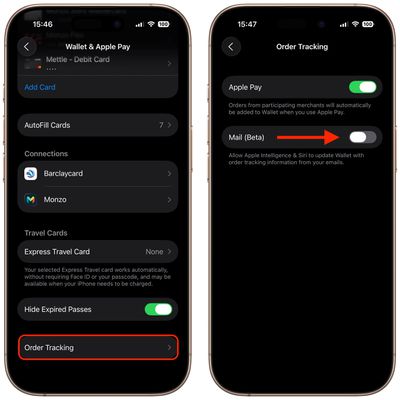
wallet order tracking ios 261

Finding Your Orders in Wallet

  1. Open the Wallet app on your iPhone.
  2. Tap the More icon (three dots) in the top-right corner.
  3. Select Orders from the dropdown menu.
  4. Browse your orders, organized by month and year.
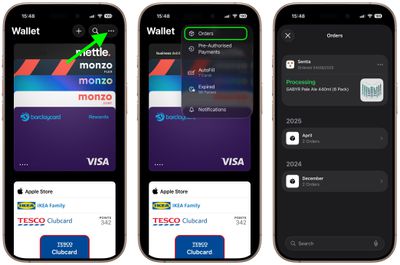
wallet order tracking ios 262

Your orders appear with merchant details, order status, and tracking information when available. You can tap individual orders to see more detailed tracking information and shipping updates, as well as mark the order as complete, mute notifications, or delete the order.

The revamped order tracking finally delivers on Wallet's promise as a centralized hub for purchase information. Surprisingly, it just took Apple Intelligence to make it work properly.


Top Rated Comments

OS X Dude Avatar
26 weeks ago
Loving the UK representation in these screenshots, lately.

For Americans - a Tesco Clubcard is this magical thing that makes a £10 tub of butter cost £2.50.
Score: 6 Votes (Like | Disagree)
jmh600cbr Avatar
26 weeks ago
not available in canada.
Score: 5 Votes (Like | Disagree)
insomniac86 Avatar
26 weeks ago
🙄 Not available for Australian users.

Of course it isn’t.

For we are “down under”, so the address syntax is reversed. Apple Intelligence can’t compute that 🤯
Score: 4 Votes (Like | Disagree)
26 weeks ago


[HEADING=2]Order Tracking Meets Apple Intelligence[/HEADING]
Oh no.
Score: 3 Votes (Like | Disagree)
26 weeks ago
Not seeing the "add from email" option...only the Apple Pay one. Maybe because I'm on 26.1 beta (though that's wild that it *wouldn't* be there for a future release)...
Score: 2 Votes (Like | Disagree)
NightFox Avatar
26 weeks ago
The fact that Wallet struggled to parse much information from the email confirmation of my iPhone 17 Pro purchase from Apple suggests that this is still a half-hearted effort, especially when it's done better with confirmation emails from third parties in the past. C'mon Apple, this should have been a perfect showcase of the function when you even had knowledge and control of the content of the email.
Score: 2 Votes (Like | Disagree)

Popular Stories

iOS 26

iOS 26.4 Adds Two New Features to CarPlay

Tuesday March 24, 2026 1:55 pm PDT by
iOS 26.4 was released today, and it includes a couple of new features for CarPlay: an Ambient Music widget and support for voice-based chatbot apps. To update your iPhone 11 or newer to iOS 26.4, open the Settings app and tap on General → Software Update. CarPlay will automatically offer the new features so long as the iPhone connected to your vehicle is running iOS 26.4 or later....
Apple Business hero

Apple Unveils 'Apple Business' All-in-One Platform

Tuesday March 24, 2026 8:53 am PDT by
Apple today announced Apple Business, a new all-in-one platform that unifies device management, productivity tools, and customer outreach features. The service is designed to be a consolidated replacement for several of Apple's existing business-focused offerings, including Apple Business Essentials, Apple Business Manager, and Apple Business Connect. It provides organizations with a single...
AirPods Pro Firmware Feature

Apple Releases New Firmware for AirPods Pro 3, AirPods Pro 2 and AirPods 4

Tuesday March 24, 2026 12:31 pm PDT by
Apple today released new firmware for the AirPods Pro 2, AirPods Pro 3, and the AirPods 4. The firmware has a version number of 8B39, up from 8B34 on the AirPods Pro 3, 8B28 on the AirPods Pro 2, and 8B21 on the AirPods 4. There is no word on what's included in the firmware, but Apple has a support document with limited notes. Most updates are limited to bug fixes and performance...















