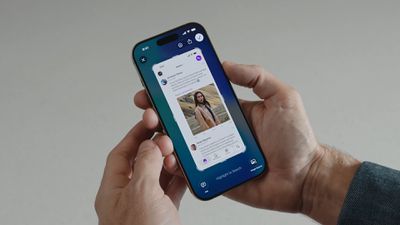
Apple has modified the screenshot experience in iOS 26 to accommodate Visual Intelligence and its new Liquid Glass aesthetic. Taking a screenshot is still done by pressing the Side button and Volume Up button on your iPhone, but the interface has been redesigned, while there's another change that might slow down your workflow if you're used to the streamlined approach taken in iOS 18 and earlier.
iOS 26 Screenshots

Why You Might Want to Switch Back

If you regularly use Apple's screen capture tools in iOS 18, you'll know that screenshots appear as small thumbnails in the bottom-left corner that you can quickly tap to edit and save or ignore. This lets you continue using your iPhone without interruption, while still giving you the option to markup and/or share a screenshot when required.

In contrast, the new full-screen preview mode in iOS 26 displays your screenshot across the entire display by default, complete with editing tools and Visual Intelligence options at the bottom. While this gives you immediate access to cropping, markup, and AI-powered features, it may feel intrusive compared to iOS 18's approach.

Disabling Full-Screen Previews

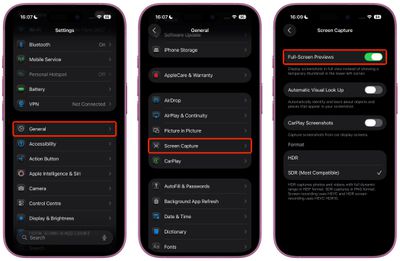
When you take your first screenshot after updating to iOS 26, you should see an on-screen prompt asking if you'd like to "Switch to Thumbnail View." If you missed this opportunity or accidentally tapped "Not Now," you can still revert to the old thumbnail approach, thanks to a new settings menu:

  1. Open Settings on your iPhone.
  2. Tap General.
  3. Select Screen Capture.
  4. Toggle off Full-Screen Previews.

settings

Once disabled, screenshots will revert to the familiar iOS 18 behavior, appearing as temporary thumbnails in the bottom-left corner. You can still access all editing features by tapping the thumbnail when you need them, or you can review the images later in the Photos app.

Additional Screenshot Options

While you're in Screen Capture settings, you'll also find new options for enabling HDR screenshots (saved in HEIF image format), a CarPlay Screenshots toggle for when your iPhone is connected to CarPlay, and Visual Lookup (iPhone 15 Pro and newer models only).


Top Rated Comments

Gobeatty Avatar
7 months ago

It would be nice if Apple allowed the ability to take screenshots, but also have the option of NOT saving the screenshot to the photo library

This would be useful for when you’re looking to share information with friends or family, but not necessarily want to save that screenshot to your photo library
iOS 18 does have this option. After tapping 'Done' there is a 'Copy and Delete' option, which is perfect for your use case (which is also often a use case for me).
Score: 11 Votes (Like | Disagree)
jz0309 Avatar
7 months ago
Thank you1 I love these type of articles!
Score: 9 Votes (Like | Disagree)
Justin Cymbal Avatar
7 months ago

Additional Screenshot Options

While you're in Screen Capture settings, you'll also find new options for enabling HDR screenshots (saved in HEIF image format), a CarPlay Screenshots toggle for when your iPhone is connected to CarPlay, and Visual Lookup (iPhone 15 Pro and newer models only).

It would be nice if Apple allowed the ability to take screenshots, but also have the option of NOT saving the screenshot to the photo library

This would be useful for when you’re looking to share information with friends or family, but not necessarily want to save that screenshot to your photo library
Score: 6 Votes (Like | Disagree)
Gobeatty Avatar
7 months ago
I am a heavy screenshot user but it isn't obvious to me - just from reading - that the change needs to be undone. Always good to have a setting to turn it off and a tutorial on how to do that, but I will try the new default behavior first. I am not a dev so waiting for the public beta to drop.
Score: 4 Votes (Like | Disagree)
Moonjumper Avatar
7 months ago
I'd like the option to just capture the screen and have no preview, going straight to saving to Photos, just like it used to be. I'd also like the same on Mac, which is where I notice the difference most. The click and carry on flow has gone. I'm not saying it should be the default, but it should be an option.
Score: 4 Votes (Like | Disagree)
jayducharme Avatar
7 months ago

good grief, I just tell Siri to take a screenshot..
"Here's what I found for screenshots on the web."

I have a slightly different problem: I inadvertently take screenshots just by picking up the phone. I wish Apple had left the power button on the top of the device, rather than opposite the volume buttons (though I realize that's inconvenient with ginormous phones).
Score: 4 Votes (Like | Disagree)

Popular Stories

Apple Logo Zoomed

Tim Cook Teases Plans for Apple's Upcoming 50th Anniversary

Thursday February 5, 2026 12:54 pm PST by
Apple turns 50 this year, and its CEO Tim Cook has promised to celebrate the milestone. The big day falls on April 1, 2026. "I've been unusually reflective lately about Apple because we have been working on what do we do to mark this moment," Cook told employees today, according to Bloomberg's Mark Gurman. "When you really stop and pause and think about the last 50 years, it makes your heart ...
wwdc sans text feature

Apple Rumored to Announce New Product on February 19

Thursday February 5, 2026 12:22 pm PST by
Apple plans to announce the iPhone 17e on Thursday, February 19, according to Macwelt, the German equivalent of Macworld. The report, citing industry sources, is available in English on Macworld. Apple announced the iPhone 16e on Wednesday, February 19 last year, so the iPhone 17e would be unveiled exactly one year later if this rumor is accurate. It is quite uncommon for Apple to unveil...
Finder Siri Feature

Why Apple's iOS 26.4 Siri Upgrade Will Be Bigger Than Originally Promised

Friday February 6, 2026 3:06 pm PST by
In the iOS 26.4 update that's coming this spring, Apple will introduce a new version of Siri that's going to overhaul how we interact with the personal assistant and what it's able to do. The iOS 26.4 version of Siri won't work like ChatGPT or Claude, but it will rely on large language models (LLMs) and has been updated from the ground up. Upgraded Architecture The next-generation...
iOS 26

iOS 26.3 and iOS 26.4 Will Add These New Features to Your iPhone

Tuesday February 3, 2026 7:47 am PST by
While the iOS 26.3 Release Candidate is now available ahead of a public release, the first iOS 26.4 beta is likely still at least a week away. Following beta testing, iOS 26.4 will likely be released to the general public in March or April. Below, we have recapped known or rumored iOS 26.3 and iOS 26.4 features so far. iOS 26.3 iPhone to Android Transfer Tool iOS 26.3 makes it easier...
iphone 17 pro dark blue 1

iPhone 18 Pro Max Rumored to Deliver Next-Level Battery Life

Friday February 6, 2026 5:14 am PST by
The iPhone 18 Pro Max will feature a bigger battery for continued best-in-class battery life, according to a known Weibo leaker. Citing supply chain information, the Weibo user known as "Digital Chat Station" said that the iPhone 18 Pro Max will have a battery capacity of 5,100 to 5,200 mAh. Combined with the efficiency improvements of the A20 Pro chip, made with TSMC's 2nm process, the...