
How to Use the iPad App Switcher - MacRumors
Skip to Content

How to Use the iPad App Switcher

by

On the iPad, iOS 11 and iOS 12 merge the Control Center with the App Switcher as part of an overhauled interface that's meant to put more of a focus on multitasking. The update also adds new ways to access the App Switcher and it brings new, enhanced app switching functionality.

Accessing the App Switcher

  1. On the Home screen, simply swipe up and hold to bring up the App Switcher.
  2. Within an app, swipe up to bring up the dock and continue the swipe further to access the App Switcher.
  3. Alternatively, the App Switcher can still be accessed by a double press on the Home button on iPads with a Home button.

The new App Switcher displays the Control Center options on the right side of the screen, the dock at the bottom of the screen, and your most recently used apps in a tiled view with large icons so you can see exactly what's open. Swipe left and right to see all of the apps you have open and tap to choose one.
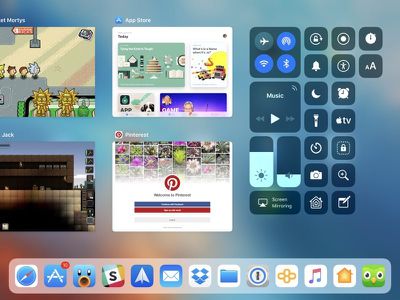
ios11ipadappswitcher
When you open two apps at once using multitasking functionality, the app arrangements are preserved in the App Switcher, so you can quickly switch between multiple multitasking windows with a simple swipe and tap.
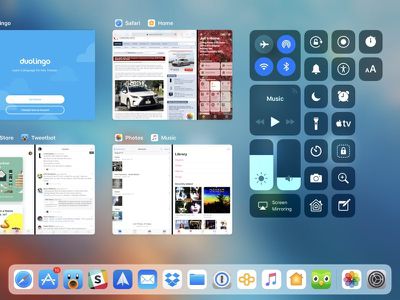
ios11appswitchermultitasking

Closing Apps

There's normally no need to close apps on iOS because Apple manages the device's power needs and keeps apps from using resources when not in use, but if you need to close an app, here's how:

  1. Bring up the App Switcher.
  2. Swipe upwards on any app to close it.

As mentioned earlier, the App Switcher is linked to the Control Center. You can change what's displayed in the Control Center portion of the App Switcher by going to Settings --> Control Center --> Customize Controls.


Related Forum: iOS 11

Popular Stories

iOS 26

iOS 26.4 Adds Two New Features to CarPlay

Tuesday March 24, 2026 1:55 pm PDT by
iOS 26.4 was released today, and it includes a couple of new features for CarPlay: an Ambient Music widget and support for voice-based chatbot apps. To update your iPhone 11 or newer to iOS 26.4, open the Settings app and tap on General → Software Update. CarPlay will automatically offer the new features so long as the iPhone connected to your vehicle is running iOS 26.4 or later....
Apple Business hero

Apple Unveils 'Apple Business' All-in-One Platform

Tuesday March 24, 2026 8:53 am PDT by
Apple today announced Apple Business, a new all-in-one platform that unifies device management, productivity tools, and customer outreach features. The service is designed to be a consolidated replacement for several of Apple's existing business-focused offerings, including Apple Business Essentials, Apple Business Manager, and Apple Business Connect. It provides organizations with a single...
AirPods Pro Firmware Feature

Apple Releases New Firmware for AirPods Pro 3, AirPods Pro 2 and AirPods 4

Tuesday March 24, 2026 12:31 pm PDT by
Apple today released new firmware for the AirPods Pro 2, AirPods Pro 3, and the AirPods 4. The firmware has a version number of 8B39, up from 8B34 on the AirPods Pro 3, 8B28 on the AirPods Pro 2, and 8B21 on the AirPods 4. There is no word on what's included in the firmware, but Apple has a support document with limited notes. Most updates are limited to bug fixes and performance...















